TBMQ 2.4.1: New Integrations, REST Publish and Node Drain

On this page
TBMQ 2.4.1 (Community Edition / Professional Edition) is out. Professional Edition gets seven new integrations, two of which pull data into the broker, plus a UI for publishing messages. In both editions you can publish over HTTP, build Kafka keys and headers from message metadata, drain a node before maintenance, and scope authorization rules to the client ID.
| New in TBMQ 2.4.1 | Community | Professional |
|---|---|---|
| REST publish API | ✓ | ✓ |
| Templated Kafka record key and headers | ✓ | ✓ |
| Graceful node drain | ✓ | ✓ |
| Client ID aware authorization rules | ✓ | ✓ |
| Seven new integrations | — | ✓ |
| Publish messages UI | — | ✓ |
Community Edition
These changes ship in both editions.
REST publish API
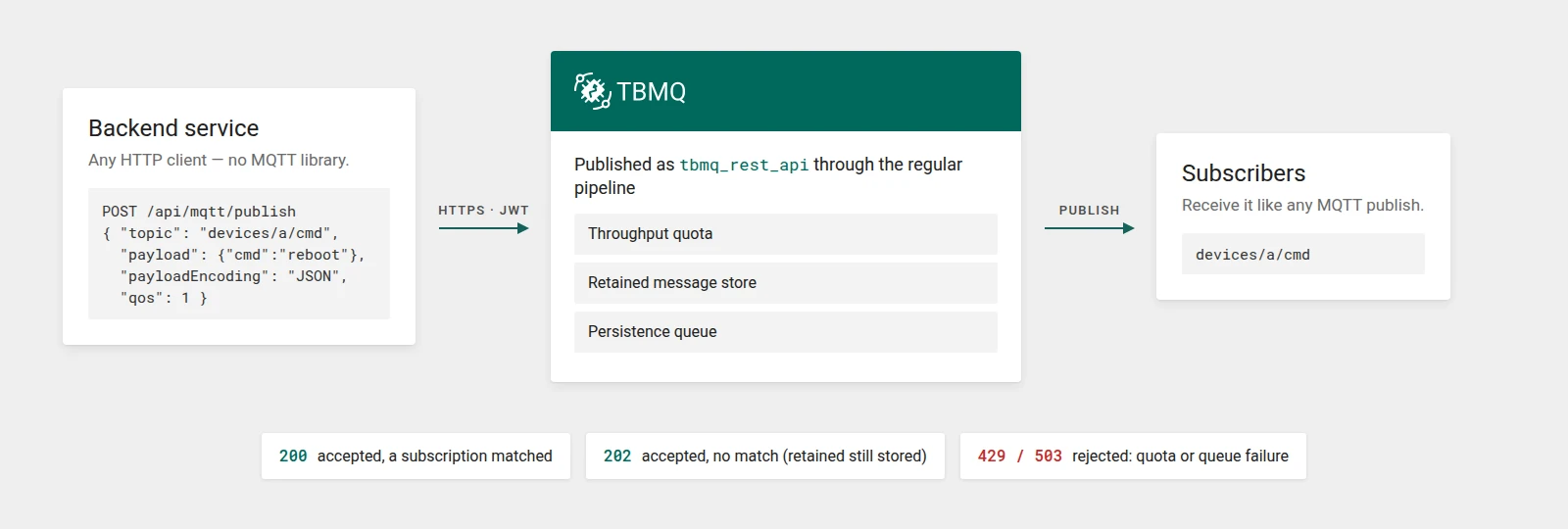
A billing service, a CI job, or a one-off script that needs to message a device usually has an HTTP client. It doesn’t have an MQTT library or a long-lived connection.
TBMQ 2.4.1 adds POST /api/mqtt/publish, building on a community contribution. The request names the topic and payload, plus the usual MQTT options:
{ "topic": "devices/a/cmd", "payload": { "cmd": "reboot" }, "payloadEncoding": "JSON", "qos": 1, "retain": false, "properties": { "contentType": "application/json", "responseTopic": "devices/a/replies", "userProperties": { "source": "backend" } }}- Payload encodings.
BASE64(the default),TEXTfor UTF-8 strings, orJSONfor any JSON value, which is published as compact JSON text. - MQTT 5 properties. Payload format indicator, message expiry interval, content type, response topic, correlation data, and user properties.
- Retain.
retain: truestores the message as retained. An empty payload withretainclears the retained message on that topic.
TBMQ publishes the message through the same throughput quota, retained message store, and persistence queue as a PUBLISH from a connected client.
A 2xx response means the broker accepted the message: 200 if a subscription matched, 202 if none did. It doesn’t confirm that a client received it.
The endpoint requires a system administrator JWT and is not checked against MQTT client authorization rules.
The MQTT message publishing reference covers every field, status code, payload limit, and metric.
Templated Kafka record key and headers
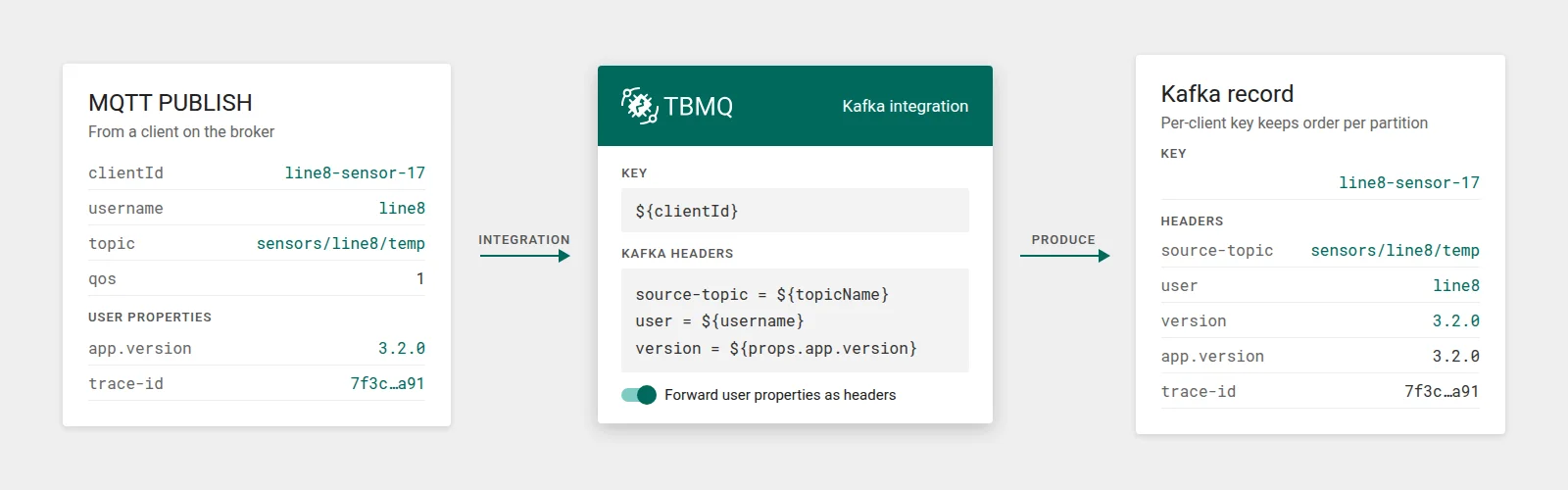
Until now, the Kafka integration’s record key and headers were fixed strings. Every record from every client got the same key, so you couldn’t partition by device, and consumers had to parse the body to learn who sent a message.
In 2.4.1 the Key and Kafka headers fields accept placeholders that are resolved for each record: the sender (${clientId}, ${username}, ${clientCertCn}), the message (${topicName}, ${qos}, and ${props.<name>} for an MQTT 5 user property), lifecycle event fields such as ${eventType} and ${ipAddress}, and more.
A key of ${clientId} keeps each client’s records on one partition and in order. If any placeholder in a template has no value, the whole template resolves empty: the key is sent as null and the header is left out.
A new Forward user properties as headers toggle copies every MQTT 5 user property into a Kafka header of the same name. A configured header name always wins: if you map a user header to ${username}, a client can’t override it by sending a user property named user.
TBMQ validates templates when you save the integration. An unknown or malformed placeholder returns a 400 that names the field and lists the allowed placeholders, instead of failing at runtime.
See record key and headers in the Kafka integration guide.
Graceful node drain
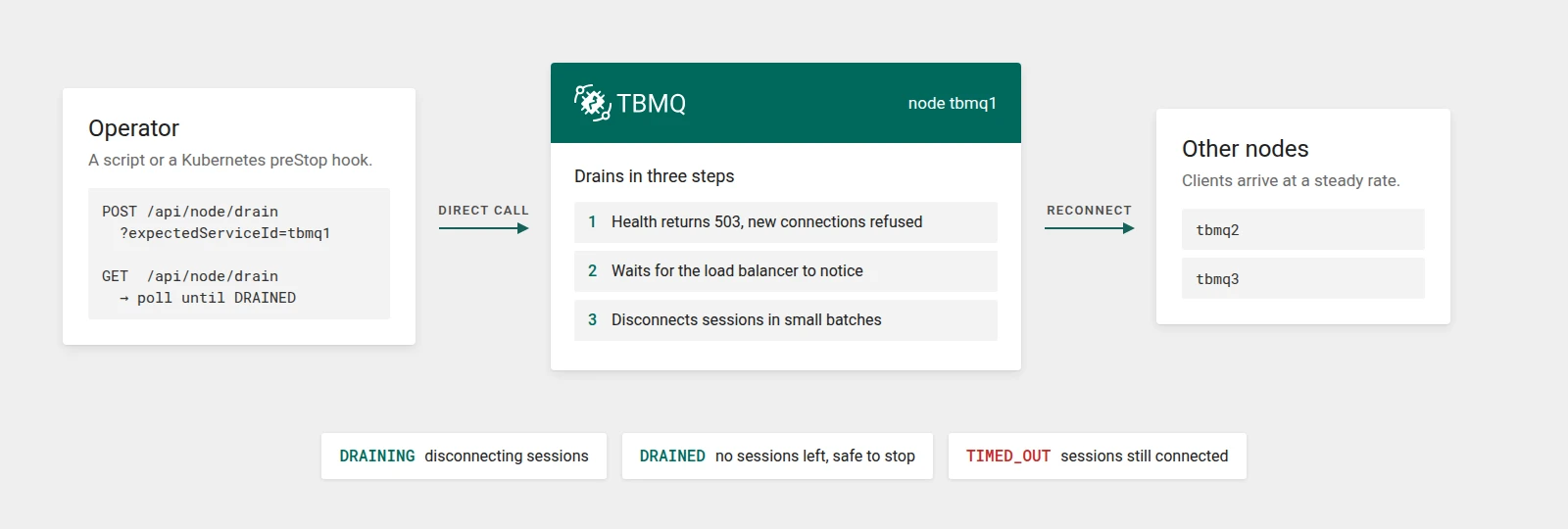
Before 2.4.1, restarting a cluster node cut off every client on it at once, and they all reconnected at the same moment.
2.4.1 adds a drain API:
POST /api/node/drain?expectedServiceId=<id>starts the drain. Call the node directly:expectedServiceIdmust match the node’s own ID, so a request a load balancer routes to the wrong node is rejected. The node immediately refuses new connections, and its health endpoint starts returning503so the load balancer stops routing to it.- After a short wait for the load balancer to notice (20 seconds by default), the node disconnects its sessions in small batches, so clients reconnect elsewhere at a steady rate.
GET /api/node/drainreports progress:DRAINING, thenDRAINEDonce no sessions remain, at which point it’s safe to stop the process. If the drain timeout passes first, the state isTIMED_OUTand some sessions are still connected.
MQTT 5 clients receive reason code 0x9C Use another server instead of Server shutting down. MQTT 3.1.1 clients that try to connect to a draining node get Server unavailable. Persistent sessions are kept.
To cancel, DELETE /api/node/drain?expectedServiceId=<id> returns the node to service. Clients it already disconnected stay disconnected.
On Kubernetes, you can call the drain from a preStop hook and poll until DRAINED. Set terminationGracePeriodSeconds longer than the drain timeout (NODE_DRAIN_TIMEOUT_MS, in milliseconds, which already includes the load balancer wait), plus time for the process to stop. See the node drain guide.
Client ID aware authorization rules
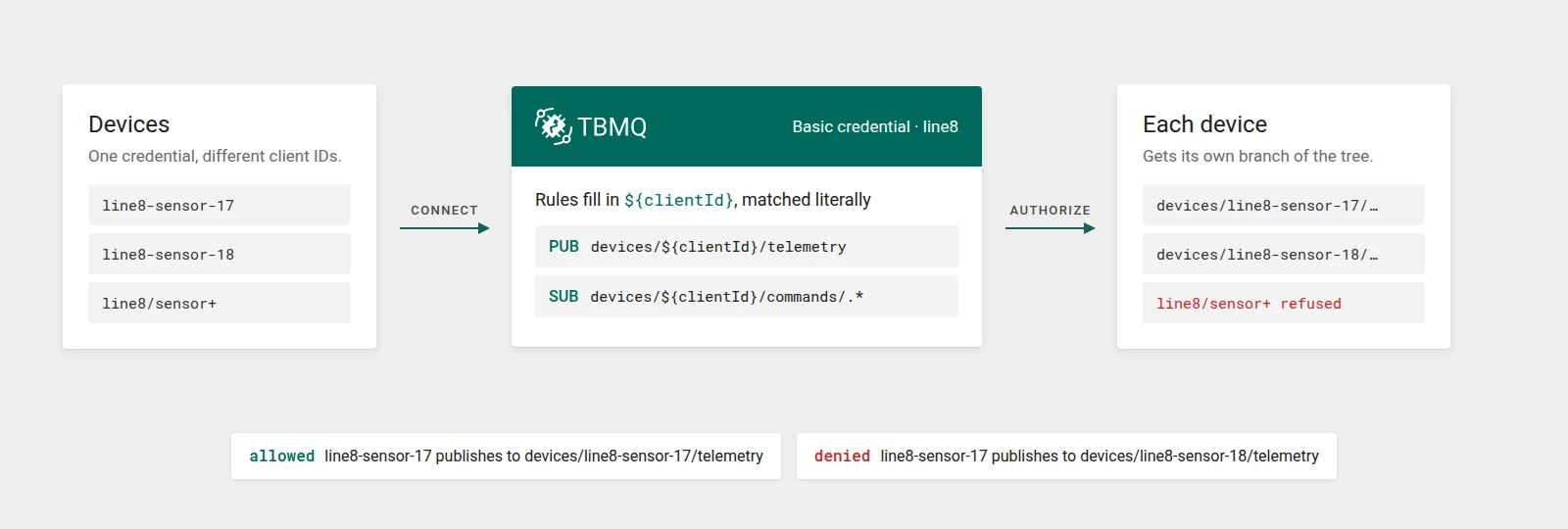
Many fleets authenticate whole groups of devices with one set of credentials, such as a shared username or a certificate per production line. Until now, one set of rules covered the whole group, so any device could use another device’s topics.
Authorization rule patterns for Basic and X.509 Certificate Chain credentials now accept a ${clientId} placeholder, which is replaced with the connecting client’s ID:
Publish: devices/${clientId}/telemetrySubscribe: devices/${clientId}/commands/.*One credential can now give each device its own branch of the topic tree. The client ID is matched literally, so regex characters in it can’t widen the rule. A client whose ID contains +, #, or / is refused when its rules use the placeholder. X.509 rules can combine ${clientId} with the existing ${cn}.
X.509 credentials also gain an optional Client ID (or Client ID regex) field. When it is set, the connecting client ID must match it in addition to the certificate CN.
See authorization for Basic credentials and the X.509 guide for certificates.
Fixes and smaller improvements
The release also includes a number of fixes and smaller improvements:
- QoS 2 and acknowledgements. When persisting a QoS 1/2 message failed, an MQTT 5 client’s later PUBACK/PUBREC responses could stall until it reconnected. They are now released in order, and duplicate QoS 2 handling is fixed.
- Session expiry. The MQTT 5 Session Expiry Interval is now read as unsigned, so
0xFFFFFFFFis no longer misread as a negative value. Like any other value, it is capped at the configured maximum. Expired sessions are no longer resumed on a Clean Start = 0 reconnect. - Startup. Subscriptions are no longer lost while the broker loads them at startup, and a first start against a fresh Kafka cluster no longer fails.
- Integrations. Messages are no longer lost when an integration is updated or disabled. Integration messages now carry the sender’s
username, and lifecycle events carry the integration executor node,tbmqIeNode. - MQTT integration. The outbound MQTT integration now uses TLS with PEM credentials, and gains reconnect backoff, backpressure, ordered acknowledgements, and correct topic routing.
- Noise. Health checks and port scanners that send non-MQTT bytes produce a one-line warning instead of a stack trace, and an unreachable HTTP auth endpoint no longer floods the log.
- API errors. Malformed REST requests and rejected integration configurations return
400or415instead of500. - Security. Tomcat and Jackson were upgraded to remediate CVEs reported in the TBMQ images.
Professional Edition
TBMQ PE 2.4.1 inherits every change above and adds the following PE-exclusive capabilities.
Seven new integrations
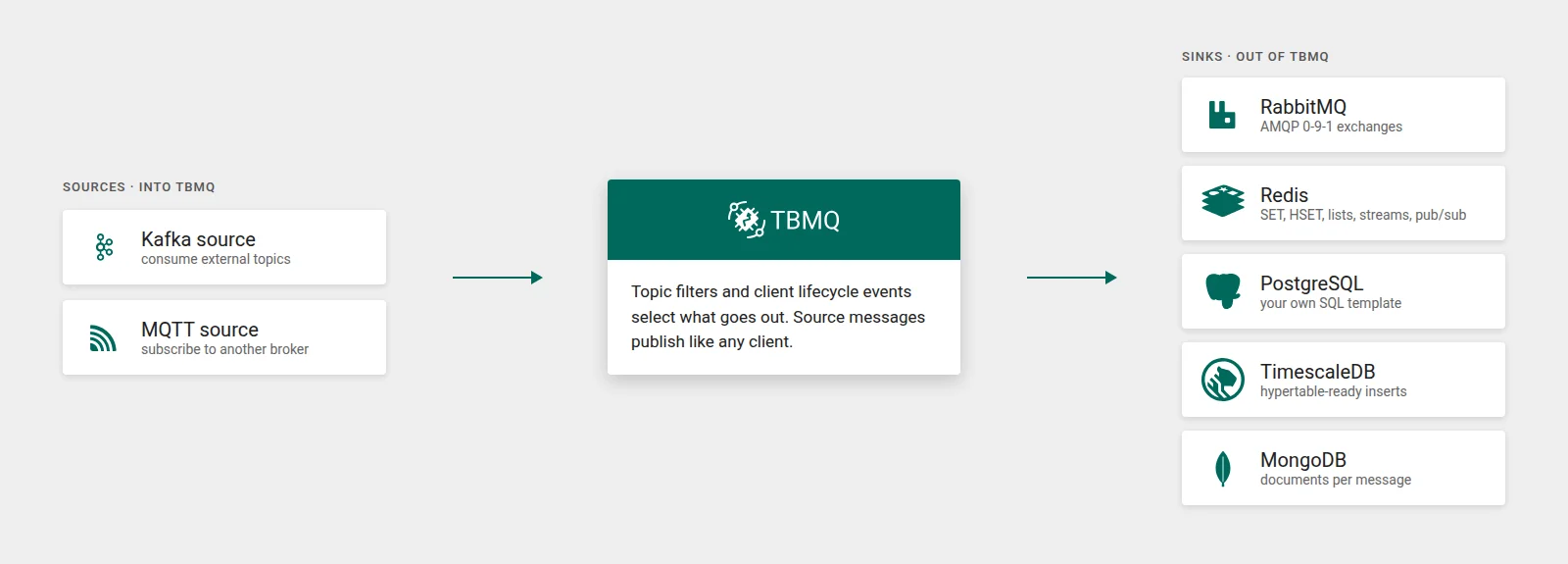
In 2.4.0, integrations could only forward messages out of the broker, to HTTP, Kafka, and MQTT targets. 2.4.1 adds five more destinations and, for the first time, two sources.
Sources:
- Kafka source consumes records from an external Kafka topic and publishes them to TBMQ on a topic built from a template.
- MQTT source connects to another MQTT broker as a client, subscribes to topic filters, and republishes what it receives under the original topic, so you don’t need a separate bridge process.
Sinks:
- RabbitMQ publishes to an AMQP 0-9-1 exchange, using either a fixed routing key or the MQTT topic (with
/replaced by.) as the routing key. - Redis writes with
SET,HSET,LPUSH,RPUSH,PUBLISH, orXADD, in standalone, Sentinel, or cluster mode. - PostgreSQL runs your own SQL for each message, with
${...}placeholders bound as parameters. - TimescaleDB works like PostgreSQL, with a hypertable-ready default template.
- MongoDB inserts a document per message and supports replica sets and
mongodb+srv://connection strings.
The new sinks support topic filters and client lifecycle events, like the existing integrations. All seven have a Check connection button for testing the configuration before you save it. Messages published by source integrations count against the licensed throughput quota like any other client’s.
Publish messages UI
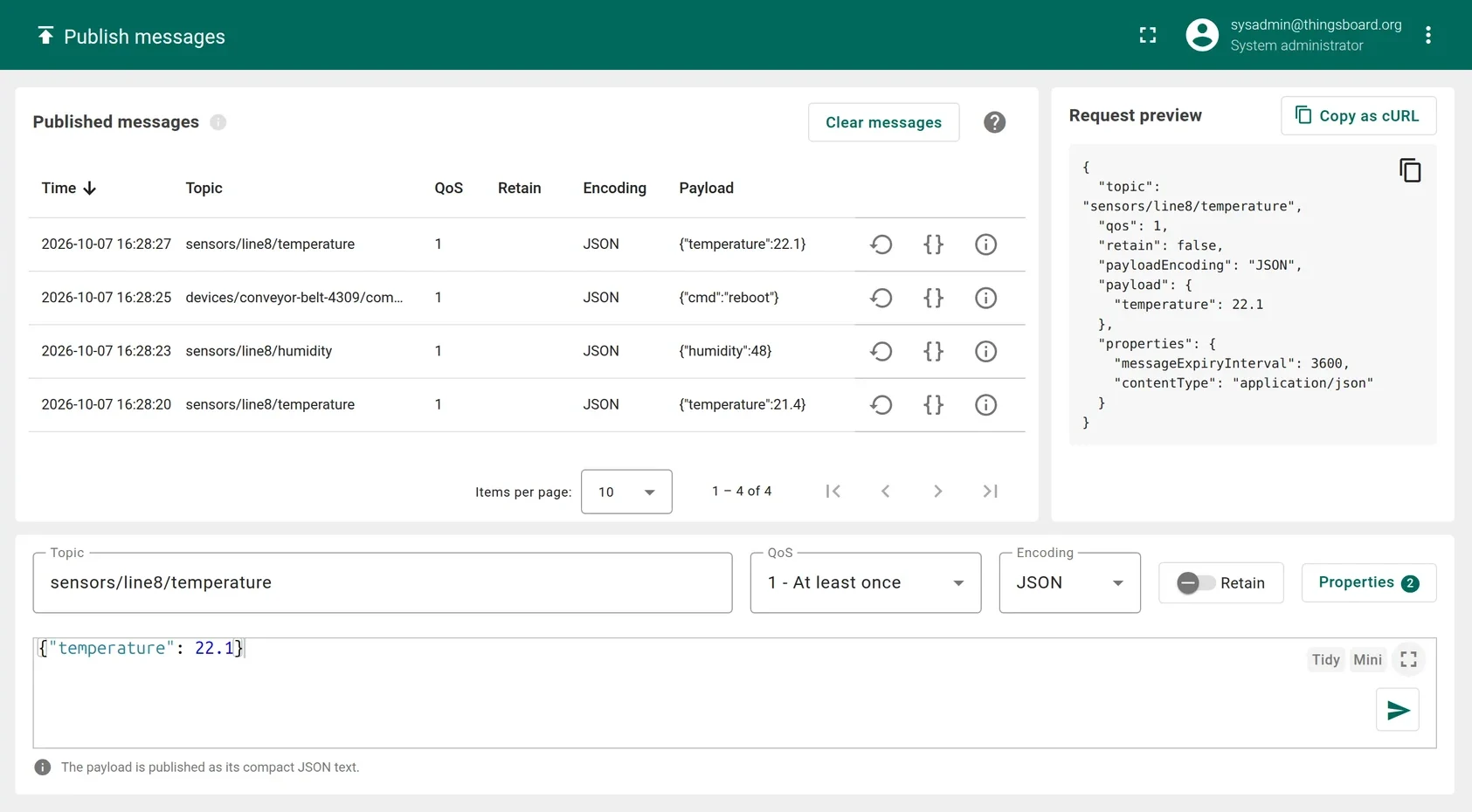
The new Publish messages page sends a message to any topic from the browser, using the REST publish API above. It has three parts:
- Composer: topic, QoS, payload encoding, payload, the Retain toggle, and a Properties dialog for MQTT 5 properties.
- Request preview: the exact JSON the page sends, with Copy as cURL to reproduce the call from a terminal or script.
- Published messages: a log of what you sent and the broker’s response, with actions to load a message back into the composer.
You don’t have to start from the page. Rows on the Retained messages and Subscriptions pages, and on a session’s Subscriptions tab, have a Publish to this topic action. It opens the composer in a dialog with the topic and QoS filled in, and wildcards replaced by sample values. From a retained message, Retain is switched on as well.
Administrators can publish, and Viewers get a read-only composer. REST publishes can also be written to the audit log, so every message is traceable to the user who sent it. The Publish messages guide walks through the page.
Upgrading
No database schema changes. Upgrading to 2.4.1 is supported from 2.4.0, so upgrade earlier versions to 2.4.0 first. A few behavior changes are worth checking before you upgrade:
- Kafka integration keys and headers. Look for
${in existing key and header values. A value that is now a valid placeholder will be resolved. An empty key is now sent as null, so records spread across partitions. An invalid${…}is still sent literally, but the integration can’t be saved until it’s fixed. - X.509 client ID constraints. Add them only after every node runs 2.4.1, and remove them before rolling back. Older nodes can fail X.509 authentication for every client once any credential has one.
MQTT_TOPIC_MAX_SEGMENTS_COUNTnow counts topic segments rather than slashes. If you tuned it by slash count, add one.- Session expiry on DISCONNECT is now capped at the configured maximum expiry interval.
Step-by-step instructions are in the upgrade guide.
Final words
With 2.4.1, systems that don’t speak MQTT can work with the broker directly. In Professional Edition, data flows in from Kafka and other MQTT brokers and out to RabbitMQ, Redis, and three databases. In both editions, backends publish over HTTP and Kafka consumers get records keyed and tagged by the sending client. Node drain makes rolling restarts quieter, and client ID rules let one credential serve a whole device group safely.
The full list of changes is in the release notes for Community Edition and Professional Edition.
If you find TBMQ useful, support the project by starring the TBMQ GitHub repository and by opening issues or pull requests.
Evaluate TBMQ Professional Edition
Kafka and MQTT sources, RabbitMQ, Redis and database sinks, the Publish messages UI, dropped message analytics, audit logs, RBAC, and more. Available as a 30-day trial or an upgrade from TBMQ CE.