
MongoDB integration
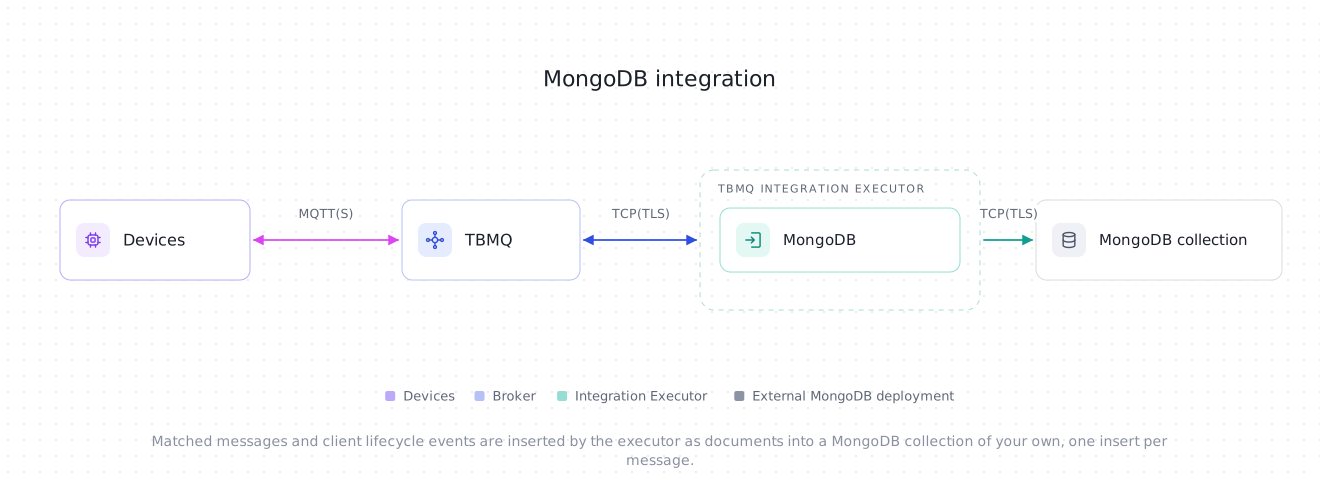
TBMQ MongoDB Integration inserts MQTT messages and client lifecycle events as documents into a MongoDB deployment of your own — a standalone server, a replica set, a sharded cluster behind mongos, or a mongodb+srv:// service such as Atlas. Each message is written as one document, with one insertOne. This is useful for the following scenarios:
- Telemetry storage — keeping device readings as queryable documents, with the JSON payload stored as an embedded document rather than a string.
- Time-series collections — landing readings in a MongoDB time-series collection, which the integration feeds with a real BSON date.
- Audit trails — recording who connected, when, and from where, by delivering client lifecycle events into a collection of their own.
Data flow
Section titled “Data flow”- A client publishes an MQTT message to a topic matching the integration’s topic filters.
- TBMQ receives the message and forwards it to the TBMQ Integration Executor over Kafka.
- The Integration Executor builds a BSON document from the message and inserts it on one of the integration’s own worker threads.
- MongoDB stores the document. The message is acknowledged only after the insert is acknowledged under the configured write concern.
Prerequisites
Section titled “Prerequisites”- A running TBMQ instance with the TBMQ Integration Executor service running. Without a reachable executor, saving an integration fails with a validation timeout.
- A MongoDB deployment reachable from the Integration Executor. For a sharded cluster that means a
mongosrouter — see Sharded clusters. - A database user allowed to insert into the target collections — see Required privileges. On a server without access control, Anonymous credentials work too.
- A client capable of publishing MQTT messages (e.g., TBMQ WebSocket Client).
MongoDB creates a collection the first time a document is inserted into it, so a plain collection does not have to exist in advance. A time-series collection does — it has to be created with its time field before the first insert.
Create TBMQ MongoDB integration
Section titled “Create TBMQ MongoDB integration”- Go to the Integrations page and click the “+” button.
- Select MongoDB as the integration type and click Next.
- On the Filters and events step, keep the default Topic filters entry
tbmq/#, leave Lifecycle events empty, and click Next. - On the Configuration step, replace the pre-filled Hosts value
localhost:27017with your server’shost:port, or set Connection mode to Connection string and paste amongodb://ormongodb+srv://URI without credentials. - Keep the pre-filled Database
tbmqand Collectionmqtt_messages, or enter your own. - If your server enforces access control, set Credentials type to Basic and enter the Username, the Password and the Authentication database.
- Click Check connection to confirm the server is reachable and the user may insert into the collection, then click Add to save the integration.
Topic filters
Section titled “Topic filters”Topic filters define MQTT-based subscriptions that trigger the integration. When TBMQ receives a message matching a configured topic filter, the integration inserts it into the Collection.
Topic filters are optional if you select at least one lifecycle event type instead — an integration only has to have one of the two. The form enforces that from the other side too: the last topic filter cannot be removed until an event type is selected, so to make an integration events-only, pick the event type first and then delete tbmq/#.
For example, with the topic filter tbmq/devices/+/status, any of the following messages will trigger the integration:
tbmq/devices/device-01/statustbmq/devices/gateway-01/statusConfiguration
Section titled “Configuration”Connection
Section titled “Connection”Connection mode picks how the server is addressed: a list of Hosts, or a Connection string.
| Field | Default | Description |
|---|---|---|
| Connection mode | Hosts |
Hosts or Connection string. |
| Hosts | localhost:27017 |
Hosts mode. Comma-separated host[:port] entries; the port defaults to 27017. Required. See Hosts mode. |
| Replica set name | — | Hosts mode, optional. Set it to discover every member of the replica set and follow the primary through elections. |
| Connection string | — | Connection string mode. A mongodb:// or mongodb+srv:// URI without credentials. Required. See Connection string mode. |
| Database | tbmq |
The database to write into. Required. |
| Collection | mqtt_messages |
The collection every message is inserted into. Required. |
| Events collection | — | Shown only while at least one lifecycle event type is selected. Optional: leave it empty to store the events in Collection. |
Hosts mode
Section titled “Hosts mode”- At most 50 entries, separated by commas. Host names may contain only letters, digits, dots and hyphens, and each
host:portmay appear only once — host names are compared case-insensitively. - IPv6 literals are not supported in the host list. Use a connection string instead, e.g.
mongodb://[::1]:27017/. - One host and no replica set name is a direct connection: every operation goes to that one server, so it must be a standalone server, a
mongosrouter or the replica set primary. Check connection and the integration’s start refuse a secondary or an arbiter reached this way, because every insert into it would fail. - One host and a replica set name, or several hosts, let the driver discover the topology and send writes to the primary, so any member works as a seed. Several hosts must all be members of one replica set, or all be
mongosrouters — the driver ignores a standalone server once more than one host is listed.
Connection string mode
Section titled “Connection string mode”The URI must start with mongodb:// or mongodb+srv://, and must not carry credentials. The following are rejected when the integration is saved:
- A user name or password in the URI (
mongodb://user:pass@host/), and theauthMechanismoption. Credentials come only from the Credentials section. Other authentication options, such asauthSource, are accepted but have no effect: the authentication database comes from the form too. - The proxy options
proxyHost,proxyPort,proxyUsernameandproxyPassword. timeoutMS. Use the timeout fields under Advanced settings instead.
Other URI options are passed to the driver, but the form wins wherever both set the same thing: the three timeouts, the pool size and the write concern always come from the form, retryable writes are always on, and TLS hostname verification is always on, whatever tlsAllowInvalidHostnames or tlsInsecure say. TLS that the URI turns on stays on — see TLS.
Name rules
Section titled “Name rules”The form and the save both check names against MongoDB’s own limits, so a name the server would refuse is rejected before the first insert:
- Database: at most 63 bytes in UTF-8, with none of the characters
/,\,., space,",$,*,<,>,:,|,?or NUL.localandconfigcannot be used in any letter case, andadminonly in lower case. - Collection and Events collection: at most 255 bytes, with no
$or NUL, and not starting withsystem.or.. The database name, a.and the collection name together must also fit in 255 bytes.
Credentials
Section titled “Credentials”| Credentials type | What is sent | Fields |
|---|---|---|
| Anonymous | Nothing — the integration does not log in. Works only against a server without access control. | — |
| Basic | SCRAM authentication; the mechanism (SCRAM-SHA-256 or SCRAM-SHA-1) is negotiated with the server. |
Username, Password (both required), Authentication database |
| PEM | X.509 authentication (MONGODB-X509): the server maps the client certificate’s subject to a user. |
CA certificate file (optional), Certificate file, Private key file (both required), Private key password |
Authentication database is the database that stores the user account — often admin, the default when the field is left empty — not the database the messages are written into.
A server that enforces access control still answers a ping from a client that did not log in, so Anonymous credentials against such a server are caught explicitly: both Check connection and the integration’s start fail with The server requires authentication: configure credentials.
PEM credentials require TLS, so selecting them turns Enable TLS on and locks it. SCRAM credentials together with a client certificate are not supported: a client certificate is presented only with PEM credentials, so a server that demands one from every client cannot be used with Basic credentials.
| Field | Default | Description |
|---|---|---|
| Enable TLS | off | Encrypts the connection. Always on, and locked, with PEM credentials. |
| CA certificate file | — | PEM of the CA that signed the server certificate. Without one, the server certificate is verified against the JVM’s default truststore. |
The server certificate is always verified, and so is the host name — there is no setting that turns either check off.
In Connection string mode, Enable TLS off does not mean plain TCP: it leaves TLS to the URI. A mongodb+srv:// URI uses TLS unless it says tls=false, and tls=true turns it on for a mongodb:// URI. That is why, in this mode, CA certificate file is shown even with the toggle off — the CA is used whenever TLS is on, however it was turned on.
With PEM credentials the TLS section has no CA field of its own; the CA certificate file of the credentials is used instead.
Every PEM is parsed when the integration is saved, so a malformed certificate or a wrong key password is reported there rather than leaving the integration to fail on start.
Document
Section titled “Document”| Field | Default | Description |
|---|---|---|
| Send only message payload | off | Off: each message is stored as the message envelope. On: the payload must be one JSON object, and that object is the document — see Payload-only documents. |
| Payload type | JSON |
Shown with Send only message payload off. How the payload field is stored: JSON, Text or Binary — see The payload field. |
| Timestamp field | — | Shown with Send only message payload on. Optional. Adds a BSON date with this name to every document — see Time-series collections. |
Send only message payload applies to messages only. Lifecycle events are always stored as full event documents.
Advanced settings
Section titled “Advanced settings”| Field | Default | Range | Description |
|---|---|---|---|
| Write concern | Acknowledged (1) |
— | Acknowledged (1): the primary confirms the write. Majority: a majority of replica set members confirm it, so the write survives a failover, at the cost of latency. |
| Wait for journal | off | — | On: the write is acknowledged only after it reaches the on-disk journal. Off: the server’s default applies. |
| Write concern timeout, ms | 0 |
0–25000 |
Shown with Majority only. How long a write waits for the replicas to confirm; 0 means no limit beyond the socket timeout. Must be less than Socket timeout. |
| Pool size | 5 |
1–50 |
Parallel inserts, each on its own worker thread and connection. See Throughput and ordering. |
| Connect timeout, seconds | 3 |
1–25 |
How long opening a new connection may take. Must not exceed Server selection timeout. |
| Server selection timeout, seconds | 7 |
1–25 |
How long an insert waits for a writable server, for example during a replica set election. |
| Socket timeout, seconds | 7 |
1–25 |
How long an insert waits for the server’s reply. Also how long a stopping integration waits for its in-flight inserts. |
Acknowledged (1) is an explicit w: 1. It is not the driver’s “server default”, which on current MongoDB versions is majority.
The timeout budget
Section titled “The timeout budget”The three timeouts are not independent. A failing insert can wait for a server, then for a new connection, then for its reply — and the driver retries a failed write once, so the reply wait can happen twice. Saving therefore enforces:
Server selection timeout + Connect timeout + 2 × Socket timeout ≤ 25 secondsThe defaults use 24 of those 25 seconds: 7 + 3 + 2 × 7. The budget is what keeps a running insert within the executor’s message pack timeout (TB_IE_MSG_PACK_PROCESSING_TIMEOUT, 30 000 ms by default), but it is not a hard bound: the driver’s retry selects a server again, which the formula counts only once. Time a message spends queued before a worker picks it up is not part of the budget at all — see Queued messages and outages. If you lower that timeout below 25 000 ms, lower the integration’s timeouts with it — the budget no longer fits inside it.
To give one step more time, take it from another: during long elections a larger Server selection timeout helps, paid for with a smaller Socket timeout.
Documents
Section titled “Documents”Envelope documents
Section titled “Envelope documents”With Send only message payload off (the default), every message is stored as an envelope document:
{ _id: ObjectId('6720f1c9b3e45a1d2c8f0a11'), payload: { temperature: 25 }, topicName: 'tbmq/mongodb-integration', clientId: 'tbmq_df52bNUQ', eventType: 'PUBLISH_MSG', qos: 1, retain: false, tbmqIeNode: 'tbmq-ie-0', tbmqNode: 'tbmq-node-0', ts: ISODate('2025-03-21T11:02:49.254Z'), props: [ { k: 'contentType', v: 'application/json' } ], metadata: { integrationName: 'MongoDB integration' }}| Field | BSON type | Value |
|---|---|---|
_id |
ObjectId | Generated by the driver for every insert. |
payload |
depends | The MQTT payload, stored according to Payload type — see below. |
topicName |
String | MQTT topic the message was published to. |
clientId |
String | ID of the MQTT client that published the message. |
eventType |
String | Always PUBLISH_MSG for a message. |
qos |
Int32 | QoS level of the incoming message: 0, 1 or 2. |
retain |
Boolean | Whether the message had the Retain flag set. |
tbmqIeNode |
String | Node ID of the Integration Executor that handled it. |
tbmqNode |
String | Node ID of the TBMQ broker that received the message. |
ts |
Date | When TBMQ received the message — a real BSON date, millisecond precision, usable by TTL indexes and as a time-series time field. |
clientCertCn |
String | Common Name of the client’s X.509 certificate. Present only when the client authenticated with mTLS. |
props |
Array | The message’s MQTT 5.0 user properties, in order, as k/v pairs. Always present; empty when there are none. |
metadata |
Document | The integration’s Metadata, plus integrationName. |
The field names match the JSON envelope the other integrations send; only the types differ. User properties are an array rather than a sub-document so that names chosen by an MQTT client never become field names, and so that a key repeated in the message — legal in MQTT 5.0 — survives. To find messages by a property, match the pair:
db.mqtt_messages.find({ props: { $elemMatch: { k: 'contentType', v: 'application/json' } } })Metadata keys become field names, so a key may not start with $ or contain a NUL character, and neither a key nor a value may contain an unpaired surrogate; that is checked when the integration is saved.
The payload field
Section titled “The payload field”Payload type decides how the envelope’s payload field is stored:
| Payload type | Stored as |
|---|---|
| JSON | The parsed JSON value — an object becomes an embedded document, an array an array, a number or string the matching BSON value. A payload that is not one strict JSON value, or that cannot be stored as a document, is stored as a string instead; bytes that are not valid UTF-8 are stored as binary data. |
| Text | A UTF-8 string, or binary data when the bytes are not valid UTF-8. |
| Binary | Always BSON binary data (subtype 0), byte for byte. |
With JSON, the payload is parsed strictly, and Extended JSON is not interpreted: {"$date": …} is never turned into a date, nor {"$oid": …} into an ObjectId, so a client cannot change the type of a stored field. A payload falls back to a string when it:
- is not strict JSON — trailing text after the value, duplicate keys, single quotes or unquoted names;
- has a key that starts with
$or contains a NUL character — common in$type,$idor$schemaproducers, which would otherwise fail outright; - contains an unpaired surrogate escape such as
\ud800, which would otherwise be stored as invalid UTF-8; - is nested deeper than 100 levels, or holds a number that no BSON type can represent.
Numbers keep their JSON form: an integer becomes Int32 or Int64, a larger integer Decimal128, and a fraction a Double. An empty payload is stored as an empty string.
Payload-only documents
Section titled “Payload-only documents”With Send only message payload on, the payload itself is the document, and nothing else about the message is stored:
{ _id: ObjectId('6720f1c9b3e45a1d2c8f0a12'), temperature: 25 }This mode is strict. The payload must be one JSON object in UTF-8; anything else — text, a number, an array, binary data, a key starting with $, an unpaired surrogate escape, an array _id — fails the message, and nothing is stored. The failure is reported as an error event and classified PERMANENT.
A payload may carry its own _id; it is used instead of a generated one. On a regular collection, that makes a redelivered copy of the same message fail as a duplicate key instead of being stored twice — see Delivery semantics. A time-series collection does not enforce a unique _id, so there a redelivered copy is stored again.
Time-series collections
Section titled “Time-series collections”A MongoDB time-series collection rejects any document without its time field, and the time field must be a BSON date. Create the collection before the integration writes to it:
db.createCollection('mqtt_messages', { timeseries: { timeField: 'ts', metaField: 'clientId', granularity: 'seconds' }})- Envelope documents already carry
tsas a BSON date, sotimeField: 'ts'works with no extra setting. Lifecycle events carrytsas a date too, so they can share the collection. - Payload-only documents have no
tsof their own. Set Timestamp field to the collection’stimeField, and every document gets that field, set to the time TBMQ received the message — overwriting any value of the same name in the payload, since a time field has to be a date. Lifecycle events get it as well, set to the event time, so messages and events can still share one collection; an event field that already has that name is kept, so choose a name no event field uses, orts, which events already carry as a date.
Timestamp field must not be blank, start with $, contain ., a NUL character or an unpaired surrogate, exceed 64 characters, or be _id — a date in _id would replace the generated ObjectId, and every two messages in the same millisecond would collide.
The same date field drives a TTL index on an ordinary collection:
db.mqtt_messages.createIndex({ ts: 1 }, { expireAfterSeconds: 604800 })Client lifecycle events
Section titled “Client lifecycle events”Besides the messages matched by topic filters, this integration can deliver client lifecycle events — a client connecting, disconnecting, changing its subscriptions, or failing authentication or authorization.
Pick the event types on the Filters and events step while creating the integration, or add them later:
- Open the integration on the Integrations page and click the Toggle edit mode button (pencil icon).
- In the Lifecycle events section, click the Event types field to list the available event types, then select the ones you need: Client connected, Client disconnected, Client subscribed, Client unsubscribed, Client authentication failed, Client authorization failed, Client connection failed. Each one is added as a chip; remove it with its x.
- Optionally, enter an Events collection under Connection. Leave it empty to store the events in Collection, alongside the messages.
- Click Apply changes.
Each event is stored as the event payload the other integrations send, converted field by field, with ts stored as a BSON date:
{ _id: ObjectId('6720f1c9b3e45a1d2c8f0a13'), eventType: 'CLIENT_CONNECTED', clientId: 'sensor-01', sessionId: 'b2f1c4de-8a35-4f6b-9d0e-7c1a5b3e2f40', ipAddress: '10.7.0.42', ts: ISODate('2026-01-01T00:00:00.000Z'), tbmqNode: 'tbmq-node-1', username: 'sensor-01', cleanStart: true, keepAlive: 60, protocolVersion: 5, sessionExpiryInterval: Long('0'), metadata: { integrationName: 'MongoDB integration' }}The full event document is stored in both document modes — Send only message payload and Payload type apply to messages only. In payload-only mode an event also gets the Timestamp field, as described in Time-series collections.
With Send only message payload off, eventType tells messages and events apart when they share a collection: it is PUBLISH_MSG for every message, and one of the CLIENT_* values for an event. In payload-only mode a message carries no eventType of its own, or one the publisher chose, so set an Events collection to keep the two apart.
Required privileges
Section titled “Required privileges”The integration only ever inserts. The user needs the insert action on every collection it writes to — Collection, and Events collection when one is set. The built-in readWrite role on the target database is the simplest way to grant it:
db.getSiblingDB('admin').createUser({ user: 'tbmq', pwd: passwordPrompt(), roles: [ { role: 'readWrite', db: 'tbmq' } ]})With that user, set Authentication database to admin, the database the user was created in.
Check connection verifies the insert privilege on each target collection without writing anything — see Check connection. The integration’s start does not repeat that check, so a privilege revoked later surfaces as failing inserts, classified PERMANENT (not authorized).
Sharded clusters
Section titled “Sharded clusters”Always connect to a sharded cluster through a mongos router — as a single host, a list of routers, or a connection string that names them.
A shard member answers a ping and accepts inserts, but a document written to it directly bypasses the router. If the document’s shard key falls in another shard’s range, it is invisible through the cluster and can be deleted by the cluster’s own range cleanup. When Check connection or the integration’s start finds itself connected straight to a shard member, it fails with a message naming the shard. That detection is best effort: a user that is not allowed to run shardingState, or a server without that command, is not refused for it.
Check connection
Section titled “Check connection”Check connection opens a separate client with a single connection and does not write anything. In order, it:
- Validates the configuration, as saving would.
- Pings the Database, and replaces the driver’s timeout or authentication error with what actually went wrong — see Connection errors.
- Refuses a direct connection to a replica set member that cannot write, and a direct connection to a shard member.
- For each target collection, reads the user’s privileges with
connectionStatusand fails if none of them grantsinserton that collection. With Anonymous credentials it instead checks that the server does not enforce access control.
A server that does not support connectionStatus — some MongoDB-compatible services — lets the privilege check pass without an answer; the first insert then tells.
The probe must answer before the API request deadline, so its timeouts are reduced to fit the executor’s connect-timeout limit, INTEGRATIONS_INIT_CONNECTION_TIMEOUT_SEC (15 seconds by default): the socket timeout to at most a third of it, the connect timeout to at most a fifth, and the server selection timeout to the rest. With the defaults that is 5, 3 and 7 seconds. The integration itself always runs with the configured values.
The integration’s start runs the same ping and the same refusals, so a server it cannot use leaves the integration Failed instead of Active and failing every message. A failed integration is re-initialized every 5 minutes (INTEGRATIONS_REINIT_FREQUENCY_MS) — see Hot reinitialization.
Connection errors
Section titled “Connection errors”The driver reports an unreachable server as a timeout and an authentication failure without its reason. Check connection and the integration’s start report the cause instead:
| Message | What to check |
|---|---|
No MongoDB server was available within 7 s. mongo1:27017: connection refused |
The host, the port, and that the server is running. unknown host, not reachable (…) and cannot connect (…) point at DNS and the network. |
No MongoDB server was available within 7 s. Failed looking up SRV record for '_mongodb._tcp.…'. |
The host name of the mongodb+srv:// URI: that it exists and has an SRV record, and that the record’s targets share its domain. The cause follows the message. |
Failed looking up TXT record for host … |
That DNS is reachable from the executor. The lookup runs while the mongodb+srv:// URI is parsed, before any connection is attempted, so this error has no No MongoDB server was available prefix and can take about 15 seconds — see Connection string mode. |
… mongo1:27017: Usage of local network host for server is not allowed! … |
A discovered replica set member or SRV target resolves to a local address while INTEGRATIONS_ALLOW_LOCAL_NETWORK_HOSTS is off — see the note under Connection. |
No MongoDB server was available within 7 s. No server responded as a writable MongoDB server |
No host reported an error, but none can take writes — for example, several standalone servers are listed. List only members of one replica set, or only mongos routers. |
… the server's TLS certificate is not trusted: set the CA certificate that signed it |
Set CA certificate file, or add the CA to the executor’s truststore. |
… the server's TLS certificate does not match the host name |
Connect with the name the certificate was issued for. Hostname verification cannot be turned off. |
… the TLS handshake was cut off: the server may not use TLS …, or it may require a client certificate |
TLS is on but the server does not speak it — often a mongodb+srv:// URI against a server without TLS — or the server wants a client certificate, which only PEM credentials send. |
… the server closed the connection; it may require TLS |
Turn Enable TLS on. |
Authentication failed for user 'tbmq' with authentication database 'admin': … |
The password, and that Authentication database is the database the user was created in. |
Authentication failed for the X.509 client certificate: … |
That a user exists in $external whose name is the certificate’s subject. |
mongo2:27017 is a replica set member that does not accept writes (REPLICA_SET_SECONDARY): … |
Set Replica set name, so that writes go to the primary, or connect to the primary. |
… No primary of replica set 'rs0' was found: check that the hosts are members of that replica set |
The replica set name and the host list. |
… a standalone server is ignored when more than one host is listed |
List only members of one replica set, or only mongos routers. |
mongo1:27018 is a member of shard 'shard01' of a sharded cluster: connect through a mongos router … |
See Sharded clusters. |
User 'tbmq' lacks the 'insert' privilege on tbmq.mqtt_messages |
See Required privileges. |
The server requires authentication: configure credentials |
Anonymous credentials against a server with access control. |
Delivery semantics
Section titled “Delivery semantics”Delivery is not exactly-once:
- An insert that fails is logged, counted, saved as an error event, and reported as a failure. It is never acknowledged as a success. What happens next is decided by the executor’s acknowledgment strategy —
SKIP_ALL(the default) drops the message, so a document can simply be missing;RETRY_ALLredelivers it up to the configured retry limit. - An insert that failed with
TRANSIENT (network error)— a socket read timeout included — orTRANSIENT (write concern not satisfied)may still have been written. The retry then inserts the same message a second time, under a new generated_id.TRANSIENT (timeout)is not such a case: it is a wait for a server or a pooled connection that expired before anything was sent. - Under
RETRY_ALL, an insert that succeeds after its pack timed out — for example, one a worker picked up just before its queue deadline — is still written. If the pack had retries left, the executor also resubmitted the message when it stopped waiting, and that copy may be written as well. - On a replica set or a sharded cluster, the driver retries a failed write once on its own, within the same insert. That retry reuses the document’s
_idand cannot store a second copy.
Each failure is classified as PERMANENT — the same message can never be written, or a configuration problem retrying will not fix — or TRANSIENT, caused by the server or the network. The classification is informational: it appears in the error event and the log, but RETRY_ALL retries both kinds alike.
| Kind | Reasons |
|---|---|
PERMANENT |
invalid document, document too large (over MongoDB’s 16 MiB document limit), document cannot be encoded, duplicate key, document validation failed (a collection validator rejected it), not authorized, authentication failed, document too deeply nested, invalid _id, invalid document value, invalid namespace |
TRANSIENT |
timeout, network error, not primary, write concern not satisfied, queued too long, or the exception’s class name for anything else |
Where duplicates matter, use payload-only documents with a publisher-supplied _id: on a regular collection, a second copy of the same message then fails with PERMANENT (duplicate key) instead of being stored. The failure is still reported, and under RETRY_ALL still retried up to the limit, but the collection keeps a single document. A time-series collection does not enforce a unique _id, so there a redelivered copy is stored again.
Client lifecycle events are weaker still — they are best-effort hints, and can be dropped before they ever reach the integration. See Delivery guarantees.
Queued messages and outages
Section titled “Queued messages and outages”Inserts run on the integration’s own worker threads; a message waits in the integration’s queue until a worker is free. During an outage every insert takes up to its whole timeout budget, so messages queue up. A message that has waited longer than its stream’s pack timeout — TB_IE_MSG_PACK_PROCESSING_TIMEOUT for messages, TB_IE_EVENT_MSG_PACK_PROCESSING_TIMEOUT for lifecycle events — is failed with TRANSIENT (queued too long) without being sent: by then the executor has stopped waiting for it. Under SKIP_ALL it has committed the pack; under RETRY_ALL it resubmits the message, unless the pack has used up its retries, in which case it commits the pack as SKIP_ALL does. Until that point the message is still attempted as soon as a worker is free, and is written if the server is back.
Stopping and updating
Section titled “Stopping and updating”When the integration stops — for example because it was updated or disabled — new messages fail at once. Messages already queued or being inserted keep running for up to Socket timeout; the ones still queued after that are failed with Integration stopped before the message was processed. An insert that is already running is never interrupted, so it ends with exactly one outcome: written and acknowledged, or failed.
The executor leaves a pack that a stop cut short uncommitted, so its messages are delivered again when the integration starts — including any that were already written.
Throughput and ordering
Section titled “Throughput and ordering”Each MongoDB integration has its own pool of Pool size worker threads, so one slow MongoDB cannot starve the other integrations on the same executor. Lifecycle events use the same workers as messages, so a burst of events delays messages, and the other way round. The driver’s connection pool to the server that takes the writes has the same size, plus the driver’s own monitoring connections to each known member.
-
Ordering. With Pool size above
1, messages are inserted in parallel and are not ordered across workers. Set it to1when insertion order must follow publish order. Even then, underRETRY_ALLa failed insert is retried after the rest of its pack has been written. Footprint. Pool size is per integration, not per node. Each integration is owned by one executor at a time, so the worst case on a node is the sum of Pool size over the integrations that executor owns — see partition ownership.
-
Pack size. The executor reads messages in packs, at most
max.poll.recordsper pack — 50 by default — and polls the next pack only after the whole pack is done or its pack timeout expires. A larger Pool size helps only up to that limit. For higher throughput on one integration, raise both:Terminal window TB_KAFKA_IE_MSG_ADDITIONAL_CONSUMER_CONFIG=max.poll.records:500together with a larger Pool size, e.g.
20. That variable sets the Kafka consumer for the messages of every integration on that executor, so a slow target of another type then receives larger packs too. Its value replaces the defaultmax.poll.records:50as a whole, so keepmax.poll.recordsin it whenever you set it: without it, packs grow to the general consumer defaultTB_KAFKA_DEFAULT_CONSUMER_MAX_POLL_RECORDS, 2000 records.
Integration events
Section titled “Integration events”These are the integration’s own events, recorded inside TBMQ for debugging and troubleshooting. They are not the client lifecycle events described above: those are about MQTT clients and are written to your collection, while these describe the integration itself and never leave TBMQ.
- Lifecycle Events — logs events such as
Created,Updated,Started,Stopped,Failed. - Statistics — the integration’s own counters: messages processed and errors occurred.
- Errors — captures failed inserts, each starting with its classification, e.g.
PERMANENT (duplicate key): …orTRANSIENT (timeout): …, followed by the error MongoDB or the driver returned.
Send an uplink message
Section titled “Send an uplink message”- Keep the defaults of the integration created above: Database
tbmq, Collectionmqtt_messages, Send only message payload off and Payload typeJSON. - Navigate to the WebSocket Client page.
- Select WebSocket Default Connection (or any working connection) and click Connect. Verify the connection status shows
Connected. - Set the Topic field to
tbmq/mongodb-integrationto match the integration’s topic filtertbmq/#. - Leave the pre-filled Payload
{"temperature": 25}as is. - Click the Send icon to publish the message.
The document should now be in your collection. In mongosh:
use tbmqdb.mqtt_messages.find().sort({ ts: -1 }).limit(1)[ { _id: ObjectId('6720f1c9b3e45a1d2c8f0a11'), payload: { temperature: 25 }, topicName: 'tbmq/mongodb-integration', clientId: 'tbmq_df52bNUQ', eventType: 'PUBLISH_MSG', qos: 1, retain: false, tbmqIeNode: 'tbmq-ie-0', tbmqNode: 'tbmq-node-0', ts: ISODate('2025-03-21T11:02:49.254Z'), props: [], metadata: { integrationName: 'MongoDB integration' } }]Note that payload is an embedded document, not a string: the payload is valid JSON, so with Payload type JSON it is stored as the object that was published, and db.mqtt_messages.find({ 'payload.temperature': { $gt: 20 } }) queries it directly.
Was this helpful?