
MQTT source integration
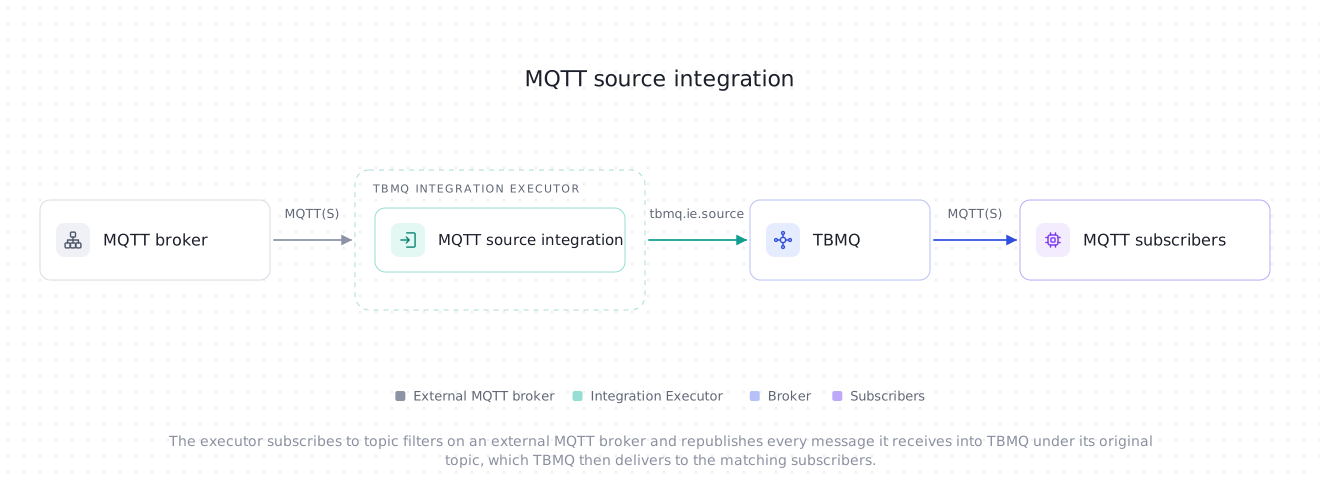
TBMQ MQTT source integration is an inbound integration: it connects to an external MQTT broker as an ordinary MQTT client, subscribes to the topic filters you configure, and republishes every message it receives into TBMQ under its original topic. Clients subscribed to that topic in TBMQ receive it like any other message. This is useful for the following scenarios:
- Bringing another broker’s traffic into TBMQ — consume what devices already publish to an existing or third-party broker without reconfiguring the devices.
- Edge-to-cloud bridging — pull data from a broker at a site, a gateway or a partner network into a central TBMQ cluster.
- Migrating gradually — run TBMQ next to the broker it replaces and feed it the same messages while clients move over.
It is the inbound counterpart of the outbound MQTT integration. Like every source integration, it has no TBMQ topic filters and no client lifecycle events, because nothing inside TBMQ triggers it. Its own topic filters are subscriptions on the external broker.
Data flow
Section titled “Data flow”- A client publishes a message to the external MQTT broker.
- The external broker delivers it to the integration, which runs in the Integration Executor and holds a subscription whose topic filter matches.
- The executor sends the message to the broker over TBMQ’s internal
tbmq.ie.sourcetopic, and then acknowledges it to the external broker (QoS 1 and 2). - TBMQ injects it into the publish pipeline as a publish from the client ID
ie-source-<integrationId>, under its original topic, and delivers it to every subscriber whose topic filter matches.
Prerequisites
Section titled “Prerequisites”- A running TBMQ instance, version 2.4.1 or later, with the TBMQ Integration Executor service running. Without a reachable executor, saving an integration fails with a validation timeout.
- An external MQTT broker that speaks MQTT 3.1, 3.1.1 or 5, is reachable from the Integration Executor, and lets the integration’s credentials subscribe to the topics you need.
- A client capable of subscribing to MQTT topics (e.g., TBMQ WebSocket Client).
Create TBMQ MQTT source integration
Section titled “Create TBMQ MQTT source integration”A source integration has no Filters and events step — the wizard goes straight from the type to the configuration.
- Go to the Integrations page and click the “+” button.
- Select MQTT source as the integration type, give the integration a Name, and click Next.
- On the Configuration step, under Remote MQTT broker, set the Host and Port of the external broker. Keep the generated Client ID, or enter one that is unique on that broker, and choose the Credentials the broker expects. See Remote MQTT broker.
- Under Subscriptions, replace the default Topic Filter
#with the topics to bring into TBMQ and set each one’s QoS. Click Add topic filter for more rows. See Topic filters. - Click Check connection to confirm the broker accepts the connection and grants every filter, then click Add to save the integration.
Configuration
Section titled “Configuration”Remote MQTT broker
Section titled “Remote MQTT broker”| Field | Default | Description |
|---|---|---|
| Host | — | Hostname or IP address of the external broker, as reachable from the Integration Executor. Required. |
| Port | 1883 |
Broker port, 1–65535. |
| Client ID | random | Client identifier on the external broker. Required — the UI pre-fills a random tbmq_ ID for every new integration. It must be unique on that broker: a second connection with the same ID takes the session over, and two integrations that share one take each other’s session over in a loop. Under MQTT 3.1 it is limited to 23 characters. |
| Credentials type | Anonymous |
Anonymous, Basic (username and password, both optional), or PEM (certificate-based, always over TLS). |
| Enable SSL | off | Connects over TLS. Hidden for PEM credentials, which always use TLS. |
Whether the integration may target a loopback or otherwise local address is a deployment-wide setting,
INTEGRATIONS_ALLOW_LOCAL_NETWORK_HOSTS — see Integration lifecycle.
With it turned off, such a host is rejected both on save and by Check connection.
Subscriptions
Section titled “Subscriptions”| Field | Default | Description |
|---|---|---|
| Topic Filter | # |
A topic filter on the external broker. Wildcards and shared subscriptions are allowed. At least one row is required. See Topic filters. |
| QoS | At least once | The QoS the integration subscribes with: At most once (0), At least once (1) or Exactly once (2). It is the highest QoS that filter’s messages arrive at. |
Advanced settings
Section titled “Advanced settings”| Field | Default | Description |
|---|---|---|
| Clean session | off | Off: the external broker keeps the session — the subscriptions and the QoS 1 and 2 messages queued for them — while the integration is disconnected. On: every connect starts a new session, so nothing is queued. See Sessions and reconnects. |
| Keep alive (sec) | 60 |
Maximum idle time before the connection is considered lost, 0–65535. 0 turns keep-alive off, but some brokers refuse it — stock Eclipse Mosquitto does, through its max_keepalive setting. |
| Connect timeout (sec) | 10 |
Time allowed to connect — TCP, TLS and CONNACK — and, on start and on Check connection, to have every subscription acknowledged. Must be greater than 0, and is capped by the executor’s INTEGRATIONS_INIT_CONNECTION_TIMEOUT_SEC (default 15) — a larger value is reduced to that limit. |
| Reconnect period (sec) | 5 |
Delay before the first reconnect attempt after the connection is lost, at least 1. Each consecutive failed attempt waits longer — 1, 2, 4… seconds more — up to 60 seconds, or this value if it is larger. Reconnecting cannot be turned off. |
| Max packet size (bytes) | 16777216 |
Largest MQTT packet the integration reads, 1–256000000. The limit applied never exceeds TBMQ’s sourced-message limit plus 1 KiB — 1049600 bytes by default. See Max packet size. |
| MQTT version | MQTT 3.1.1 | MQTT 3.1, MQTT 3.1.1 or MQTT 5. See MQTT 5. |
| Description | — | Free-form notes on the integration. |
| Metadata | — | Custom key-value pairs stored on the integration. They are not attached to republished messages, so they serve as documentation here, not as data. |
Topic filters
Section titled “Topic filters”Each row of Subscriptions is one subscription on the external broker, at the row’s QoS. The filters are validated when the integration is saved and on Check connection, and the form flags most of these mistakes before you save:
+must occupy a whole topic level;#must occupy a whole level and be the last one.- A shared subscription,
$share/<group>/<filter>, needs a group name without+or#and a non-empty filter after it. It is passed to the external broker as written, so that broker must support shared subscriptions; it then splits the matching messages between the members of the group. - No filter may start with
$, after any$share/<group>/prefix. Such a filter matches only$topics, which TBMQ never accepts a publish to, so every message it brought in would be dropped. - The same filter cannot be listed twice. Filters are compared as written, so overlapping filters such as
a/+anda/#are both accepted. - Characters such as
.,*or[have no special meaning and are accepted as they are.
QoS. The external broker delivers a message at the lower of its publish QoS and the QoS it granted for the filter, so the row’s QoS is a ceiling, not a guarantee. The broker may also grant less than requested; the integration accepts the lower grant and logs it.
Overlapping filters. The integration handles each delivery once, however many of its filters match the topic. But some brokers — Eclipse Mosquitto among them — send a separate copy of the message for every matching subscription, and each copy is forwarded. Keep the filters disjoint unless duplicates are acceptable.
Check connection
Section titled “Check connection”Check connection opens a separate, short-lived connection to the external broker, subscribes to every configured filter, waits until the broker has acknowledged each one, and disconnects. It succeeds only if the connection is accepted and every filter is granted within the Connect timeout, so it confirms at once that the host is reachable, that TLS and the credentials are accepted, and that the broker allows every subscription.
It never touches the running integration’s session:
- It connects as
<clientId>-check: the Client ID, shortened to its first 17 UTF-8 bytes, followed by-check, so the whole ID fits the 23 bytes every MQTT broker must accept. - It always uses a clean session, whatever Clean session says, so the broker keeps nothing for it — even if the connection drops halfway.
- Messages the broker sends during the check are discarded: they never reach TBMQ and never move the integration’s statistics.
Unlike the outbound MQTT integration’s check, running it while the integration is active does not interrupt the integration.
What it cannot detect is a broker that grants a subscription and then withholds the messages its access control does
not let the client read — Eclipse Mosquitto’s acl_file behaves this way. If a filter checks fine but nothing ever
arrives on it, check the broker’s read permissions for the integration’s user.
Message mapping
Section titled “Message mapping”| MQTT publish in TBMQ | Comes from |
|---|---|
| Topic | The topic the message was published to on the external broker, unchanged. A $share/ filter does not alter it. |
| Payload | The message payload, byte for byte. |
| QoS | The QoS the message arrived at — never above the QoS the broker granted for the matching filter. |
| Retain | Always false, including for a retained message the external broker sends on subscribe. |
| Client ID | The integration, not the original publisher — see below. |
Nothing else travels with the message: MQTT 5 properties such as user properties, content type or message expiry, and the original publisher’s client ID, are not carried into TBMQ.
A republished message has no MQTT session behind it, so TBMQ derives its publisher identity from the integration: the
client ID is ie-source- followed by the integration’s UUID. That is the ID an outbound integration’s JSON envelope
carries as clientId, and the one the
Dropped messages page lists if such a
message is dropped.
Delivery semantics
Section titled “Delivery semantics”Delivery is at-most-once for a message TBMQ fails to accept, and ordering is preserved per integration.
The integration handles messages on a thread of its own, one at a time and in the order the external broker delivers
them. It writes each one to TBMQ’s internal tbmq.ie.source topic and acknowledges it to the external broker —
PUBACK for QoS 1, PUBREC for QoS 2 — once that write has an outcome:
- Accepted — the message is acknowledged and counted as processed.
- Failed — the message is acknowledged anyway, with reason code
0x80under MQTT 5 and a plain acknowledgment under MQTT 3.x, and counted as an error. It is not retried, and the external broker does not redeliver it: under MQTT 3.x any acknowledgment means delivered.
The consequences worth planning for:
- A kept session covers disconnects, not failures. With Clean session off, the external broker queues QoS 1 and 2 messages while the integration is disconnected, stopped or disabled, and they are forwarded once it connects again. A message TBMQ failed to take has already been acknowledged and is lost. Do not rely on end-to-end QoS 1 or 2 through this integration.
- An outage in TBMQ fails the messages in flight together. If the internal Kafka stalls, up to the backpressure window — about 450 messages — fails at once, each counted as one error.
- QoS 1 can duplicate across a reconnect. A message forwarded just before the connection dropped, whose
PUBACKnever reached the external broker, is redelivered on the next connect and forwarded again. - Order holds within one integration. Every message of an integration is keyed by its integration ID and shares
one
tbmq.ie.sourcepartition, so it reaches TBMQ in the order the external broker delivered it. Messages of different integrations have no order relative to each other.
Backpressure
Section titled “Backpressure”The integration does not buffer without bound. Once 450 messages are waiting for their outcome, it stops reading from the connection, and it resumes once fewer than 200 are pending. Further messages then wait on the external broker, where its own queue limits apply. Keep-alive does not drop the connection while reading is paused, so a long stall in TBMQ does not cost the session.
Stopping
Section titled “Stopping”When the integration stops — disabled, updated, deleted, or its executor shutting down — the messages whose handling has already started may finish and be acknowledged, for up to 5 seconds. Then the integration disconnects and cancels any reconnect in progress. A QoS 1 or 2 message that was not acknowledged by then is redelivered by a kept session on the next connect.
Sessions and reconnects
Section titled “Sessions and reconnects”After a lost connection the integration reconnects by itself, with the backoff described under Reconnect period. What happens to its subscriptions depends on whether the external broker kept the session:
| Clean session off (default) | Clean session on | |
|---|---|---|
| While disconnected | The broker keeps the subscriptions and queues QoS 1 and 2 messages for them. | Nothing is kept; messages published meanwhile are not delivered. |
| On reconnect | Nothing is resubscribed, and the queued messages are forwarded. Retained messages are not sent again. | Every filter is subscribed again, and the broker sends its retained messages for them again — each forwarded as a non-retained message. |
If the broker lost a kept session anyway — it expired, or the broker restarted without persistence — the integration subscribes every filter again, as with a clean session. A filter the broker refuses then raises an error event and receives nothing until the next reconnect, when it is tried again. The other filters keep working, and the integration stays active.
MQTT 5
Section titled “MQTT 5”With MQTT 5, the integration connects as an MQTT 5 client and, when Clean session is off, asks the broker to
keep the session indefinitely (Session Expiry Interval 0xFFFFFFFF); the broker may shorten it. Otherwise it behaves
as MQTT 3.1.1: it sends no subscription options and no properties, so there is no No Local to keep it from
receiving what is published under its own client ID elsewhere.
Updating and deleting
Section titled “Updating and deleting”A kept session outlives the connection, so the integration cleans up what it would otherwise leave on the external broker:
- Update — before the old connection closes, every filter the new configuration will not subscribe again on that same session is unsubscribed: the removed filters when Host, Port and Client ID stay the same, all of them when any of the three changes. Nothing is unsubscribed when Clean session was on, or when the new configuration reconnects to the same session with Clean session on.
- Delete — with Clean session off, every filter is unsubscribed before the disconnect, so the broker stops queueing for a client that will not return. This is best effort, bounded by the Connect timeout. A clean session needs nothing: the broker discards it at the disconnect.
Unsubscribing needs a live connection. Filters stay in the broker’s kept session when they were removed — or the
Host, Port or Client ID was changed — while the integration was disabled or the broker was unreachable,
and when the integration was deleted in either state. Nothing unsubscribes those; when the broker is unreachable, the
filters left behind are logged at WARN level.
If the integration later connects to that session again, the leftover filters’ messages still arrive, and each one is handled by its topic, not by the subscription it was sent for:
- A message whose topic matches none of the configured filters is acknowledged, counted as an error and logged — at most once every 10 seconds — but never forwarded.
- A message whose topic also matches a configured filter is forwarded like any other. On a broker that sends a separate
copy for each matching subscription, such as Eclipse Mosquitto, the leftover subscription adds a copy, and both are
forwarded. For example, with a leftover
sensors/tempand a configuredsensors/#, every message published tosensors/tempreaches TBMQ twice.
To clear leftover filters, turn Clean session on, save, and turn it off again.
Max packet size
Section titled “Max packet size”The integration reads a message only if its MQTT packet fits the Max packet size. The limit actually applied is
the lower of that field and TBMQ’s limit for a sourced message plus 1 KiB of framing. TBMQ’s limit is
max.request.size of the internal tbmq.ie.source producer, 1048576 bytes by default, so the default limit applied
is 1049600 bytes, and the form’s default of 16 MiB only takes effect once that limit is raised past it.
A larger message is skipped without being read: it is acknowledged as failed, counted as an error, and reported in an error event of its own that names its topic and size. The connection stays up.
A message that fits is checked once more before it is sent: its payload, plus its topic, plus a fixed 1024-byte
envelope allowance must fit max.request.size, so the usable payload is a little under 1 MiB by default. A message
over that is skipped and reported the same way. To raise the limit, set max.request.size in
TB_KAFKA_IE_SOURCE_ADDITIONAL_PRODUCER_CONFIG on the Integration Executor, as described under the Kafka source
integration’s payload size.
What the broker enforces
Section titled “What the broker enforces”TBMQ validates every republished message again on its side, exactly as it does for the Kafka source integration:
topic validity — including MQTT_TOPIC_MAX_SEGMENTS_COUNT, the one topic rule the executor cannot pre-check — the
retain flag, the QoS, the licensed throughput quota, and the hand-off to tbmq.msg.all. A refusal there is
permanent: the integration has already acknowledged the message to the external broker.
Every refusal is reported on the integration as an error event, rate-limited to one per integration per broker node per
minute. A quota refusal or a failed hand-off is also counted on the
Dropped messages page. All of an
integration’s messages share one tbmq.ie.source partition, so its refusals come from one broker node at a time. See
the Kafka source integration’s broker-side checks
for the full table.
Avoid a publish loop
Section titled “Avoid a publish loop”The integration republishes every message under its original topic, and it sets no MQTT 5 No Local, so a loop forms
whenever what it writes into TBMQ can reach a topic it subscribes to:
- Pointed at TBMQ itself with a filter that matches the topics it republishes to, it receives its own output.
- Paired with an outbound MQTT integration whose TBMQ topic filters match what this one republishes, and which publishes to the same external broker on a topic this one subscribes to, every message circulates between the two brokers.
Nothing detects either case. Keep the topics each side writes out of the filters the other side reads.
Integration events
Section titled “Integration events”These are the integration’s own events, recorded inside TBMQ for debugging and troubleshooting.
- Lifecycle Events —
Created,Updated,Started,Stopped,Failed.Startedis also recorded each time the external broker accepts a connection, andStoppedeach time the connection is lost. - Statistics — the integration’s own counters: messages processed and errors occurred. Every failed, oversized or unmatched message, and every refused resubscription, counts as one error.
- Errors — every failure that concerns this integration: failed writes to TBMQ (at most one event every 10 seconds, carrying how many further failures it stands for), a message too large to read or to send, a message on a topic TBMQ cannot accept, a filter the broker refused after a reconnect, and the broker-side refusals above. Unmatched messages are counted and logged, not reported as events.
The integration starts only once the external broker has accepted the connection and granted every filter within the
Connect timeout. Otherwise it is Failed, and the error names the cause: a TCP timeout, a refused connection or
an unresolvable host, a failed TLS handshake, a TLS handshake or CONNACK that did not arrive within the Connect
timeout, the CONNACK return code, or the filter the broker refused or did not acknowledge in time. A failed
integration is retried by
hot reinitialization,
every 5 minutes by default.
A connection lost once the integration is running does not fail it. Its status shows Pending until it connects again, and Active once it has.
Throughput metrics
Section titled “Throughput metrics”A source integration consumes into the executor, so its throughput is counted in the downlink direction.
- In the executor’s current integration activity
statistics, the counter is
MSGS_DOWNLINK, withintegrationType=MQTT_SOURCE; outbound types reportMSGS_UPLINK. In theintegration_stats_counter_totalPrometheus series, the same counter isname="msgDownlink", withtype="MQTT_SOURCE"; outbound types reportmsgUplink. - The producer that writes to the internal
tbmq.ie.sourcetopic reports its own queue statistics underie.source.published, shared with every other source integration.
See Prometheus metrics for the full series list.
Receive a message from an external broker
Section titled “Receive a message from an external broker”-
Create the integration as described above, with Host and Port pointing at your external broker and the topic filter
devices/+/telemetry, and make sure its status is Active. -
Navigate to the WebSocket Client page.
-
Select WebSocket Default Connection (or any working connection) and click Connect. Verify the connection status shows
Connected. -
Add a subscription for the topic filter
devices/+/telemetry. -
Publish a message to the external broker on the topic
devices/device-01/telemetrywith the payload{"temperature": 25}. Withmosquitto_pub, pointing-hand-pat your own broker:Terminal window mosquitto_pub -h localhost -p 1883 -q 1 -t devices/device-01/telemetry -m '{"temperature": 25}' -
The message appears in the WebSocket client’s Messages list, on its original topic
devices/device-01/telemetry.
If nothing arrives, check in this order: the integration’s status and its Errors tab, then whether the filter matches the topic you published to, then whether the external broker lets the integration’s user read that topic — a granted subscription can still deliver nothing under the broker’s access control.
Was this helpful?