
PostgreSQL integration
TBMQ PostgreSQL Integration writes MQTT messages and client lifecycle events straight into a PostgreSQL database of your own, using SQL statements that you write. Nothing about the table layout is fixed by TBMQ — you supply an INSERT, UPDATE or WITH statement, reference the fields you want with ${...} placeholders, and the integration binds them as query parameters. This is useful for the following scenarios:
- Long-term telemetry storage — landing device readings in a relational database for reporting and BI tools.
- Audit trails — recording who connected, when, and from where, by delivering client lifecycle events into an events table.
- Feeding existing applications — writing into tables an application already reads, without adding a message broker or a stream processor in between.
Data flow
Section titled “Data flow”- A client publishes an MQTT message to a topic matching the integration’s topic filters.
- TBMQ receives the message and forwards it to the TBMQ Integration Executor over Kafka.
- The Integration Executor binds the message fields into the configured SQL template and executes it as a prepared statement on one of the integration’s pooled connections.
- PostgreSQL stores the row. The message is acknowledged only after the statement commits.
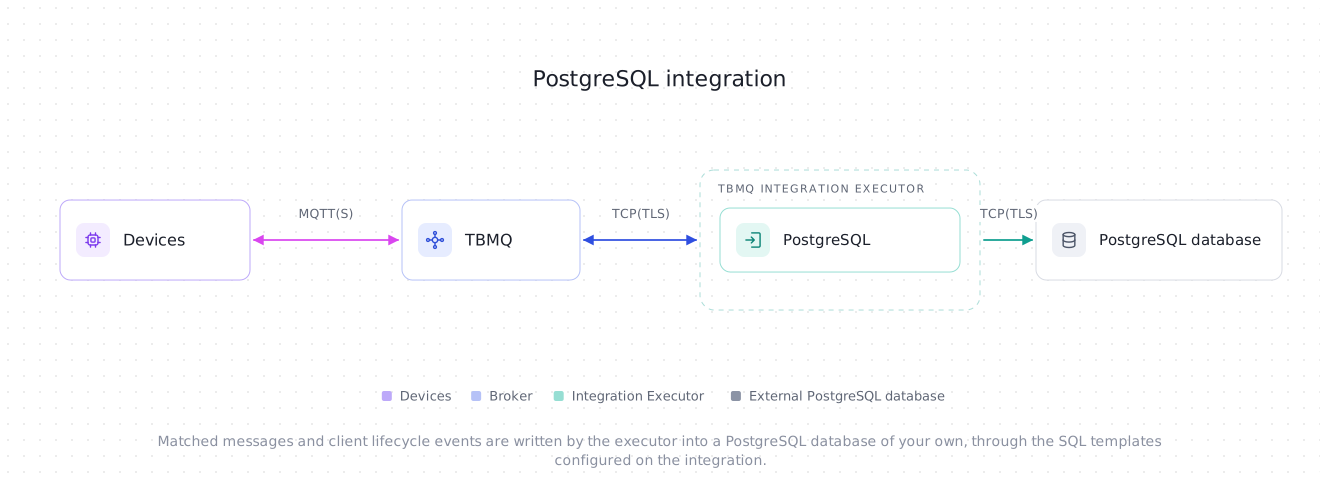
Prerequisites
Section titled “Prerequisites”- A running TBMQ instance with the TBMQ Integration Executor service running. Without a reachable executor, saving an integration fails with a validation timeout.
- A PostgreSQL database reachable from the Integration Executor, with a role the integration can log in as.
- The destination tables must already exist, and the role must hold the
INSERT(orUPDATE) grant on them. The integration never creates or alters tables. - A client capable of publishing MQTT messages (e.g., TBMQ WebSocket Client).
Create TBMQ PostgreSQL integration
Section titled “Create TBMQ PostgreSQL integration”- Go to the Integrations page and click the “+” button.
- Select PostgreSQL as the integration type and click Next.
- On the Filters and events step, keep the default Topic filters entry
tbmq/#, leave Lifecycle events empty, and click Next. - On the Configuration step, fill in Host, Port and Database, then set Username and Password under Credentials.
- Replace the pre-filled SQL query template with a statement that matches a table in your database, or create the table the pre-filled statement expects — see Example: storing messages.
- Click Check connection to confirm the credentials, the table and the grants are right, then click Add to save the integration.
Topic filters
Section titled “Topic filters”Topic filters define MQTT-based subscriptions that trigger the integration. When TBMQ receives a message matching a configured topic filter, the integration binds it into the message SQL template and executes it.
Topic filters are optional if you select at least one lifecycle event type instead — an integration only has to have one of the two. The form enforces that from the other side too: the last topic filter cannot be removed until an event type is selected, so to make an integration events-only, pick the event type first and then delete tbmq/#. Without topic filters the SQL query template disappears, since no message can arrive to bind it.
For example, with the topic filter tbmq/devices/+/status, any of the following messages will trigger the integration:
tbmq/devices/device-01/statustbmq/devices/gateway-01/statusConfiguration
Section titled “Configuration”Connection
Section titled “Connection”| Field | Default | Description |
|---|---|---|
| Host | localhost |
Hostname or IPv4 address of the database server. Letters, digits, dots and hyphens only — bracketed IPv6 is not supported. Required. |
| Port | 5432 |
PostgreSQL port, 1–65535. Required. |
| Database | — | Name of an existing database. Letters, digits, underscores, dots and hyphens only. Required. |
| Schema | — | Optional. Sets the connection’s currentSchema, so an unqualified table name in either template resolves inside it. Leave empty to use the role’s default search_path. |
| Username | — | Role to connect as. Required — there is no anonymous login to PostgreSQL, and without a username the driver would connect as whatever OS account runs the Integration Executor. |
| Password | — | Optional. Leave it empty for trust authentication, which still states the role explicitly. |
| Field | Default | Description |
|---|---|---|
| SSL mode | Disable |
How the connection is encrypted and verified. See the four modes below. |
| Provide certificates | off | Enables the PEM fields below. Requires an SSL mode other than Disable. |
| CA certificate file | — | PEM of the CA that signed the server certificate. Used in every mode other than Disable. |
| Certificate file / Private key file | — | PEM client certificate and its key, for certificate authentication. Both are required together. |
| Private key password | — | Password of an encrypted private key. |
The four SSL modes map one-to-one onto the PostgreSQL driver’s sslmode values:
| Mode | Encrypted | Server certificate | Hostname |
|---|---|---|---|
| Disable | No — plain TCP | — | — |
| Require | Yes | Verified only if you supply a CA certificate. Without one, any server certificate is accepted. | Not checked |
| Verify CA | Yes | Verified against the supplied CA, or against the JVM’s default truststore when no CA is supplied. | Not checked |
| Verify full | Yes | As Verify CA. | Checked against the certificate |
Use Verify full in production. Each step up adds one check: encryption, then the server certificate, then the hostname.
SQL configuration
Section titled “SQL configuration”| Field | Default | Description |
|---|---|---|
| SQL query template | An INSERT into mqtt_messages |
Executed once per message matched by the topic filters. Shown and required only while at least one topic filter is configured. |
| Lifecycle events SQL template | An INSERT into mqtt_client_events |
Executed once per selected client lifecycle event. Shown and required only while at least one lifecycle event type is selected. |
Both fields are SQL editors — use the expand icon in the corner for a full-screen view. See SQL templates for the rules both templates follow.
Each template belongs to its own trigger, and a template whose trigger is not selected is not shown, not validated on save, not planned by Check connection, and never bound. A stale statement left behind a hidden field therefore cannot block the integration — but it is also not checked until you select that trigger again.
Advanced settings
Section titled “Advanced settings”| Field | Default | Range | Description |
|---|---|---|---|
| Connection pool size | 5 |
1–50 |
Maximum open connections to the database for this integration, and also the number of worker threads it runs statements on. See Sizing the connection pool. |
| Pool connection wait timeout (ms) | 10000 |
250–25000 |
How long a message waits for the pool to hand it a connection, which may mean opening one. Not a network timeout. On expiry the message fails with Connection is not available, request timed out. |
| Database connect timeout (sec) | 10 |
1–25 |
How long establishing a new TCP connection to the database host may take. |
| Socket read timeout (sec) | 15 |
1–25 |
How long to wait for a response on an open connection before treating it as dead. |
| Query timeout (sec) | 10 |
1–25 |
How long a single statement may run on the server. Doubles as the drain window on stop: a stopping integration waits this long for in-flight statements before interrupting its workers. |
Each timeout is capped at 25 seconds so that no single blocking step can outlive the executor’s message pack timeout (TB_IE_MSG_PACK_PROCESSING_TIMEOUT, 30 000 ms by default). If you lower that timeout below 25 000 ms, lower these values with it — the cap alone no longer holds the guarantee.
SQL templates
Section titled “SQL templates”Template rules
Section titled “Template rules”A template is a single SQL statement with ${...} placeholders where values go. Before the integration is saved, the statement is checked against the following rules:
- It must be exactly one statement, starting with
INSERT,UPDATEorWITH. A;anywhere outside a quoted literal is rejected, including a trailing one. - Placeholders are written bare, never inside quotes:
VALUES (${clientId}), notVALUES ('${clientId}'). - A placeholder name must be one of the fields listed below for that template’s envelope.
${metadata.…}and${props.…}always need a key —${metadata}on its own is rejected.${props.…}exists only in the message envelope; the events template rejects it. - A bare
?outside a quoted literal is rejected, because the JDBC driver would read it as a parameter marker. Write PostgreSQL’s JSON operators?,?|and?&doubled:??,??|,??&. - The template must not exceed 10 000 characters.
- A placeholder whose field is absent from the arriving envelope binds
NULL, so every column a template writes must be nullable unless the field is always present.
Values are bound as query parameters, never spliced into the SQL text, so a payload can never alter the statement.
Message placeholders
Section titled “Message placeholders”These are the fields available to the SQL query template:
| Placeholder | Value | Suggested column type |
|---|---|---|
${clientId} |
ID of the MQTT client that published the message. | text |
${topicName} |
MQTT topic the message was published to. | text |
${payload} |
Message payload as UTF-8 text when it is valid UTF-8 with no NUL byte, Base64-encoded otherwise. | text |
${qos} |
QoS level of the incoming message: 0, 1 or 2. |
integer |
${retain} |
Whether the message had the Retain flag set. | boolean |
${ts} |
Timestamp (milliseconds) when TBMQ received the message. | bigint |
${eventType} |
Always PUBLISH_MSG for a message. |
text |
${tbmqNode} |
Node ID of the TBMQ broker that received the message. | text |
${tbmqIeNode} |
Node ID of the Integration Executor that handled it. | text |
${clientCertCn} |
Common Name of the client’s X.509 certificate. NULL unless the client authenticated with mTLS. |
text |
${metadata.<key>} |
A value from the integration’s Metadata, e.g. ${metadata.integrationName}. |
text |
${props.<name>} |
An MQTT 5.0 user property of the message, e.g. ${props.contentType}. NULL when the message does not carry it. |
text |
A jsonb column also works for ${payload} — the value is sent untyped and the server casts it — but only if every payload the integration receives is valid JSON. A payload that is not, including a Base64-encoded binary one, fails the insert.
Example: storing messages
Section titled “Example: storing messages”The pre-filled template expects this table:
CREATE TABLE mqtt_messages ( client_id text, topic text, qos integer, retain boolean, payload text, ts bigint);INSERT INTO mqtt_messages (client_id, topic, qos, retain, payload, ts)VALUES (${clientId}, ${topicName}, ${qos}, ${retain}, ${payload}, ${ts})UPDATE and WITH work the same way:
UPDATE device_state SET payload = ${payload}, updated_at = ${ts}WHERE client_id = ${clientId}Client lifecycle events
Section titled “Client lifecycle events”Besides the messages matched by topic filters, this integration can deliver client lifecycle events — a client connecting, disconnecting, changing its subscriptions, or failing authentication or authorization.
Pick the event types on the Filters and events step while creating the integration, or add them later:
- Open the integration on the Integrations page and click the Toggle edit mode button (pencil icon).
- In the Lifecycle events section, click the Event types field to list the available event types, then select the ones you need: Client connected, Client disconnected, Client subscribed, Client unsubscribed, Client authentication failed, Client authorization failed, Client connection failed. Each one is added as a chip; remove it with its x.
- Fill in the Lifecycle events SQL template that appears under SQL configuration.
- Click Apply changes.
Events have no originating MQTT message, so they are bound against a different envelope and need their own template — an integration with at least one event type selected cannot be saved without one.
Lifecycle event placeholders
Section titled “Lifecycle event placeholders”Common to every event type:
| Placeholder | Value | Suggested column type |
|---|---|---|
${eventType} |
One of CLIENT_CONNECTED, CLIENT_DISCONNECTED, CLIENT_SUBSCRIBED, CLIENT_UNSUBSCRIBED, CLIENT_AUTHENTICATION_FAILED, CLIENT_AUTHORIZATION_FAILED, CLIENT_CONNECTION_FAILED. Always present. |
text |
${clientId} |
ID of the MQTT client the event is about. | text |
${sessionId} |
ID of the client session. | text |
${ipAddress} |
IP address the client connected from. | text |
${ts} |
Timestamp (milliseconds) when the event was created. | bigint |
${tbmqNode} |
Node ID of the TBMQ broker that produced the event. | text |
${username} |
Username the client authenticated with. | text |
${clientCertCn} |
Common Name of the client’s X.509 certificate. | text |
${metadata.<key>} |
A value from the integration’s Metadata. | text |
Type-specific fields, added on top:
| Placeholder | Present for | Value | Suggested column type |
|---|---|---|---|
${cleanStart} |
CLIENT_CONNECTED |
Whether the client requested a clean session start. | boolean |
${keepAlive} |
CLIENT_CONNECTED |
Keep-alive interval (seconds) in effect for the session. | integer |
${protocolVersion} |
CLIENT_CONNECTED, CLIENT_AUTHENTICATION_FAILED |
MQTT protocol level: 3, 4 or 5. |
integer |
${sessionExpiryInterval} |
CLIENT_CONNECTED |
Session expiry interval (seconds). | bigint |
${disconnectReason} |
CLIENT_DISCONNECTED |
Name of the MQTT reason code, e.g. NORMAL_DISCONNECT. |
text |
${subscriptions} |
CLIENT_SUBSCRIBED, CLIENT_UNSUBSCRIBED |
The granted or removed subscriptions, as a JSON array — see below. | jsonb |
${reason} |
CLIENT_AUTHENTICATION_FAILED, CLIENT_CONNECTION_FAILED |
Why authentication or the connection failed. | text |
${action} |
CLIENT_AUTHORIZATION_FAILED |
The denied operation: publish or subscribe. |
text |
${topic} |
CLIENT_AUTHORIZATION_FAILED |
The topic or topic filter that was denied. | text |
One template serves every selected event type, so a placeholder that does not apply to the event that arrives binds NULL — a CLIENT_DISCONNECTED row written by a template that also references ${subscriptions} simply has NULL there. Keep every column but event_type nullable.
Text fields are omitted from the envelope when they have no value rather than sent empty, so expect NULL in username when the client sent none, and in client_cert_cn unless the client authenticated with an X.509 certificate.
The subscriptions array
Section titled “The subscriptions array”${subscriptions} binds a JSON array. A CLIENT_SUBSCRIBED entry carries the topic filter, the granted QoS and the MQTT 5 subscription options, with shareName and subscriptionId present only when the client sent them:
[ { "topicFilter": "tbmq/devices/+/status", "qos": 1, "shareName": "group-a", "subscriptionId": 7, "options": { "noLocal": false, "retainAsPublish": false, "retainHandling": "SEND" } }]retainHandling is one of SEND, SEND_IF_NOT_EXISTS or DONT_SEND. A CLIENT_UNSUBSCRIBED entry is just topicFilter, plus shareName for a shared subscription.
Example: storing lifecycle events
Section titled “Example: storing lifecycle events”The pre-filled events template expects this table:
CREATE TABLE mqtt_client_events ( event_type text NOT NULL, client_id text, session_id text, ip_address text, username text, ts bigint, details jsonb);INSERT INTO mqtt_client_events (event_type, client_id, session_id, ip_address, username, ts, details)VALUES (${eventType}, ${clientId}, ${sessionId}, ${ipAddress}, ${username}, ${ts}, ${subscriptions})With details as jsonb you can query the subscriptions directly:
SELECT client_id, details -> 0 ->> 'topicFilter' AS topic_filterFROM mqtt_client_eventsWHERE event_type = 'CLIENT_SUBSCRIBED'details -> 0 reads the first subscription of each event, which keeps the example short. One SUBSCRIBE can grant several, so use jsonb_array_elements(details) to expand the array when you need all of them.
Check connection
Section titled “Check connection”Check connection does more than open a socket. It connects with the configured settings through a single-connection pool, runs SELECT 1, then asks the server to parse, plan and permission-check each template that is in play — the message one when topic filters are configured, the events one when lifecycle events are selected — with every placeholder bound to NULL, inside a transaction that is always rolled back.
That means a misspelled table or column, or a role without the INSERT grant, fails here instead of failing every message after the integration has started. Nothing is written: the statement is planned, never executed, so no row is inserted, no trigger fires and no constraint is evaluated.
All four timeouts are clamped for the probe to the executor’s own connect-timeout limit, so no single step of it runs past the API request deadline. The clamp bounds each step, not their sum.
Delivery semantics
Section titled “Delivery semantics”Delivery is not exactly-once, and PostgreSQL rows are the visible consequence:
- A statement that fails is logged, counted, saved as an error event, and reported as a failure. It is never acknowledged as a success. What happens next is decided by the executor’s acknowledgment strategy —
SKIP_ALL(the default) drops the message, so a row can simply be missing;RETRY_ALLredelivers it up to the configured retry limit. - A statement can still commit after the executor has given up on its message pack. The retry then inserts the same row a second time.
Where duplicates matter, make the insert idempotent — add a unique key and ON CONFLICT DO NOTHING:
CREATE TABLE mqtt_messages ( msg_id text PRIMARY KEY, client_id text, topic text, qos integer, retain boolean, payload text, ts bigint);INSERT INTO mqtt_messages (msg_id, client_id, topic, qos, retain, payload, ts)VALUES (${props.msgId}, ${clientId}, ${topicName}, ${qos}, ${retain}, ${payload}, ${ts})ON CONFLICT DO NOTHINGThe key has to be genuinely unique per message. A publisher-supplied id carried as an MQTT 5.0 user property (${props.msgId} above) is the reliable choice. (client_id, topic, ts) is tempting but wrong for anything fast: two publishes in the same millisecond collide, and ON CONFLICT DO NOTHING would silently discard the second one.
Client lifecycle events are weaker still — they are best-effort hints, and can be dropped before they ever reach the integration. See Delivery guarantees.
Sizing the connection pool
Section titled “Sizing the connection pool”Connection pool size is per integration, not per node. Each PostgreSQL integration gets its own pool and its own worker threads, so that one slow database cannot starve the other integrations running on the same executor. Budget accordingly:
- An integration holds at most
poolSizeconnections while it is busy, and runs statements on at mostpoolSizethreads. - An idle integration shrinks back to one connection: the pool’s idle floor is 1, so a connection that has been unused for the connection pool’s idle timeout (HikariCP’s default of 10 minutes) is closed. The price is one connect per extra worker on the first burst after such a lull, bounded by Pool connection wait timeout.
- The worst case on a node is therefore the sum of
poolSizeover the integrations that executor owns. Ten integrations at the default5can reach 50 connections; ten at the maximum50can reach 500. Check that against the server’smax_connections. - Which executor pays that cost depends on partition ownership — each integration is owned by exactly one executor instance at a time.
Size poolSize for the throughput of the individual integration, not for the node. Raising it does not help a target that is slow for a reason other than concurrency, and it multiplies the node’s connection footprint.
Integration events
Section titled “Integration events”These are the integration’s own events, recorded inside TBMQ for debugging and troubleshooting. They are not the client lifecycle events described above: those are about MQTT clients and are written to your database, while these describe the integration itself and never leave TBMQ.
- Lifecycle Events — logs events such as
Created,Updated,Started,Stopped,Failed. - Statistics — the integration’s own counters: messages processed and errors occurred.
- Errors — captures failures such as an unreachable database, a rejected statement, or an expired timeout. Each entry carries the message PostgreSQL itself returned, e.g.
permission denied for table mqtt_messages, which names the table or column at fault. The SQLState behind it —42501for a missing grant,42703for a bad column,23505for a unique violation — is written to the Integration Executor log rather than stored with the event.
Send an uplink message
Section titled “Send an uplink message”- Create the
mqtt_messagestable from Example: storing messages in your database, and keep the pre-filled SQL query template. - Navigate to the WebSocket Client page.
- Select WebSocket Default Connection (or any working connection) and click Connect. Verify the connection status shows
Connected. - Set the Topic field to
tbmq/postgresql-integrationto match the integration’s topic filtertbmq/#. - Leave the pre-filled Payload
{"temperature": 25}as is. - Click the Send icon to publish the message.
The row should now be in your database:
SELECT client_id, topic, qos, retain, payload, ts FROM mqtt_messages; client_id | topic | qos | retain | payload | ts--------------+----------------------------+-----+--------+-----------------------+--------------- tbmq_df52bNUQ| tbmq/postgresql-integration| 1 | f | {"temperature": 25} | 1742554969254Note that payload is stored as text here, not Base64: the payload is valid UTF-8, so it is stored as it was published. A binary payload — or one containing a NUL byte — would be Base64-encoded instead.
Was this helpful?