
Kafka source integration
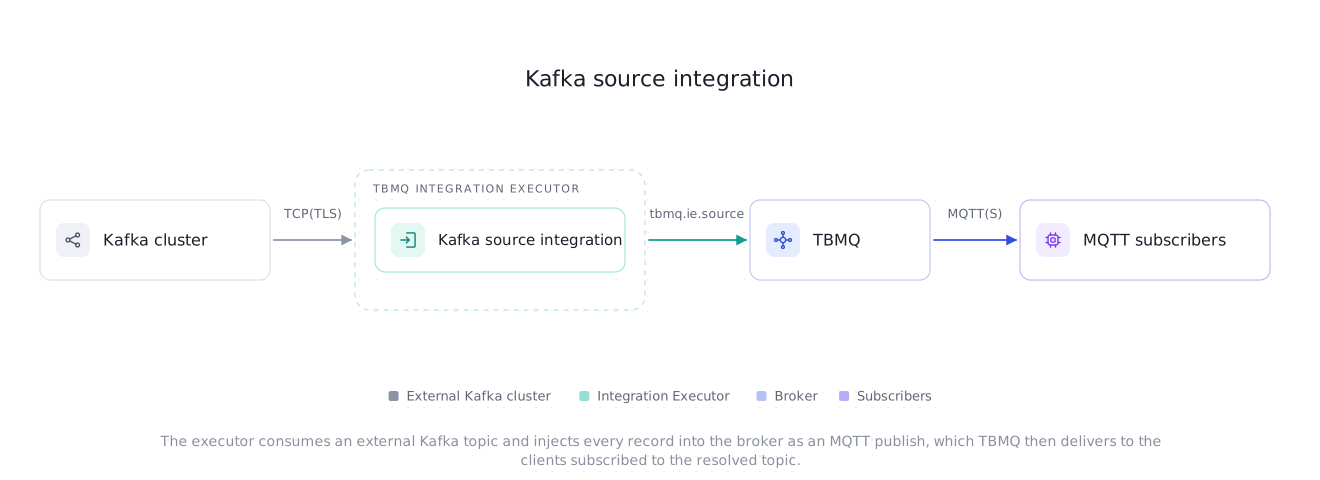
TBMQ Kafka source integration is an inbound integration: instead of pushing MQTT messages out, it consumes records from a topic on an Apache Kafka cluster of your own and injects each one into the broker as an MQTT publish. Clients subscribed to the resolved topic receive it like any other message. This is useful for the following scenarios:
- Commands and configuration from a backend — a service that already produces to Kafka can reach devices over MQTT without speaking MQTT itself.
- Bridging an existing stream into MQTT — replay or fan out a Kafka topic to MQTT subscribers.
- Decoupling producers from the broker — Kafka absorbs the producer’s bursts, and the integration feeds the broker at its own pace.
Every other integration type is outbound, except the MQTT source integration. The two are the only direction reversals, and it changes what the integration entity carries: a source integration has no topic filters and no client lifecycle events, because nothing inside TBMQ triggers it.
Data flow
Section titled “Data flow”- A producer writes a record to the external Kafka topic.
- The Integration Executor polls that topic with a consumer group of its own and resolves an MQTT topic for each record from the configured template.
- The executor sends the record to the broker over TBMQ’s internal
tbmq.ie.sourcetopic, keyed so that the records of one source partition stay in order. - TBMQ injects it into the publish pipeline as a publish from the client ID
ie-source-<integrationId>, and delivers it to every subscriber whose topic filter matches.
Prerequisites
Section titled “Prerequisites”- A running TBMQ instance, version 2.4.1 or later, with the TBMQ Integration Executor service running. Without a reachable executor, saving an integration fails with a validation timeout.
- An external Kafka cluster with the topic to consume, reachable from the Integration Executor.
- A client capable of subscribing to MQTT topics (e.g., TBMQ WebSocket Client).
Create TBMQ Kafka source integration
Section titled “Create TBMQ Kafka source integration”A source integration has no Filters and events step — the wizard goes straight from the type to the configuration.
- Go to the Integrations page and click the “+” button.
- Select Kafka source as the integration type, give the integration a Name, and click Next.
- On the Configuration step, under Kafka source, set the Bootstrap servers of your Kafka cluster and the Kafka topic to consume. See Connecting to Kafka for SASL/SSL clusters.
- Under MQTT target, set the MQTT topic template — the topic the records are published to. Keep the default
tbmq/kafka/messagesto publish every record to one fixed topic, or use a placeholder to derive it from the record; see MQTT topic template. - Leave QoS at At least once, or pick another level.
- Click Check connection to confirm the cluster is reachable and the topic exists, then click Add to save the integration.
Configuration
Section titled “Configuration”Kafka source
Section titled “Kafka source”| Field | Default | Description |
|---|---|---|
| Bootstrap servers | localhost:9092 |
Kafka broker addresses as a comma-separated list of host:port pairs. Every entry must have a port in 1–65535. Required. |
| Kafka topic | tbmq.source.messages |
The Kafka topic to consume from. Required. |
| Consumer group ID | — | Consumer group the integration joins. Leave empty to use tbmq-ie-kafka-source-<integrationId>, which is unique to this integration. Changing it moves the integration to a group with no committed offsets, so its starting position comes from Auto offset reset again. |
| Client ID prefix | — | Prefix for the Kafka client ID. Leave empty for tbmq-ie-kafka-source. The full ID is <prefix>-<integrationId>-<executorServiceId>, so the consumer is identifiable in the Kafka cluster. |
MQTT target
Section titled “MQTT target”| Field | Default | Description |
|---|---|---|
| MQTT topic template | tbmq/kafka/messages |
The MQTT topic each record is published to, optionally with ${key} and ${header.<name>} placeholders. Required. See MQTT topic template. |
| QoS | At least once | QoS of the injected publish: At most once (0), At least once (1) or Exactly once (2). Applies to every record. |
The retain flag is always off. TBMQ rejects a retained sourced publish outright, so a Kafka record can never become a retained message.
Advanced settings
Section titled “Advanced settings”| Field | Default | Description |
|---|---|---|
| Auto offset reset | Latest | Where a consumer group with no committed offset starts. Latest consumes only records produced after the integration joins; Earliest consumes everything still retained in the topic. It has no effect once the group has committed an offset. |
| Max records per poll | 500 |
Records fetched per poll (max.poll.records). This is both the in-flight window and the redelivery window: a batch that fails is retried whole, so a smaller value narrows the duplicates a failure can produce. Must be at least 1. |
| Other properties | — | Additional Kafka consumer properties as key-value pairs — this is where SASL/SSL settings go. Some keys are reserved; see Other properties. |
| Description | — | Free-form notes on the integration. |
| Metadata | — | Custom key-value pairs stored on the integration. They are not attached to sourced publishes — an injected message carries only its topic, payload and QoS — so they serve as documentation here, not as data. |
MQTT topic template
Section titled “MQTT topic template”The template is resolved once per record. Two placeholders are supported:
| Placeholder | Resolves to |
|---|---|
${key} |
The record key, read as a UTF-8 string. |
${header.<name>} |
The value of the record header <name>, read as a UTF-8 string. |
Anything outside a placeholder is literal text, and a template with no placeholder at all is valid — every record then goes to the same topic.
tbmq/kafka/messages → every record to one fixed topicdevices/${key}/commands → the record key becomes a topic level${header.region}/${key}/state → a header and the key togetherThe template is validated when the integration is saved:
- An unsupported placeholder (
${topic},${value},${header.}) is rejected, naming the placeholder. - The topic the template produces must be a valid MQTT publish topic once the placeholders are filled: no
+or#wildcards, no leading$, not empty, no null character (U+0000), and at most 65 535 characters.
What validation cannot check is the record. These are decided per record, at runtime:
- The template reads
${key}but the record has no key. - The template reads
${header.x}but the record carries no headerx. - The resolved topic has more levels than the broker’s
MQTT_TOPIC_MAX_SEGMENTS_COUNTallows — a limit the executor cannot see, so it is the broker that refuses the message. It is off by default (0, unlimited), so this applies only where one has been set.
The first two make the record unmappable; the third is a broker-side refusal.
Other properties
Section titled “Other properties”Other properties are passed to the Kafka consumer as-is, so this is where a secured cluster is configured. Two rules apply:
- A key that holds PEM material —
ssl.keystore.certificate.chain,ssl.keystore.key,ssl.truststore.certificates— may be pasted with literal\nsequences; the integration converts them to real newlines. - Any
ssl.*property requiressecurity.protocolto be set as well. Without it the Kafka client would silently stay onPLAINTEXTand ignore the TLS settings, so the integration refuses to save instead.
The properties the integration manages itself are rejected rather than quietly overridden, because a user value
there would break delivery — enable.auto.commit=true would commit records that were never published, and a different
deserializer would break the record loop:
bootstrap.servers client.id group.idauto.offset.reset enable.auto.commit auto.commit.interval.msmax.poll.records key.deserializer value.deserializerEach of these has its own field, or is fixed by the delivery model. Set them through the form, not here.
Connecting to Kafka
Section titled “Connecting to Kafka”For a cluster that requires SASL over TLS — Confluent Cloud, for example — add these Other properties:
| Key | Value |
|---|---|
ssl.endpoint.identification.algorithm |
https |
sasl.mechanism |
PLAIN |
sasl.jaas.config |
org.apache.kafka.common.security.plain.PlainLoginModule required username="CLUSTER_API_KEY" password="CLUSTER_API_SECRET"; |
security.protocol |
SASL_SSL |
Replace CLUSTER_API_KEY and CLUSTER_API_SECRET with your cluster’s API key and secret. On Confluent Cloud, generate
one under Data Integration → API Keys → Create key.
Check connection
Section titled “Check connection”Check connection creates a Kafka admin client with the configured connection settings — including the same PEM unescaping the consumer applies — lists the cluster’s topics, and reports whether the configured Kafka topic is among them. It confirms three things at once: the bootstrap servers resolve, the security settings are accepted, and the topic exists.
Unlike the outbound Kafka integration, a missing topic here is a real problem: a source integration only reads, so nothing will ever create the topic for it. The integration can still be saved, and it will consume the topic as soon as it appears.
Record mapping
Section titled “Record mapping”| MQTT publish | Comes from |
|---|---|
| Topic | The resolved MQTT topic template. |
| Payload | The record value, byte for byte. A record with a null value — a tombstone — becomes an empty publish. |
| QoS | The QoS field, the same for every record. |
| Retain | Always false. |
| Client ID | The integration, not the record — see Publisher identity. |
Nothing else from the record travels with the message: the key and the headers are only inputs to the topic template, and Kafka offsets, timestamps and partitions are not carried into MQTT.
Publisher identity
Section titled “Publisher identity”A sourced publish has no MQTT session behind it, so the broker derives its identity from the integration ID in the
message itself: the client ID is ie-source- followed by the integration’s UUID. The executor cannot influence it,
which is what keeps one integration from publishing as another.
That ID is what you will see wherever the broker names the publisher of such a message: in an outbound integration’s
JSON envelope as clientId, and on the
Dropped messages page if one of these
publishes is dropped. There is no session to open for it.
Delivery semantics
Section titled “Delivery semantics”Delivery is at-least-once, and ordering is per source partition.
The executor polls a batch, publishes every record of it, waits until each one has settled, and only then commits the batch’s offsets. Auto-commit is off — an offset is never committed for a record that was not acknowledged. If any record of the batch fails transiently, the whole batch’s partitions are rewound to their first offset, the integration backs off, and the batch is retried. The backoff starts at 1 second and doubles up to 60 seconds, resetting on the first batch that commits.
The consequences worth planning for:
- Duplicates are possible, bounded by one batch. A failure after some records of a batch were already published redelivers the whole batch, so those records reach MQTT twice. Max records per poll is the bound: lower it if duplicates are expensive for your subscribers.
- The first failure in a batch stops the rest of it. The remaining records are not attempted, are rewound together with the failed one, and are retried on the next cycle. Nothing is lost, and a dead broker connection costs one failed send per cycle instead of one per record.
- Order is preserved only within a source partition. The records of one Kafka partition share an internal partition and are handed to the publish pipeline in poll order. Records from different source partitions have no order relative to each other — as in Kafka itself. If a group of messages must stay ordered, produce them under the same Kafka key.
- A stopped integration abandons the batch in flight. Nothing is committed, so disabling and re-enabling the integration, or restarting the executor, redelivers that batch.
- A pack the broker has accepted is committed even if some of it is still in flight. The broker awaits every record
of a pack before committing its own offsets, bounded by
TB_IE_SOURCE_PACK_PROCESSING_TIMEOUT(20 000 ms by default); it then commits regardless, so that one stuck publish cannot stall every other source integration. A broker crash inside that window loses the outstanding records.
Unmappable records
Section titled “Unmappable records”A record that can never be published — no matter how many times it is retried — is skipped for good: it is counted as an error, saved as an error event on the integration, and its offset is committed so the partition moves on. This covers:
- A template that cannot be resolved for this record:
${key}with no key,${header.x}with no such header. - A resolved topic that is not a valid publish topic.
- A record too large for the internal topic that carries it — see Payload size.
- A record the internal producer rejects for what it is, rather than for a transient condition.
Blocking the partition on such a record would stop every record behind it, which is why the offset advances instead.
The Integration Executor log records one warning per batch with the number of records skipped; the per-record reason is
logged at DEBUG level and carried by the error event.
Payload size
Section titled “Payload size”Before a record is sent to the broker, the executor checks it against the internal topic’s producer limit
(max.request.size, 1048576 bytes by default). What is measured is the record payload plus the resolved topic plus a
fixed 1024-byte allowance for the envelope, so the usable payload is a little under 1 MiB. A record over the limit is
unmappable — it is skipped, not retried.
To raise it, set max.request.size in TB_KAFKA_IE_SOURCE_ADDITIONAL_PRODUCER_CONFIG on the
Integration Executor. It has to be that
per-topic key: a value in the common producer configuration is not seen by this check. Raise the
broker-side limits to match, or the larger
records will simply be refused a step later.
What the broker enforces
Section titled “What the broker enforces”A sourced publish is validated again on the broker side, and a refusal there is permanent — by the time the broker sees the record, the executor has already committed its Kafka offset, so there is nobody to hand it back to. Every refusal is reported on the integration as an error event; the Also counted as column says which ones are additionally recorded on the Dropped messages page. Protocol errors are not — the MQTT path treats a malformed publish from a client the same way, and neither shows up on that page.
| Check | Result when it fails | Also counted as |
|---|---|---|
| Topic validity | The publish is rejected. This is also where MQTT_TOPIC_MAX_SEGMENTS_COUNT applies — the one topic rule the executor cannot pre-check, and off by default (0, unlimited). |
Protocol error |
| Retain flag off | A retained sourced publish is rejected. The executor never sets the flag, so this guards the path, not the configuration. | Protocol error |
QoS in 0–2 |
The publish is rejected. | Protocol error |
| Throughput quota | The publish is dropped, exactly like a client publish over the licensed quota. | Dropped message — Rate limits |
Hand-off to tbmq.msg.all |
The publish is dropped because the broker could not queue it. | Dropped message — Internal error |
Because a broken configuration can fail on every record, these error events are rate-limited to one per integration per broker node per minute — the window is held in memory on each node, not shared across the cluster. The event carries the reason of the drop that opened the window, how many further drops were suppressed since the previous one, and the service ID of the node that emitted it, so a sustained refusal costs one row a minute per node instead of one per message.
How many nodes that is depends on partitioning, not on cluster size. A record’s key is the integration ID and its
source partition, so an integration reading a single-partition Kafka topic always lands on one tbmq.ie.source
partition and therefore one node, however large the cluster. Reading a topic with more partitions spreads it across the
nodes consuming those tbmq.ie.source partitions — at most as many as that topic has, six by default. The
integration’s own error counter is not rate-limited at all and stays the accurate measure of how much is failing.
Integration events
Section titled “Integration events”These are the integration’s own events, recorded inside TBMQ for debugging and troubleshooting.
- Lifecycle Events —
Created,Updated,Started,Stopped,Failed. - Statistics — the integration’s own counters: messages processed and errors occurred.
- Errors — every failure that concerns this integration: a record skipped as unmappable, a consumer that had to be recreated, and the broker-side refusals above.
A Kafka cluster that becomes unreachable does not move the integration to Failed. The consumer is recreated in
the background, with the same backoff, and the integration stays Active while reporting the failure as an error
event — the same way an outbound integration reports an unreachable sink. It resumes from its committed offset once the
cluster is back.
Throughput metrics
Section titled “Throughput metrics”A source integration consumes into the executor, so its throughput is counted in the downlink direction.
- In the executor’s current integration activity
statistics, the counter is
MSGS_DOWNLINK, withintegrationType=KAFKA_SOURCE; outbound types reportMSGS_UPLINK. In theintegration_stats_counter_totalPrometheus series, the same counter isname="msgDownlink", withtype="KAFKA_SOURCE"; outbound types reportmsgUplink. - The producer that writes to the internal
tbmq.ie.sourcetopic reports its own queue statistics underie.source.published.
See Prometheus metrics for the full series list.
Receive a Kafka record over MQTT
Section titled “Receive a Kafka record over MQTT”-
Create the integration as described above, keeping the defaults Kafka topic
tbmq.source.messagesand MQTT topic templatetbmq/kafka/messages, and make sure its status is Active. -
Navigate to the WebSocket Client page.
-
Select WebSocket Default Connection (or any working connection) and click Connect. Verify the connection status shows
Connected. -
Add a subscription for the topic filter
tbmq/kafka/messages. -
Produce a record to the integration’s Kafka topic with the payload
{"temperature": 25}. Withkafka-console-producer, pointing--bootstrap-serverat your own cluster:Terminal window kafka-console-producer.sh --bootstrap-server localhost:9092 --topic tbmq.source.messages{"temperature": 25} -
The message appears in the WebSocket client’s Messages list, on the topic
tbmq/kafka/messageswith QoS 1.
If nothing arrives, check in this order: the integration’s status and its Errors tab, then whether the records were produced after the integration joined the group — with Auto offset reset at its default Latest, records that predate it are not consumed.
Was this helpful?