
Redis integration
TBMQ Redis Integration writes MQTT messages and client lifecycle events into a Redis server of your own. You pick the Redis command each message runs — SET, HSET, LPUSH, RPUSH, PUBLISH or XADD — and a key built from the message’s own fields, and the integration issues exactly that one command per message. This is useful for the following scenarios:
- Latest-value cache —
SETthe current reading under a key derived from the topic, with a time-to-live so an entry nobody refreshes expires on its own. - Recent-history buffer —
LPUSHorRPUSHinto a list capped with Max length, for a dashboard that only ever shows the last N samples. - Stream processing —
XADDinto a Redis stream that consumer groups read, replay and acknowledge independently of the broker. - Fan-out to running processes —
PUBLISHto a channel that applications already listen on, without adding a second message broker.
Data flow
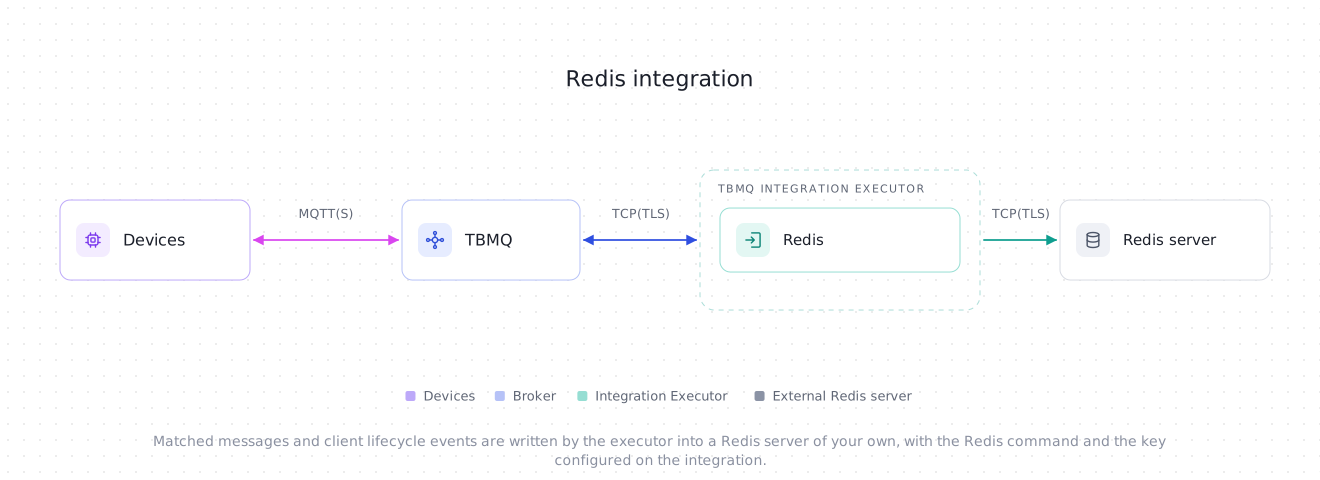
Section titled “Data flow”- A client publishes an MQTT message to a topic matching the integration’s topic filters.
- TBMQ receives the message and forwards it to the TBMQ Integration Executor over Kafka.
- The Integration Executor resolves the key against the message, builds the value, and issues the configured Redis command asynchronously.
- Redis applies the command. The message is acknowledged only after Redis replies.
Prerequisites
Section titled “Prerequisites”- A running TBMQ instance with the TBMQ Integration Executor service running. Without a reachable executor, saving an integration fails with a validation timeout.
- A Redis server reachable from the Integration Executor. Any version works, except that XADD needs Redis 5.0 or newer — streams did not exist before it.
- A client capable of publishing MQTT messages (e.g., TBMQ WebSocket Client).
Create TBMQ Redis integration
Section titled “Create TBMQ Redis integration”- Go to the Integrations page and click the “+” button.
- Select Redis as the integration type and click Next.
- On the Filters and events step, keep the default Topic filters entry
tbmq/#, leave Lifecycle events empty, and click Next. - On the Configuration step, keep Deployment mode
Standaloneand fill in Host and Port. If your server requires authentication, set Credentials to Basic and enter the username, the password, or both. - Under Operation, pick the Command and adjust the Key — it is pre-filled with
mqtt:${topicName}. - Click Check connection to confirm the server is reachable and the key is usable, then click Add to save the integration.
Topic filters
Section titled “Topic filters”Topic filters define MQTT-based subscriptions that trigger the integration. When TBMQ receives a message matching a configured topic filter, the integration resolves the key against that message and runs the configured command.
Topic filters are optional if you select at least one lifecycle event type instead — an integration only has to have one of the two. The form enforces that from the other side too: the last topic filter cannot be removed until an event type is selected, so to make an integration events-only, pick the event type first and then delete tbmq/#. Without topic filters the Key field disappears, since no message can arrive to resolve it.
For example, with the topic filter tbmq/devices/+/status, any of the following messages will trigger the integration:
tbmq/devices/device-01/statustbmq/devices/gateway-01/statusConfiguration
Section titled “Configuration”Connection
Section titled “Connection”Deployment mode decides which set of connection fields is shown. Only the selected mode’s fields are saved.
Standalone — a single Redis server:
| Field | Default | Description |
|---|---|---|
| Host | localhost |
Hostname or IPv4 address of the Redis server. Letters, digits, dots and hyphens only — bracketed IPv6 is not supported. Required. |
| Port | 6379 |
Redis port, 1–65535. Required. |
| Database index | 0 |
Logical database to select on connect. Must not be negative. |
Sentinel — a sentinel-managed master, resolved and re-resolved through the sentinels:
| Field | Default | Description |
|---|---|---|
| Master name | mymaster |
The name the sentinels know the master by. Required. |
| Sentinel nodes | localhost:26379 |
Comma-separated host[:port] list. An entry without a port uses 26379. Required. |
| Database index | 0 |
Logical database to select on the master. Must not be negative. |
| Sentinel authentication | Anonymous |
Credentials for the sentinel nodes themselves. They are separate from the Redis credentials below, because sentinels commonly have their own. |
Cluster — a Redis Cluster, discovered from seed nodes:
| Field | Default | Description |
|---|---|---|
| Cluster nodes | localhost:6379 |
Comma-separated host[:port] seed list; an entry without a port uses 6379. The rest of the topology is discovered from the cluster itself, so listing every node is not required. Required. |
There is no database index in cluster mode — Redis Cluster always uses database 0.
Credentials
Section titled “Credentials”| Type | Description |
|---|---|
| Anonymous | No authentication. The default. |
| Basic | Username, password, or both. A username alone is for a Redis ACL user that has no password; a password alone is for the legacy requirepass setting. Both left blank is rejected. |
| Field | Default | Description |
|---|---|---|
| Enable SSL | off | Connects with TLS instead of plain TCP. |
| Verify server certificate | on | Verifies the server’s certificate chain and its hostname. |
| CA certificate file | — | PEM of the CA that signed the server certificate. When supplied, only chains anchored at it are trusted; with no PEM at all, the JVM’s default truststore is used. |
| Certificate file / Private key file | — | PEM client certificate and its key, for mTLS. Both are required together. |
| Private key password | — | Password of an encrypted private key. |
Every PEM is parsed when the integration is saved, so a malformed certificate or a wrong key password is reported there rather than leaving the integration to fail on start.
Operation
Section titled “Operation”| Field | Default | Description |
|---|---|---|
| Command | SET |
The Redis command each message runs. See Commands. |
| Key | mqtt:${topicName} |
The key the command targets — the channel name for PUBLISH. Shown and required while at least one topic filter is configured. See Keys. |
| Events key | mqtt:events |
The key client lifecycle events are written to. Shown and required while at least one lifecycle event type is selected. |
| Hash field | ${clientId} |
HSET only. The field inside the hash. Resolved the same way as the key. |
| Expiration, seconds | 0 |
SET only. Time-to-live of the key. 0 means no expiration. |
| Max length | 0 |
LPUSH, RPUSH and XADD only. Caps the list or stream after each write. 0 means unbounded. See Limiting growth. |
| Send only message payload | off | On, the value written is the raw MQTT payload; off, it is the full message envelope as JSON. See Values. |
| Stream field name | payload |
XADD with Send only message payload on: the name of the single stream field that carries the raw payload. |
An option that does not apply to the selected command is hidden, and sending one anyway is rejected on save.
Advanced settings
Section titled “Advanced settings”| Field | Default | Range | Description |
|---|---|---|---|
| Command timeout, seconds | 10 |
1–25 |
Budget for establishing the connection and for each command sent on it. Doubles as the shutdown budget: a stopping integration waits this long for its connection to close. |
| Metadata | integrationName |
— | Custom key-value pairs, exposed as metadata in the envelope and available to both key templates as ${metadata.<key>}. integrationName is added for you and holds the integration’s name. |
The timeout is capped at 25 seconds so that no single command can outlive the executor’s message pack timeout (TB_IE_MSG_PACK_PROCESSING_TIMEOUT, 30 000 ms by default). If you lower that timeout below 25 000 ms, lower this value with it — the cap alone no longer holds the guarantee.
Commands
Section titled “Commands”| Command | Redis type | What one message does | Extra options |
|---|---|---|---|
| SET | string | Replaces the value stored at the key. | Expiration |
| HSET | hash | Sets one field of the hash at the key, replacing that field’s previous value. | Hash field |
| LPUSH | list | Prepends the value to the list at the key. | Max length |
| RPUSH | list | Appends the value to the list at the key. | Max length |
| PUBLISH | — | Sends the value to the channel named by the key. Nothing is stored: Redis hands it to whoever is subscribed at that moment and drops it otherwise. | — |
| XADD | stream | Appends an entry to the stream at the key. Needs Redis 5.0 or newer. | Max length, Stream field name |
The same command is used for lifecycle events, under the Events key.
The Key is a template: literal text plus ${...} placeholders resolved against the message. The resolved string is always one Redis argument — it is never split on whitespace or re-parsed — so a topic containing spaces or control characters cannot change the shape of the command.
The same rules and the same catalogue apply to the Hash field.
Message placeholders
Section titled “Message placeholders”| Placeholder | Value |
|---|---|
${topicName} |
MQTT topic the message was published to. |
${clientId} |
ID of the MQTT client that published the message. |
${qos} |
QoS level of the incoming message: 0, 1 or 2. |
${retain} |
Whether the message had the Retain flag set. |
${ts} |
Timestamp (milliseconds) when TBMQ received the message. |
${eventType} |
Always PUBLISH_MSG for a message. |
${tbmqNode} |
Node ID of the TBMQ broker that received the message. |
${tbmqIeNode} |
Node ID of the Integration Executor that handled it. |
${clientCertCn} |
Common Name of the client’s X.509 certificate. Present only for a client that authenticated with mTLS. |
${metadata.<key>} |
A value from the integration’s Metadata, e.g. ${metadata.integrationName}. |
${props.<name>} |
An MQTT 5.0 user property of the message, e.g. ${props.deviceType}. |
The rest of the rules are checked when the integration is saved:
- A placeholder name must be one of the names above. An unknown one is rejected.
${metadata}and${props}on their own are rejected — a nested placeholder always needs a key, and only one level deep (${metadata.a.b}is rejected too). A nested value that turns out to be an object or an array fails the message at delivery time.- An unclosed
${is rejected. - Literal braces are left alone, which is what makes cluster hash tags work.
Cluster hash tags
Section titled “Cluster hash tags”In cluster mode the key decides the hash slot, and therefore the node. Redis pins the slot to the part of a key between { and } when there is one, so
mqtt:{${clientId}}:${topicName}keeps every key of one client on one node while still giving each topic its own key. Braces are literal text to the template parser and pass through unchanged.
Values
Section titled “Values”Messages
Section titled “Messages”With Send only message payload off (the default), the value written is the message envelope as JSON:
{ "payload": "{\"temperature\":25}", "topicName": "tbmq/redis-integration", "clientId": "tbmq_df52bNUQ", "eventType": "PUBLISH_MSG", "qos": 1, "retain": false, "tbmqIeNode": "tbmq-ie-0", "tbmqNode": "tbmq-node-0", "ts": 1742554969254, "props": {}, "metadata": { "integrationName": "Redis integration" }}payload holds the MQTT payload as UTF-8 text when it is valid UTF-8 with no NUL byte, and Base64 otherwise. clientCertCn is present only for a client that authenticated with mTLS.
With Send only message payload on, the value is the raw payload bytes, written byte for byte — binary safe, never re-encoded and never Base64. Nothing about the message other than its payload reaches Redis, so put whatever you need to distinguish messages into the key.
Stream entries
Section titled “Stream entries”A stream entry is a field map rather than a single value, so XADD differs:
- Send only message payload on — one field, named by Stream field name (
payloadby default), holding the raw payload bytes. - Send only message payload off — one field per top-level envelope field, in the order above.
propsandmetadataare objects, so they are stored as JSON strings; everything else is stored as its plain string form.
Limiting growth
Section titled “Limiting growth”Redis keeps everything in memory, so an integration that only ever adds is a memory leak with a schedule. Each command has its own way of bounding what it writes:
- SET — Expiration is applied as
SET key value EX <seconds>, so every message resets the key’s time-to-live. A key nobody writes to any more expires on its own. - LPUSH / RPUSH — Max length issues an
LTRIMon the same key right after each push, keeping the most recentmaxLengthelements. The push and the trim are two commands, not a transaction: they travel together on the same connection, so Redis runs them in order, but a crash between them can leave one extra element, which the next push trims away. - XADD — Max length is applied as
XADD key MAXLEN ~ <maxLength>. The~means approximate trimming: Redis removes entries only on whole-node boundaries, so the stream can hold somewhat more than the cap, never less. That is what keeps the trim cheap.
Nothing bounds PUBLISH (it stores nothing to begin with), SET without an expiration, or HSET. A hash grows by one field per distinct Hash field value, so the default ${clientId} on a fleet with short-lived, randomly named clients grows without limit — key it on something bounded, or give the whole hash a lifetime outside the integration.
Client lifecycle events
Section titled “Client lifecycle events”Besides the messages matched by topic filters, this integration can deliver client lifecycle events — a client connecting, disconnecting, changing its subscriptions, or failing authentication or authorization.
Pick the event types on the Filters and events step while creating the integration, or add them later:
- Open the integration on the Integrations page and click the Toggle edit mode button (pencil icon).
- In the Lifecycle events section, click the Event types field to list the available event types, then select the ones you need: Client connected, Client disconnected, Client subscribed, Client unsubscribed, Client authentication failed, Client authorization failed, Client connection failed. Each one is added as a chip; remove it with its x.
- Fill in the Events key that appears under Operation.
- Click Apply changes.
Events use the same Command and the same Hash field as messages, but their own Events key. The value written is always the whole event envelope — its common fields plus the ones the event type adds, as Event payload describes them. Send only message payload is a message-only switch: an event carries no MQTT payload to send on its own.
Lifecycle event placeholders
Section titled “Lifecycle event placeholders”An event is a different envelope, so the Events key — and, with HSET, the Hash field — resolves against a different, smaller catalogue:
| Placeholder | Value |
|---|---|
${eventType} |
One of CLIENT_CONNECTED, CLIENT_DISCONNECTED, CLIENT_SUBSCRIBED, CLIENT_UNSUBSCRIBED, CLIENT_AUTHENTICATION_FAILED, CLIENT_AUTHORIZATION_FAILED, CLIENT_CONNECTION_FAILED. Always present. |
${ts} |
Timestamp (milliseconds) when the event was created. Always present. |
${metadata.<key>} |
A value from the integration’s Metadata. |
${clientId} |
ID of the MQTT client the event is about. |
${sessionId} |
ID of the client session. |
${ipAddress} |
IP address the client connected from. |
${username} |
Username the client authenticated with. |
${tbmqNode} |
Node ID of the TBMQ broker that produced the event. |
${clientCertCn} |
Common Name of the client’s X.509 certificate. |
${topicName}, ${qos}, ${retain}, ${tbmqIeNode} and ${props.<name>} do not exist for events and are rejected in the Events key.
With HSET, the Hash field has to resolve for messages and events when both are enabled, so it must use a placeholder both catalogues have: ${eventType}, ${clientId}, ${ts}, ${tbmqNode}, ${clientCertCn} or ${metadata.<key>}.
Check connection
Section titled “Check connection”Check connection does more than open a socket:
- Connects with the configured mode, credentials and TLS settings.
PING— the server must answerPONG.INFO server— the reported version must support the selected command. Only XADD has a floor, Redis 5.0. A reply the version cannot be parsed out of is not treated as a failure.CLUSTER INFO, in cluster mode only — the cluster must reportcluster_state:ok, so a cluster that is up but has unassigned slots fails here.TYPEon each key in play — the message key when topic filters are configured, the events key when lifecycle events are selected. A key that already holds a type the command cannot write to fails with, for example,Key 'mqtt:events' already holds a list; SET needs a string.
Nothing is written: every step above is a read.
The TYPE probe only runs for a key without placeholders — a templated key is not known until a message arrives — and never for PUBLISH, whose key is a channel name and has no stored type.
The probe’s budget is the Command timeout, clamped by INTEGRATIONS_INIT_CONNECTION_TIMEOUT_SEC (15 seconds by default) when that is lower, so no step of it runs past the API request deadline.
Delivery semantics
Section titled “Delivery semantics”Delivery is not exactly-once:
- A command that fails is logged, counted, saved as an error event, and reported as a failure. It is never acknowledged as a success. What happens next is decided by the executor’s acknowledgment strategy —
SKIP_ALL(the default) drops the message;RETRY_ALLredelivers it up to the configured retry limit. - A retried message runs the command a second time.
SETandHSETabsorb that — the repeat overwrites what the first attempt wrote.LPUSH,RPUSHandXADDappend a second copy, andPUBLISHdelivers twice.
In cluster mode, recovery after a failover is bounded by topology refresh rather than by MOVED redirects — no command reaches the cluster while the slot’s node is down, so nothing redirects. The client refreshes its view of the topology periodically and on reconnect failures, which brings delivery back within a few seconds of the replica being promoted.
Client lifecycle events are weaker still — they are best-effort hints, and can be dropped before they ever reach the integration. See Delivery guarantees.
Threads and connections
Section titled “Threads and connections”A Redis integration holds one connection, opened when it starts and closed when it stops — there is no pool to size. In cluster mode that connection is a facade the client maintains over one channel per node it needs.
Processing never blocks: the command is issued on the integration’s consumer thread and its reply is handled on a shared event loop, so a slow Redis costs latency, not threads. All Redis integrations on one executor share a single set of client resources, whose I/O and computation thread pools are sized by INTEGRATIONS_NETTY_SHARED_GROUP_THREADS (see the Integration Executor configuration) — 0, the default, leaves each pool at max(availableProcessors, 2).
Which executor pays that cost depends on partition ownership — each integration is owned by exactly one executor instance at a time.
Integration events
Section titled “Integration events”These are the integration’s own events, recorded inside TBMQ for debugging and troubleshooting. They are not the client lifecycle events described above: those are about MQTT clients and are written to Redis, while these describe the integration itself and never leave TBMQ.
- Lifecycle Events — logs events such as
Created,Updated,Started,Stopped,Failed. - Statistics — the integration’s own counters: messages processed and errors occurred.
- Errors — captures failures such as an unreachable server, a rejected command, or an expired timeout. Each entry carries the reply Redis itself returned, e.g.
WRONGTYPE Operation against a key holding the wrong kind of value,NOAUTH Authentication required.orWRONGPASS invalid username-password pair.
A lost connection is reported once per outage, not once per reconnect attempt. In cluster mode it is not reported at all — the cluster connection never declares itself closed — but a real cluster outage still surfaces, as a failed message and an error event for every message it affects.
Send an uplink message
Section titled “Send an uplink message”- Keep the pre-filled Key
mqtt:${topicName}and the default CommandSET. - Navigate to the WebSocket Client page.
- Select WebSocket Default Connection (or any working connection) and click Connect. Verify the connection status shows
Connected. - Set the Topic field to
tbmq/redis-integrationto match the integration’s topic filtertbmq/#. - Leave the pre-filled Payload
{"temperature": 25}as is. - Click the Send icon to publish the message.
The key should now be in Redis:
redis-cli GET "mqtt:tbmq/redis-integration"{"payload":"{\"temperature\": 25}","topicName":"tbmq/redis-integration","clientId":"tbmq_df52bNUQ","eventType":"PUBLISH_MSG","qos":1,"retain":false,"tbmqIeNode":"tbmq-ie-0","tbmqNode":"tbmq-node-0","ts":1742554969254,"props":{},"metadata":{"integrationName":"Redis integration"}}Note that payload is stored as text here, not Base64: the payload is valid UTF-8, so it is stored as it was published. A binary payload — or one containing a NUL byte — would be Base64-encoded instead. Turning Send only message payload on would have stored {"temperature": 25} alone, with no envelope around it.
Was this helpful?