
TimescaleDB integration
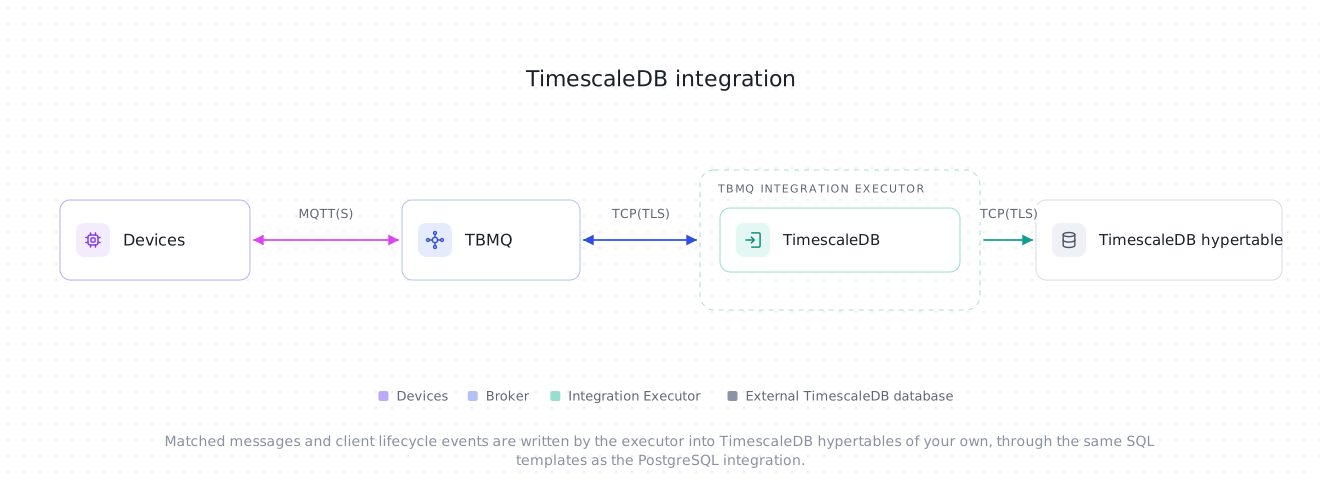
TBMQ TimescaleDB Integration writes MQTT messages and client lifecycle events into a TimescaleDB hypertable of your own, using SQL statements that you write. TimescaleDB is PostgreSQL plus an extension — same driver, wire protocol, URL scheme, SSL modes and connection properties — so this integration reuses the PostgreSQL integration’s connection setup, SQL template rules, placeholders and write path unchanged. What differs is the check-connection probe and the default SQL template, both covered below. The integration is tested against TimescaleDB 2.17 on PostgreSQL 16; any release with the timescaledb extension installed works, since the broker only checks for the extension.
Only what’s different from the PostgreSQL integration is documented on this page. For the connection fields, TLS modes, advanced timeouts, SQL template rules and placeholders, topic filters, client lifecycle events, delivery semantics, connection pool sizing and integration events, see the PostgreSQL integration guide — every one of them applies to TimescaleDB as-is.
Prerequisites
Section titled “Prerequisites”- Everything listed under PostgreSQL prerequisites applies here too.
- The destination tables must already exist as hypertables. The integration never runs DDL — it only ever prepares and executes the SQL statement you configure — so create the tables and turn them into hypertables yourself before adding the integration. See Tables below.
- Use a dedicated role with the
INSERTgrant (andUPDATEif your template updates rows) on the hypertables, not a superuser.
Tables
Section titled “Tables”The default message and lifecycle-events templates (see Default templates) expect these two hypertables:
CREATE TABLE mqtt_messages (    time      TIMESTAMPTZ NOT NULL,    client_id TEXT NOT NULL,    topic     TEXT NOT NULL,    qos       SMALLINT,    retain    BOOLEAN,    payload   JSONB);
SELECT create_hypertable('mqtt_messages', 'time');
CREATE TABLE mqtt_client_events ( time TIMESTAMPTZ NOT NULL, event_type TEXT NOT NULL, client_id TEXT NOT NULL, session_id TEXT, ip_address TEXT, username TEXT, details JSONB);
SELECT create_hypertable('mqtt_client_events', 'time');Time column
Section titled “Time column”Every hypertable needs a partitioning column, and both default tables use time TIMESTAMPTZ NOT NULL for it. NOT NULL is not a formality here: a placeholder whose field is absent from the arriving message binds NULL (see template rules), and a NOT NULL time column then rejects that row outright with SQLState 23502 instead of silently storing a hypertable row with no time.
The default templates fill time from the broker’s own receive timestamp:
to_timestamp(${ts}::double precision / 1000)${ts} is milliseconds; PostgreSQL’s to_timestamp() expects seconds, hence the / 1000.
If you’d rather use a time carried in the payload, cast it out with the JSON operators instead:
(${payload}::jsonb ->> 'ts')::timestamptzA payload that is missing the ts field yields NULL from ->>, and one where ts is not a parseable timestamp fails the ::timestamptz cast — either way time cannot be populated, so the insert fails and the row is not written.
Default templates
Section titled “Default templates”The pre-filled SQL query template and lifecycle events SQL template, matching the tables above:
INSERT INTO mqtt_messages (time, client_id, topic, qos, retain, payload)VALUES (to_timestamp(${ts}::double precision / 1000), ${clientId}, ${topicName}, ${qos}, ${retain}, ${payload})INSERT INTO mqtt_client_events (time, event_type, client_id, session_id, ip_address, username, details)VALUES (to_timestamp(${ts}::double precision / 1000), ${eventType}, ${clientId}, ${sessionId}, ${ipAddress}, ${username}, ${subscriptions})Connection
Section titled “Connection”The connection fields, TLS modes and advanced timeouts are exactly the ones described for PostgreSQL. The only difference is the default SSL mode, which is Require here instead of Disable — TimescaleDB deployments, especially managed ones, are reachable over TLS far more often than not.
Connecting to Tiger Cloud
Section titled “Connecting to Tiger Cloud”Tiger Cloud (Timescale’s managed TimescaleDB service) exposes a service you connect to with:
| Field | Value |
|---|---|
| Host | <service>.<project>.tsdb.cloud.timescale.com, from your service’s connection info |
| Port | The service’s own direct-connection port (not the default 5432) — copy it from the service page |
| Database | tsdb |
| Username | tsdbadmin |
| SSL mode | Require — Verify CA and Verify full need the CA chain from your service page uploaded as CA certificate file |
A transaction-mode connection pooler works with this integration only if it tracks prepared statements. The integration uses the PostgreSQL JDBC driver with its default prepareThreshold of 5: once the same template has run five times on a pooled connection, the driver switches to a server-side named prepared statement and reuses it on that connection. A pooler that routes each transaction to a different backend without re-preparing then fails with prepared statement "S_1" does not exist. Tiger Cloud’s pooled connection string is backed by a PgBouncer that tracks prepared statements, so it works as-is. For a self-hosted PgBouncer, use version 1.21 or newer with max_prepared_statements set to a non-zero value (the default is 0 before 1.24 and 200 from 1.24), or connect directly to the database instead.
Check connection
Section titled “Check connection”Check connection runs the same probe as PostgreSQL — a single connection, SELECT 1, then an EXPLAIN of each configured template inside a transaction that’s always rolled back (see PostgreSQL: Check connection) — plus one extra step run right after SELECT 1: it queries pg_extension for timescaledb, and fails with
TimescaleDB extension is not installed in the target databaseif the extension isn’t installed. This exists because EXPLAIN alone succeeds against a perfectly ordinary PostgreSQL table too, so without this check picking the TimescaleDB integration type and pointing it at a database without the extension would still show a green check.
Whether the destination table is actually a hypertable is not checked — your template may be an UPDATE or a WITH, or write into a view or a staging table on purpose, so the probe only confirms the extension is present and the statement is plannable.
Operating the hypertable
Section titled “Operating the hypertable”A few TimescaleDB-specific things to plan for once messages are flowing:
-
Chunk interval. Size chunks so the indexes of the currently-active chunks fit comfortably in memory — a common rule of thumb is keeping them within about 25% of
shared_buffers. Adjust it with:SELECT set_chunk_time_interval('mqtt_messages', INTERVAL '1 day'); -
Compression, once older chunks stop taking inserts:
ALTER TABLE mqtt_messages SET (timescaledb.compress, timescaledb.compress_segmentby = 'client_id');SELECT add_compression_policy('mqtt_messages', INTERVAL '7 days'); -
Retention, to drop chunks past an age you no longer need:
SELECT add_retention_policy('mqtt_messages', INTERVAL '90 days'); Upserts. If your template relies on
ON CONFLICT(see Delivery semantics for why you might), theUNIQUEorPRIMARY KEYconstraint it targets must include the hypertable’s time column — TimescaleDB does not support one that doesn’t. For example:CREATE TABLE latest (time TIMESTAMPTZ NOT NULL,client_id TEXT NOT NULL,payload TEXT,UNIQUE (time, client_id));SELECT create_hypertable('latest', 'time');INSERT INTO latest (time, client_id, payload)VALUES (to_timestamp(${ts}::double precision / 1000), ${clientId}, ${payload})ON CONFLICT (time, client_id) DO UPDATE SET payload = EXCLUDED.payload
Was this helpful?