
Architecture
TBMQ is designed with four core attributes:
Scalability
Horizontally scalable, built on proven open-source technologies.
Fault tolerance
No single point of failure; every node in the cluster is functionally identical.
Performance
Handles millions of clients and messages per second: at least 3 million messages per second on a single node and 100 million concurrent connections in a cluster.
Durability
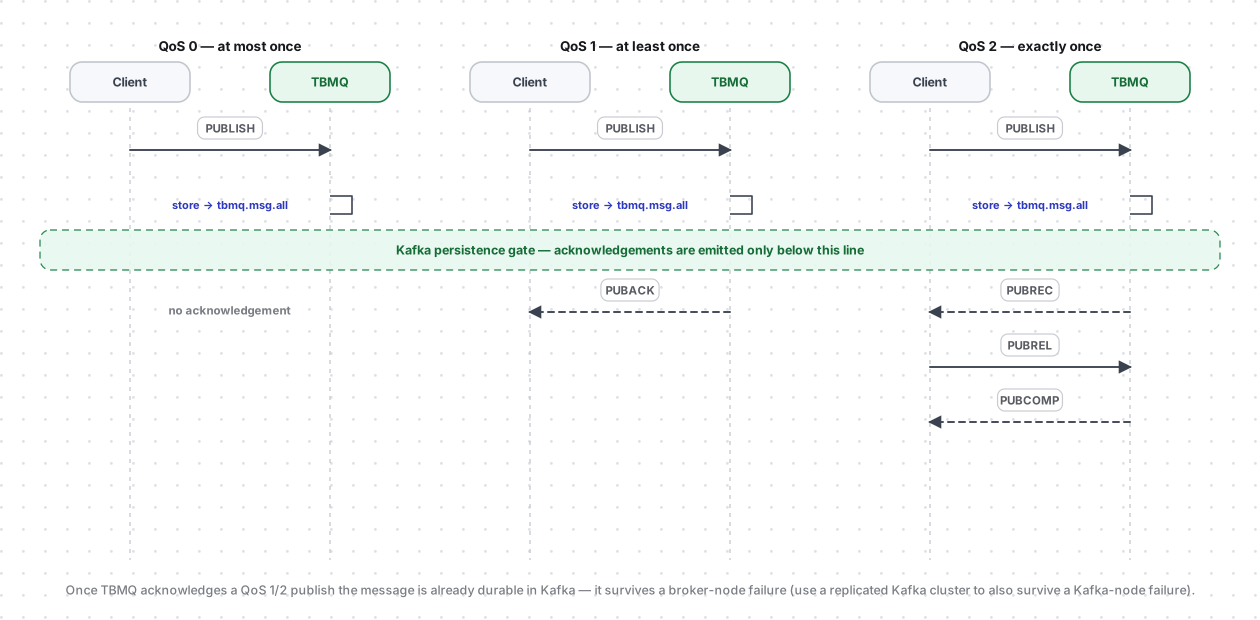
A message is acknowledged only after Kafka has persisted it, so once the broker acknowledges a publish it is never lost.
Architecture diagram
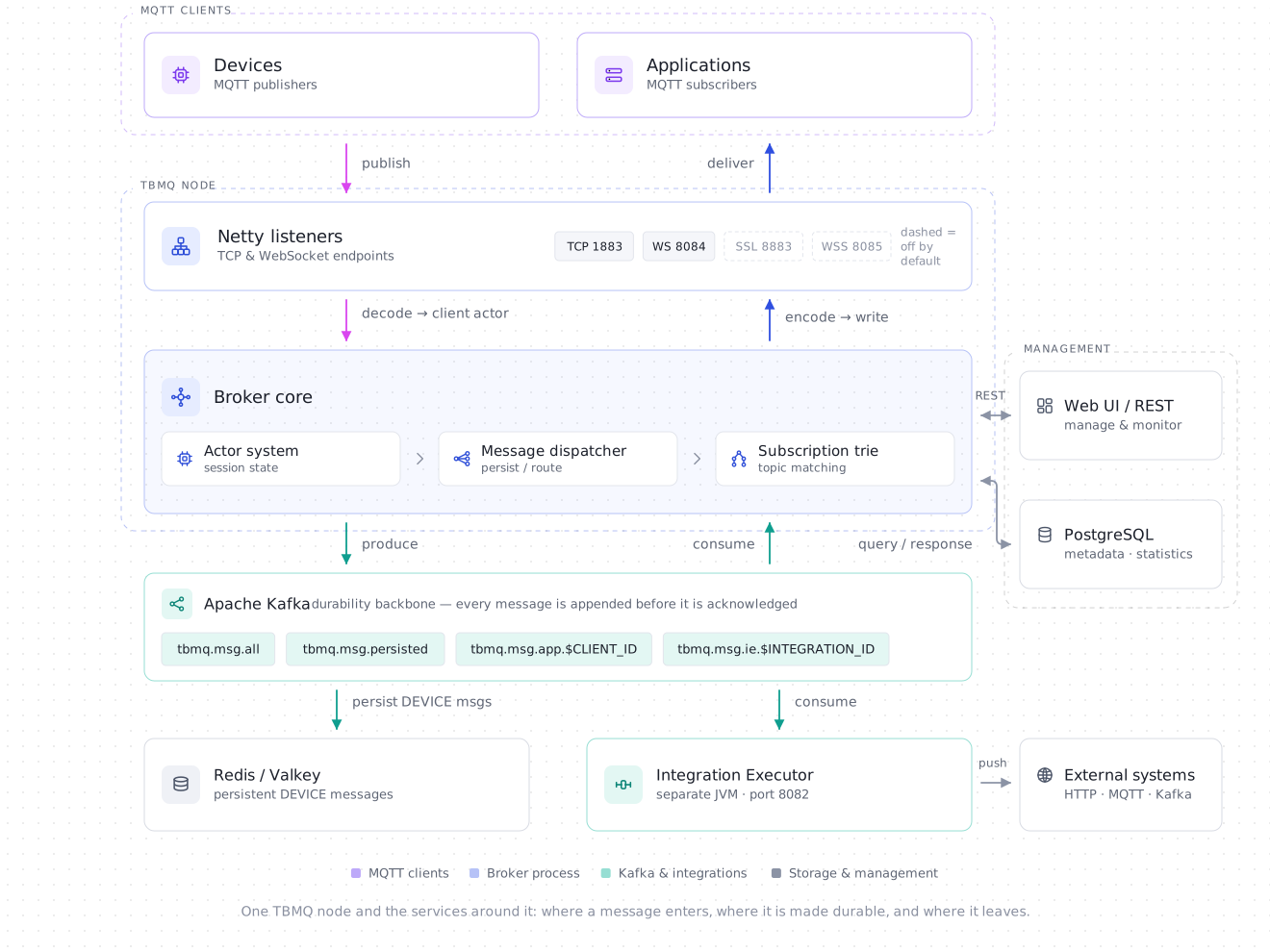
Section titled “Architecture diagram”The diagram below is the top-level map of a TBMQ node and the services around it. Each MQTT client connects through Netty; packets are handled by the Actor system, routed by the Message dispatcher service using the Subscriptions Trie, and persisted to Kafka — the durability backbone. Redis stores messages for persistent DEVICE clients, PostgreSQL holds metadata, and the Integration Executor bridges to external systems. The rest of this page zooms into each of these.
Motivation
Section titled “Motivation”ThingsBoard’s experience building scalable IoT applications has surfaced three primary MQTT messaging scenarios:
- Fan-in — many devices generate large message volumes consumed by a few applications. No message can be missed.
- Fan-out (broadcast) — a few publishers trigger high-volume outgoing data to many subscribers.
- Point-to-point (P2P) — one publisher routes messages to a specific subscriber through uniquely defined topics. Ideal for private messaging and command delivery.
In all scenarios, persistent clients with QoS 1 or 2 are often used to ensure reliable delivery even during temporary offline periods.
TBMQ is intentionally designed to excel at all three, and its performance tests are built around them: fan-in — 100M connections, fan-out — 3M msg/sec per node, and point-to-point — 1M msg/sec persistent. Key design principles:
- No master or coordinator processes — all nodes have identical functionality.
- Distributed processing enables effortless horizontal scalability.
- High-throughput, low-latency delivery; data durability and replication guaranteed.
- Kafka as the underlying backbone prevents message loss even during node or client failures.
How TBMQ works
Section titled “How TBMQ works”Kafka stores all unprocessed published messages, client sessions, and subscriptions in dedicated topics (see Kafka topics for the full list). All broker nodes maintain local copies of sessions and subscriptions for efficient processing. When a client disconnects from one node, other nodes continue based on the latest state. Newly added nodes receive the current state on startup — Session state and cluster coordination covers how.
Client subscriptions are organized in a Trie data structure for fast topic matching.
Kafka is the only coordination mechanism. TBMQ nodes never call each other directly, and the broker runs no registry, lock service, or leader election of its own. Everything one node needs another to know — a client connected, a subscription changed, a message that has to be delivered on a different node — travels as a record in a Kafka topic. That single decision is what makes the nodes identical and individually replaceable, and it is why the topic list below contains not just messages but session state, routing, and housekeeping.
Ordering comes from the partition key. Records in tbmq.msg.all are keyed by the MQTT topic name, so every
message published to a given topic lands in the same partition and is processed in publish order — regardless of which
node accepted the PUBLISH or how many nodes are running. Session and subscription records are keyed by client ID,
giving the same per-client ordering for state updates.
When a publisher sends a PUBLISH message:
- It is stored in the
tbmq.msg.allKafka topic. - Once Kafka acknowledges persistence, the broker replies with PUBACK/PUBREC (or no response for QoS 0).
- Kafka consumer threads retrieve messages and use the Subscription Trie to identify recipients.
- Depending on client type (DEVICE or APPLICATION) and persistence settings, the broker either routes the message to another Kafka topic or delivers it directly.
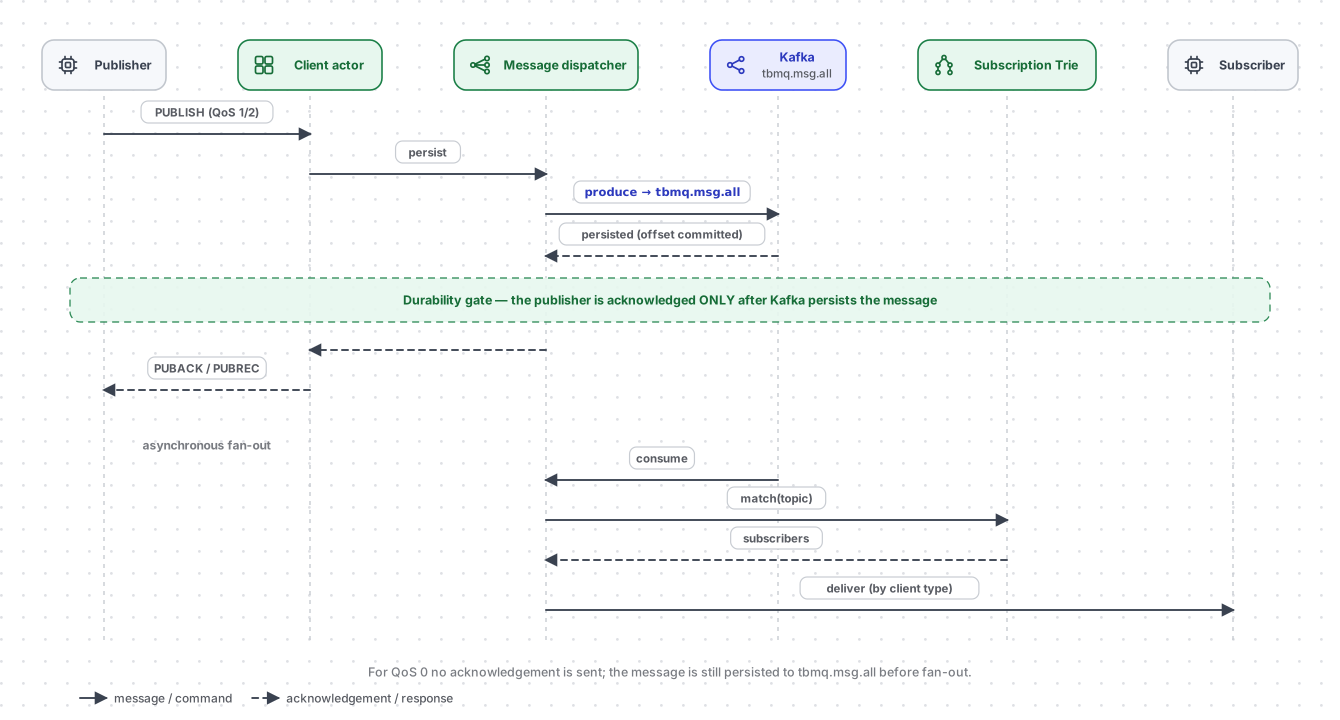
Two independent loops. The asynchronous fan-out marker in the diagram is the boundary between them. The first
loop accepts the PUBLISH and produces it to tbmq.msg.all — that is all the publisher ever waits for. The second loop
is a pool of Kafka consumers (4 per node by default, across the topic’s 16 partitions) that read the topic back, match
the topic name in the Subscription Trie and route each copy onward. Because the loops meet only through the topic, a
slow, backed-up, or offline subscriber cannot slow down a publisher.
Durability guarantee. The acknowledgement for a QoS 1/2 publish is emitted only after the Kafka producer
confirms the write to tbmq.msg.all. Once the publisher receives its PUBACK/PUBREC the message is durably stored and
survives a broker-node failure — another node resumes processing it from Kafka. To also survive the loss of a Kafka
broker, run a replicated Kafka cluster (the shipped defaults use acks=1 and a replication factor of 1). Note what
the acknowledgement does and does not promise: the message is stored, not delivered. Everything after the gate —
trie lookup, per-client persistence, the network write — happens once the publisher has already moved on.
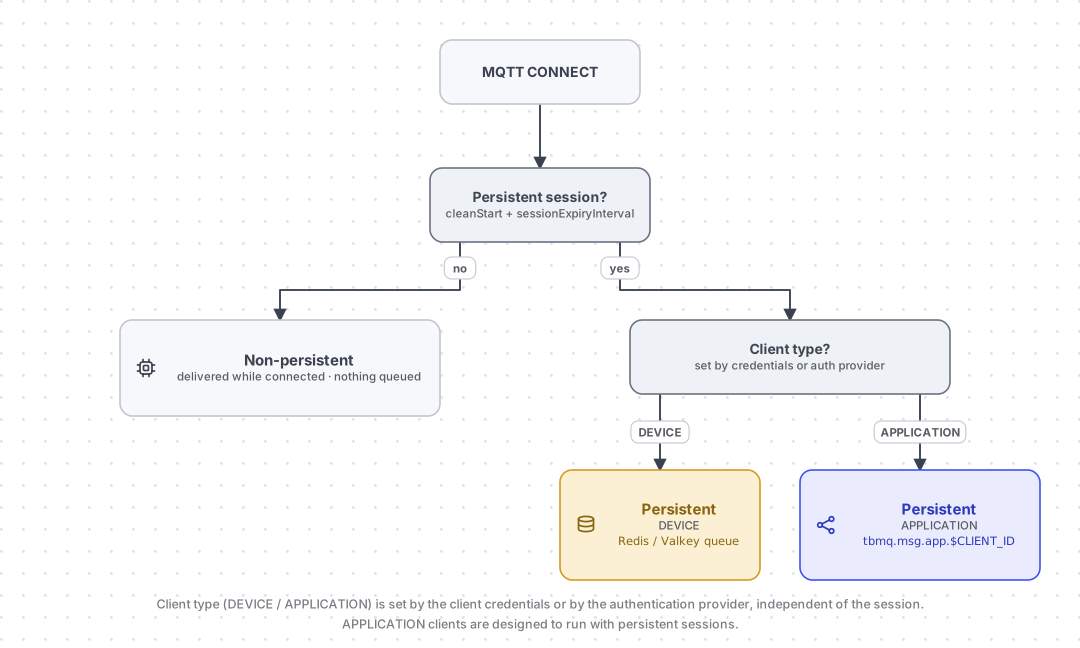
The DEVICE/APPLICATION client type and the session type (persistent vs. non-persistent) together decide where a message is stored and how it is delivered:
Non-persistent client
Section titled “Non-persistent client”A client is non-persistent when the CONNECT packet specifies:
- MQTT v3.x:
clean_session = true - MQTT v5:
clean_start = trueandsessionExpiryInterval = 0(or not specified)
Non-persistent clients receive messages published directly without additional persistence. Non-persistent sessions are used by DEVICE clients; the persistence path is chosen purely from the session flags above, independent of the client type.
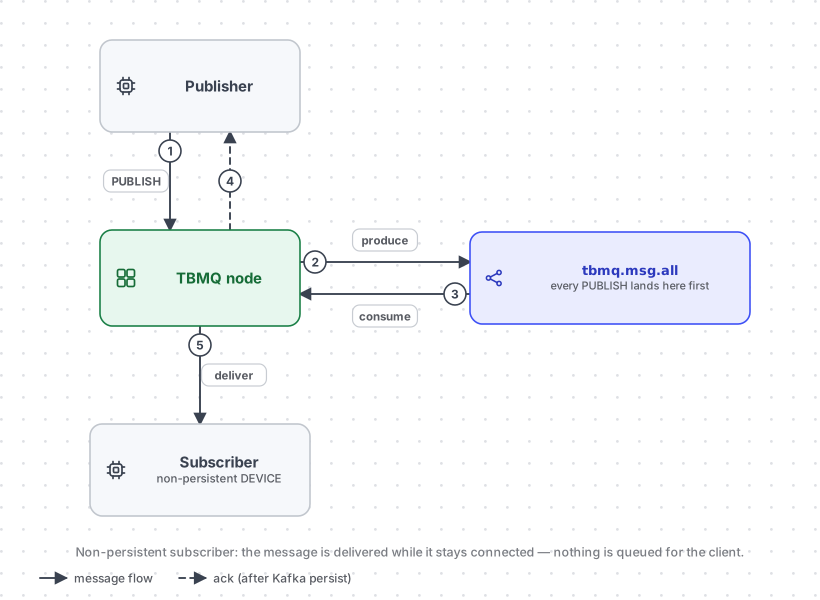
Note what the diagram does not skip: the message still goes through tbmq.msg.all (steps 2–4), because that is
where the publisher’s acknowledgement comes from. What a non-persistent session skips is the per-client queue —
nothing is written on the subscriber’s behalf, so a copy that cannot be handed to a live connection is dropped. If the
subscriber is offline at the moment the message is routed, it never receives that message, and there is nothing to
replay when it reconnects.
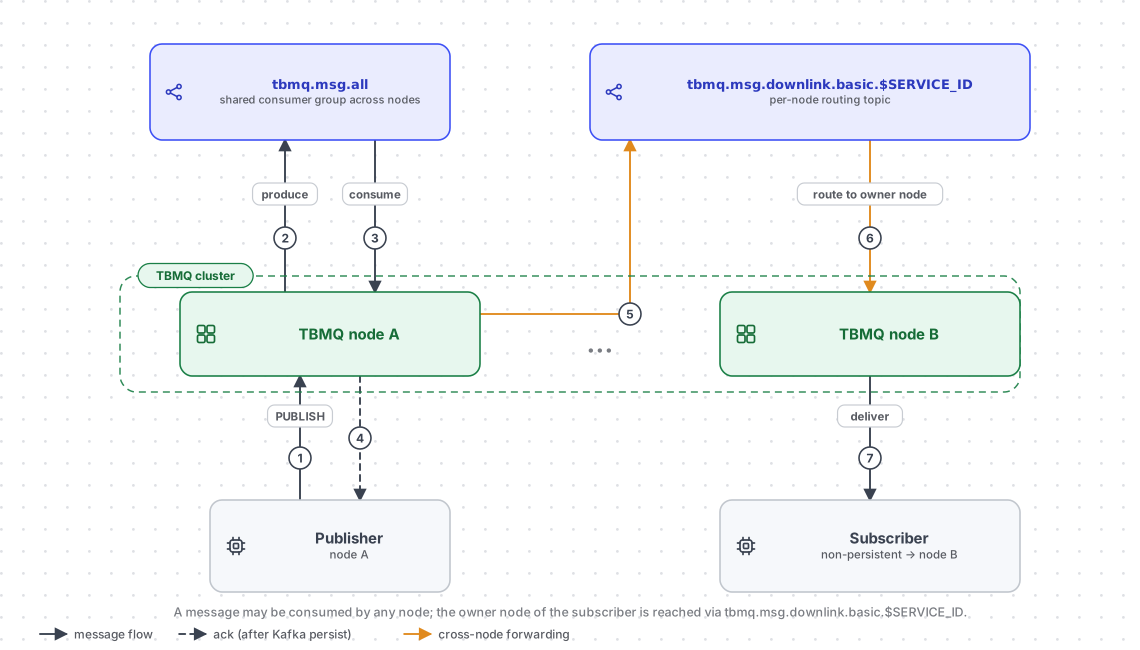
Cluster mode: multiple TBMQ nodes run Kafka consumers in the same consumer group for tbmq.msg.all. A
published message may be processed by a node different from the one the subscriber is connected to. The
tbmq.msg.downlink.basic Kafka topic is used to forward messages between nodes for delivery via the established
connection.
Persistent client
Section titled “Persistent client”A client is persistent when:
- MQTT v3.x:
clean_session = false - MQTT v5:
sessionExpiryInterval > 0(anyclean_start), orclean_start = falsewithsessionExpiryInterval = 0
Persistent clients are classified into two types:
- DEVICE — primarily publish large volumes; subscribe to few topics with moderate message rates. Typically IoT sensors.
- APPLICATION — subscribe to high-rate topics; require offline message persistence for later delivery. Used for analytics, data processing, and similar backend functions.
The client type is assigned through the MQTT client credentials or by the
authentication provider — never by the CONNECT packet. The JWT and HTTP providers
can each resolve it per client — the JWT provider from a token claim, the HTTP provider from the clientType field in
the response its remote authentication endpoint returns — and both fall back to their configured default client type
when the claim or field is absent.
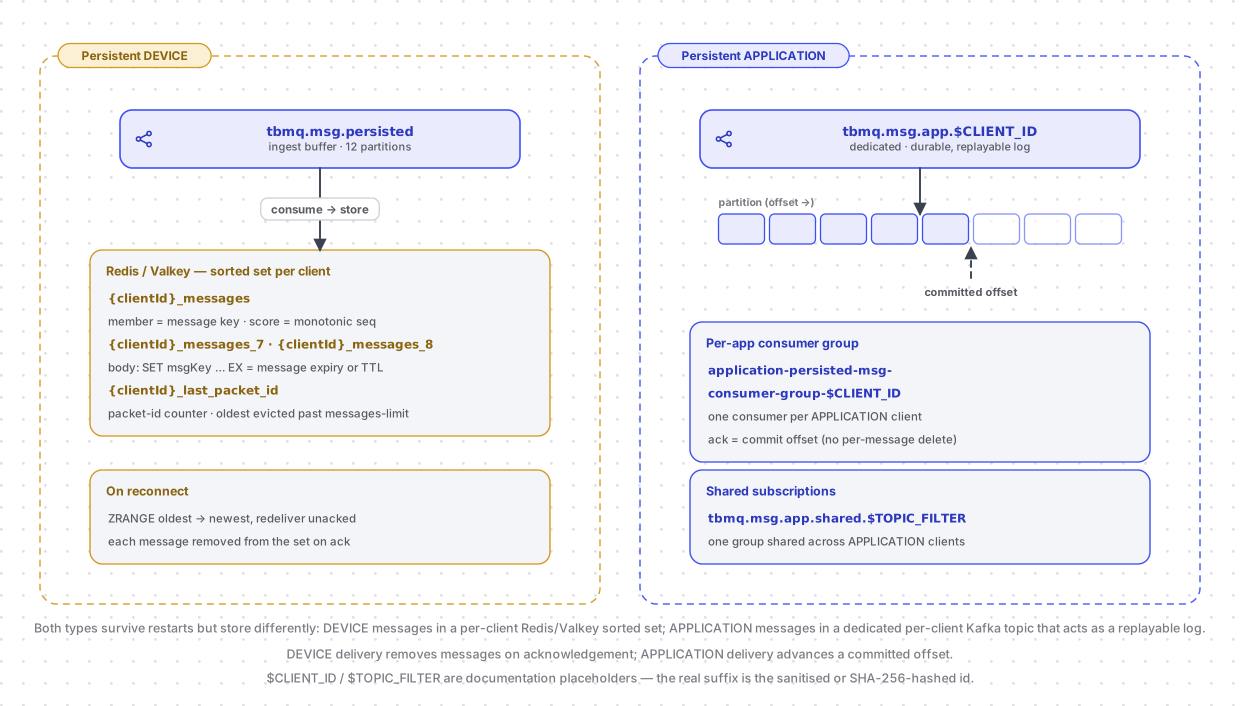
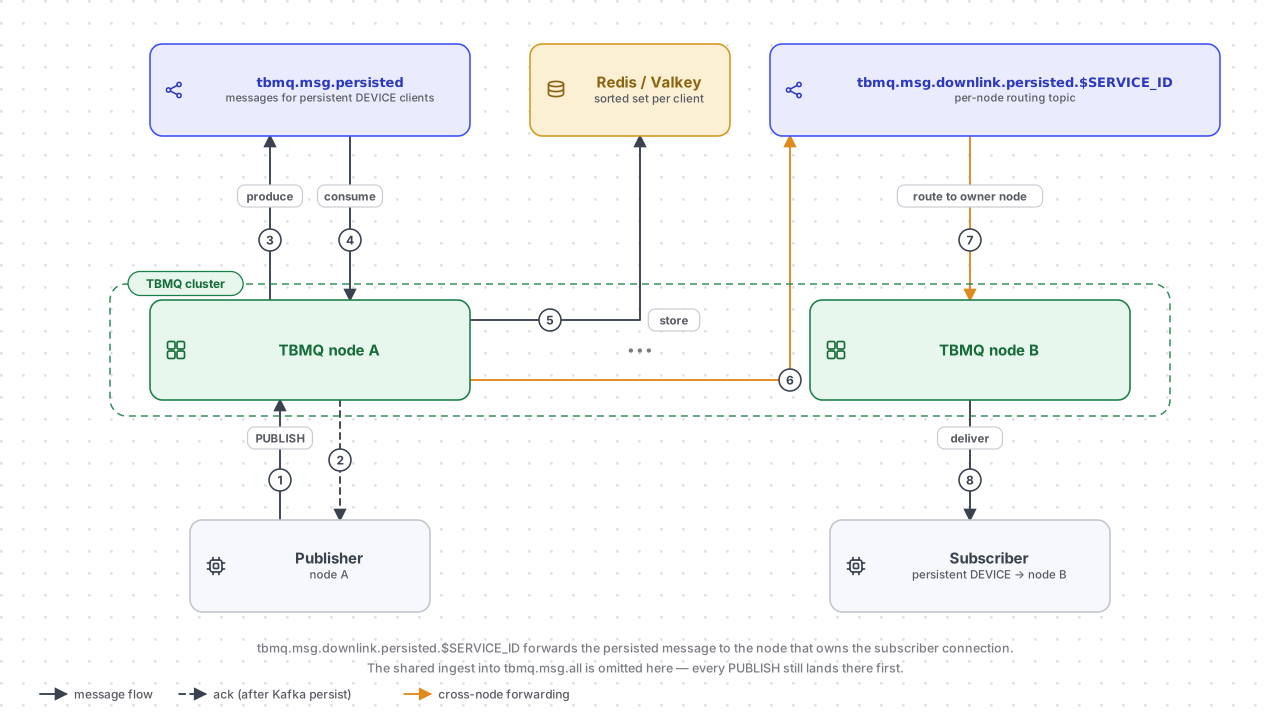
The two types are stored very differently — DEVICE messages in a Redis / Valkey sorted set per client, APPLICATION messages in that client’s own dedicated Kafka topic:
Persistent DEVICE client
Section titled “Persistent DEVICE client”Messages for persistent DEVICE clients flow through the tbmq.msg.persisted Kafka topic, separating them from
other message types. Dedicated Kafka consumer threads persist messages to Redis for storage. When a
client reconnects, stored messages are retrieved and delivered efficiently.
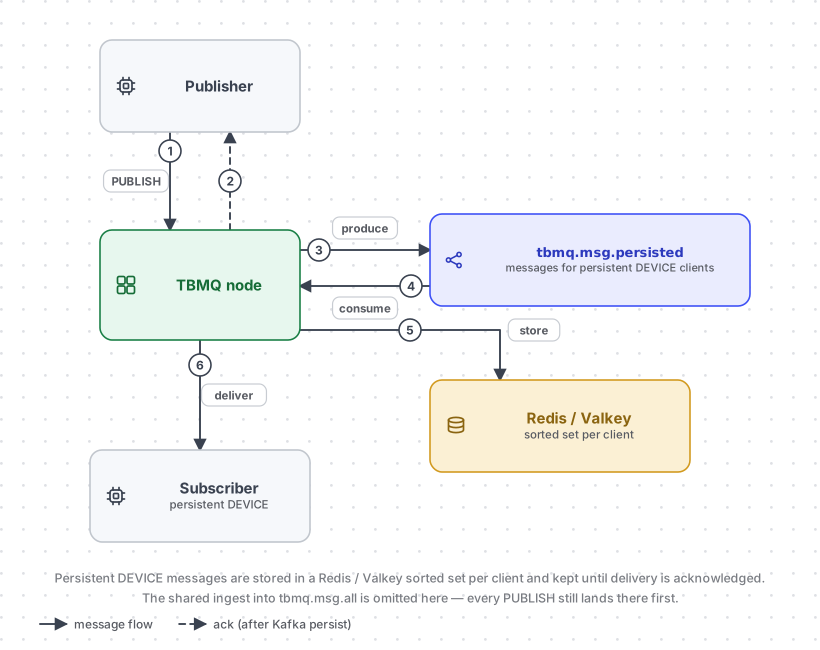
The step order in the diagram matters: the publisher is acknowledged at step 2, before the message reaches Redis at
step 5. Durability for a persistent DEVICE subscriber is provided by Kafka, not by Redis — tbmq.msg.persisted holds
the message until a consumer has written it to the client’s queue, so a node that dies mid-write simply replays the
record. Redis holds the pending inbox, not the durable copy.
Inside Redis each client’s inbox is two keys, written by server-side Lua scripts (loaded once and invoked by SHA, so each operation is a single atomic round trip):
{clientId}_messages— a sorted set whose members are the individual message keys and whose score is a monotonically increasing sequence, preserving FIFO order even when MQTT packet IDs wrap at 65535.{clientId}_last_packet_id— the packet-ID counter the broker assigns from.
Each message body is stored under its own key with a Redis TTL taken from the MQTT 5 Message Expiry Interval when
the publisher set one, falling back to MQTT_PERSISTENT_SESSION_DEVICE_PERSISTED_MESSAGES_TTL (one week by default).
Redis expires the body on its own; the sorted set is repaired lazily on the next read. When the inbox exceeds
MQTT_PERSISTENT_SESSION_DEVICE_PERSISTED_MESSAGES_LIMIT (10 000 by default) the oldest entries are evicted. On
reconnect the broker reads the set oldest-first and redelivers, and each acknowledgement removes that one message. For
QoS 2 the stored entry is rewritten in place as a PUBREL marker once the client sends PUBREC, so an interrupted QoS 2
handshake resumes at the right step instead of redelivering the payload.
The braces in the key names are Redis Cluster hash tags: they force both of a client’s keys into the same hash slot, which is what lets the Lua scripts touch them together on a clustered deployment.
A detailed breakdown of Redis-based persistence for DEVICE clients is available in the Persistent DEVICE client reference.
Cluster mode: nodes run Kafka consumers in the same group for tbmq.msg.persisted. The
tbmq.msg.downlink.persisted Kafka topic forwards messages to the node where the subscriber is connected.
Persistent APPLICATION client
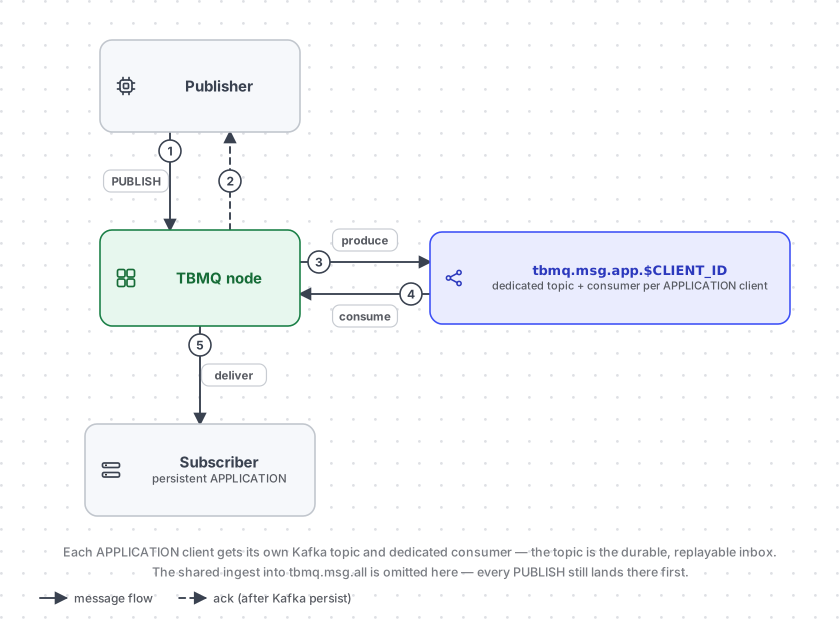
Section titled “Persistent APPLICATION client”Each APPLICATION client maps to a dedicated Kafka topic (tbmq.msg.app.$CLIENT_ID). Messages read from
tbmq.msg.all are routed to the client’s topic. A separate Kafka consumer thread per APPLICATION client
retrieves and delivers messages. This architecture supports millions of dedicated topics and sustains high message
throughput per client — the topic itself is the durable, replayable inbox.
There is no per-message delete on this path. The client’s own consumer group
(application-persisted-msg-consumer-group-$CLIENT_ID) tracks a committed offset, and acknowledging a message
advances it; on reconnect the consumer resumes from the last committed offset. That is the whole redelivery mechanism —
the topic is a log the client replays, so retention is a Kafka topic property rather than a per-client limit. Messages
whose MQTT 5 expiry has passed are skipped at read time rather than deleted.
Packet IDs and offsets are not the same thing, so the broker keeps the in-flight mapping between them (plus any
unfinished QoS 2 PUBRELs) in PostgreSQL, letting a reconnecting client be handed the same packet IDs for messages it
has not yet acknowledged. Because the client ID becomes part of a Kafka topic name, APPLICATION client IDs are
validated as alphanumeric by default (TB_APP_PERSISTED_MSG_CLIENT_ID_VALIDATION). If a client’s type is later changed
to DEVICE, its now-unused topic is cleaned up through the tbmq.sys.app.removed event, processed by a nightly job.
The dedicated consumer group structure also makes
MQTT 5 shared subscriptions
extremely efficient for APPLICATION clients: they get their own topic, tbmq.msg.app.shared.$TOPIC_FILTER, consumed by
a single group shared across the subscribers, so Kafka itself distributes the messages. Shared subscriptions for
DEVICE clients have no such topic — the broker picks a recipient in memory, round-robin by default
(MQTT_SHARED_SUBSCRIPTIONS_PROCESSING_TYPE).
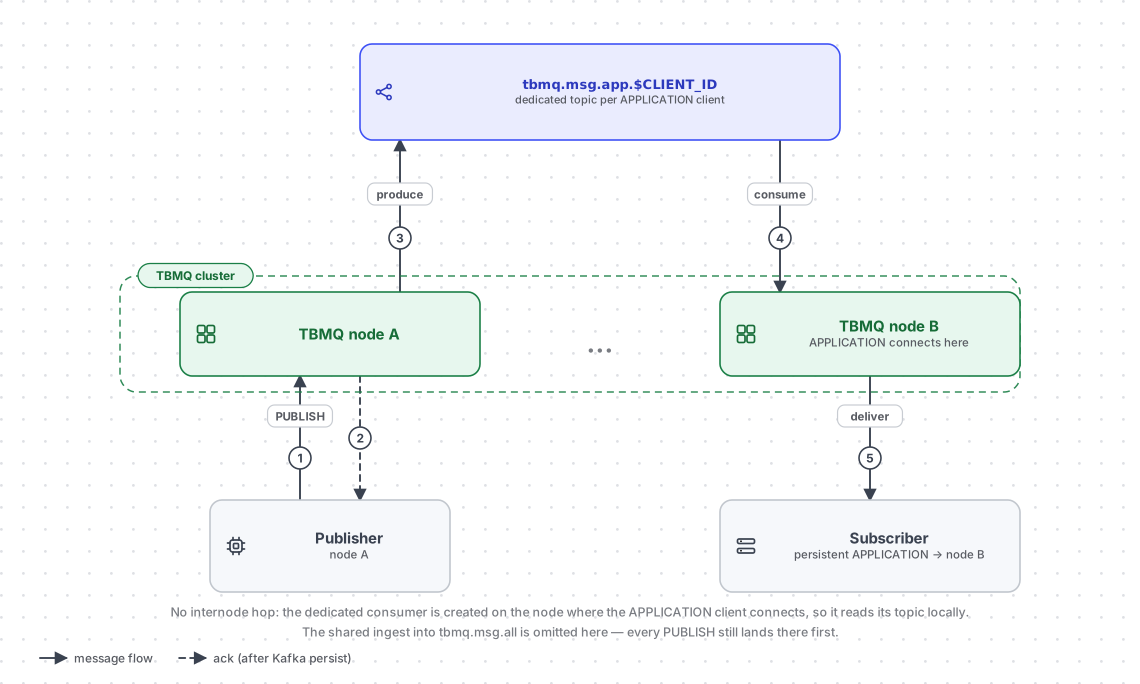
Cluster mode: APPLICATION clients work identically in cluster and standalone modes — no internode communication is needed. A dedicated consumer is created on the node where the client connects, so message processing happens directly on the target node.
Persistence configuration — the following environment variables control message retention per client type:
| Variable | Purpose |
|---|---|
TB_KAFKA_APP_PERSISTED_MSG_TOPIC_PROPERTIES |
Kafka topic properties for APPLICATION client messages |
MQTT_PERSISTENT_SESSION_DEVICE_PERSISTED_MESSAGES_LIMIT |
Max persisted messages per DEVICE client |
MQTT_PERSISTENT_SESSION_DEVICE_PERSISTED_MESSAGES_TTL |
TTL for persisted DEVICE client messages |
See the full configuration reference for details.
Related mechanics that shape delivery: Backpressure, Msg delivery strategies, and Shared subscriptions.
Session state and cluster coordination
Section titled “Session state and cluster coordination”MQTT allows only one live session per client ID, and TBMQ enforces that across the cluster without a master. A CONNECT
is not resolved on the node that received it: that node publishes a session event to
tbmq.client.session.event.request, keyed by client ID. Kafka’s partitioning does the mutual exclusion — every
event for a given client ID lands on the same partition, so exactly one node handles it and competing connection
attempts for the same client ID are serialized by construction rather than by a lock.
That node compares the request against the current session and, if the client is already connected elsewhere, sends a
disconnect command to the owning node over tbmq.client.disconnect.$SERVICE_ID. It then writes the new session to
tbmq.client.session and replies on tbmq.client.session.event.response.$SERVICE_ID — the response topic belonging to
the node that is handling the CONNECT. Only after that reply arrives does the client receive its CONNACK, which is why
session takeover behaves the same on one node and on twenty.
tbmq.client.session and tbmq.client.subscriptions are log-compacted and keyed by client ID. Compaction turns
them from a stream of events into a replayable snapshot: Kafka retains the newest record per key and discards the rest,
so the topic size tracks the number of clients rather than the number of changes. Deleting a session writes an empty
record — a tombstone — and nodes apply it as a removal, since compaction may not have physically dropped the old record
yet.
That snapshot is how a starting node builds its in-memory caches. It subscribes with a fresh consumer group on every start (stale groups from earlier runs are cleaned up), which makes it re-read the entire log rather than resume from a committed offset. To recognise the end of the log it writes a marker record of its own and keeps reading until it sees it come back; at that point the local view is complete and the node switches to following the topic for changes. A node therefore never serves traffic with a partially loaded picture of the cluster, and this is exactly the mechanism behind “new nodes receive the current state on startup”.
Kafka topics
Section titled “Kafka topics”Topics fall into a few functional groups. Their scope tells you how they are partitioned across the cluster: global
topics are shared by every node (consumer groups rebalance across them), per-node topics carry the owner node’s
$SERVICE_ID, and per-client topics are dedicated to a single APPLICATION client.
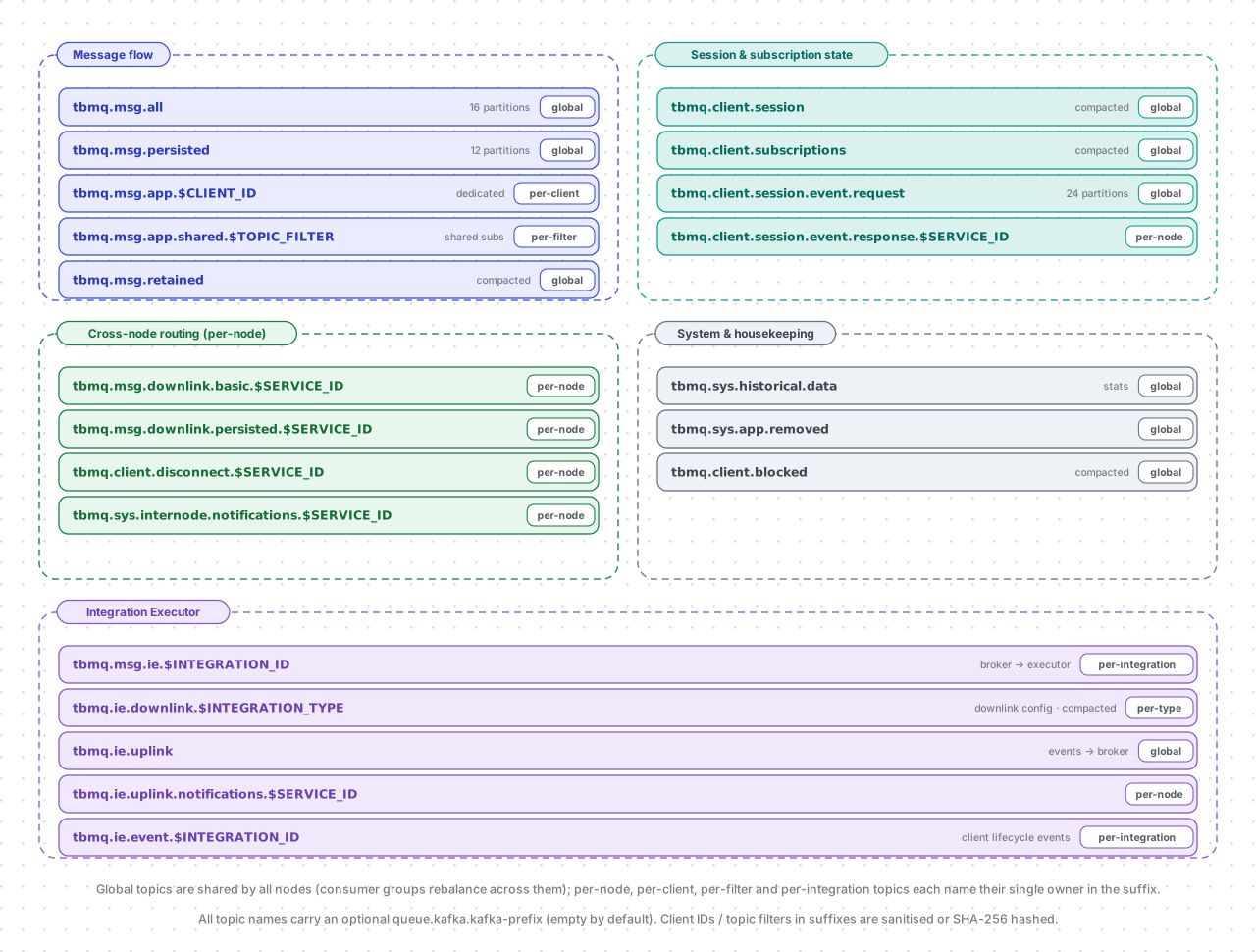
Full topic reference — every topic, with scope and defaults
| Topic | Scope | Description |
|---|---|---|
tbmq.msg.all |
global | All published messages from MQTT clients. 16 partitions by default, keyed by MQTT topic name |
tbmq.msg.persisted |
global | Messages for DEVICE persistent clients. 12 partitions by default |
tbmq.msg.app.$CLIENT_ID |
per-client | Messages for a specific APPLICATION client — its durable, replayable inbox |
tbmq.msg.app.shared.$TOPIC_FILTER |
per-filter | Messages for APPLICATION clients on a shared subscription |
tbmq.msg.retained |
global | All retained messages. Compacted — the latest retained message per topic |
tbmq.client.session |
global | Sessions of all clients. Compacted, keyed by client ID |
tbmq.client.subscriptions |
global | Subscriptions of all clients. Compacted, keyed by client ID |
tbmq.client.session.event.request |
global | Session events (CONNECTION_REQUEST, DISCONNECTION_REQUEST, CLEAR_SESSION_REQUEST, etc.). 24 partitions by default, keyed by client ID |
tbmq.client.session.event.response.$SERVICE_ID |
per-node | Responses to session events, routed to the node handling the request |
tbmq.msg.downlink.basic.$SERVICE_ID |
per-node | Forwards messages between nodes for non-persistent DEVICE subscribers |
tbmq.msg.downlink.persisted.$SERVICE_ID |
per-node | Forwards messages between nodes for persistent DEVICE subscribers |
tbmq.client.disconnect.$SERVICE_ID |
per-node | Forced client disconnection events (admin request or session conflict) |
tbmq.sys.internode.notifications.$SERVICE_ID |
per-node | System notifications between broker nodes for auth provider sync, admin settings sync, and cache cleanup |
tbmq.sys.historical.data |
global | Historical statistics (incoming/outgoing message counts, etc.) published from each broker node to calculate total values per cluster |
tbmq.sys.app.removed |
global | Events for removal of an APPLICATION client’s Kafka topic (client type changed to DEVICE) |
tbmq.client.blocked |
global | Distributes and stores the blocked clients list across the cluster. Compacted |
tbmq.msg.ie.$INTEGRATION_ID |
per-integration | Published messages matched by one integration, for the Integration Executor to deliver. One single-partition topic per integration, created and deleted with the integration |
tbmq.ie.downlink.$INTEGRATION_TYPE |
per-type | Integration configuration and validation requests, broker → executor. Compacted, one topic per integration type |
tbmq.ie.uplink |
global | Integration lifecycle, statistics, and error events, executor → broker |
tbmq.ie.uplink.notifications.$SERVICE_ID |
per-node | Validation responses routed back to the node that asked |
tbmq.ie.event.$INTEGRATION_ID |
per-integration | MQTT client lifecycle events (connected, disconnected, subscribed, unsubscribed, authentication/authorization failed, connection failed) for the integrations configured to receive them, broker → executor. One single-partition topic per integration, created by the executor |
Retention vs. compaction. Message topics are retained by time and size — tbmq.msg.all, for instance, keeps a week
of traffic by default — because their purpose is to hold a message until every consumer has processed it. State topics
are log-compacted instead: tbmq.client.session, tbmq.client.subscriptions, tbmq.msg.retained,
tbmq.client.blocked, and the IE downlink topics keep the newest record per key forever and drop older ones, so they
grow with the number of entities rather than the number of changes and can be replayed as a snapshot. Compaction is
applied by TBMQ when it creates these topics, not declared in the configuration file.
Redis — or its drop-in fork Valkey, which TBMQ bundles by default in its Docker and Kubernetes deployments — is the in-memory data store used to persist messages for DEVICE persistent clients. Each client’s queue is stored as a Redis sorted set, giving low-latency, high-throughput reads and writes. Redis Cluster horizontal scalability ensures persistent messages are retrieved and delivered efficiently even as message volume grows.
Every queue operation — append a batch, read the pending messages, acknowledge one, clear a session — runs as a Lua script inside Redis rather than as a sequence of commands from the broker. Each script is loaded once at startup and invoked by its SHA, so an operation that touches several keys stays atomic and costs one round trip. See Persistent DEVICE client above for the key layout and expiry behaviour. TBMQ also uses Redis as its distributed cache for entities such as MQTT client credentials, keeping authentication off the database on the connect path.
PostgreSQL
Section titled “PostgreSQL”TBMQ uses PostgreSQL to store users, user credentials, MQTT client credentials, authentication providers, integration definitions, Application Shared Subscription entities, unauthorized-client records, admin settings, statistics time series, WebSocket connections, WebSocket subscriptions, and other metadata. PostgreSQL’s ACID compliance and transaction management guarantee data integrity and consistency for these critical entities. MQTT message payloads are never stored in PostgreSQL — they live in Kafka and Redis.
PostgreSQL also holds a small amount of per-client MQTT session context that has to outlive a broker restart but
does not belong in the message path: the inbound QoS 2 packet IDs a client still owes a PUBREL for, and for APPLICATION
clients the mapping between in-flight packet IDs and Kafka offsets. Both exist so that a reconnecting client resumes an
interrupted QoS 2 handshake, or its unacknowledged offsets, exactly where it left off. Integration lifecycle,
statistics, and error events arriving on tbmq.ie.uplink are persisted here as well, which is what the UI renders on an
integration’s event page.
Web UI
Section titled “Web UI”The TBMQ management UI provides a lightweight graphical interface for administration:
- MQTT client credentials — create, update, and delete client credentials.
- Client sessions and subscriptions — monitor and control active sessions; add, remove, and modify subscriptions.
- Shared subscriptions — manage Application Shared Subscription entities for message distribution to APPLICATION clients.
- Retained messages — view and manage retained messages.
- WebSocket client — establish and manage WebSocket connections for real-time debugging and testing.
- Monitoring dashboards — real-time metrics and visualizations for broker performance and system health.
TBMQ uses Netty — a high-performance, asynchronous, event-driven network framework — as the TCP server for the MQTT protocol.
In IoT environments where thousands or millions of devices maintain persistent connections, efficient resource management is critical. Netty uses non-blocking I/O (NIO), which allows it to handle large numbers of simultaneous connections without dedicating a thread to each one, greatly reducing overhead. This approach ensures high throughput and low-latency communication even under heavy loads.
Netty’s modular design provides fine-grained control over protocol handling, message parsing, and connection management. It also offers built-in TLS encryption support, making it both secure and extensible.
TBMQ exposes four MQTT listeners; each is a separate Netty server with its own boss and worker thread pools (one boss thread accepting connections and 12 workers serving them by default) and its own maximum payload size, 64 KB by default:
| Listener | Default port | Enabled by default |
|---|---|---|
| MQTT over TCP | 1883 | Yes |
| MQTT over TLS (MQTTS) | 8883 | No |
| MQTT over WebSocket (WS) | 8084 | Yes |
| MQTT over secure WebSocket (WSS) | 8085 | No |
When TBMQ runs behind a load balancer, the PROXY protocol (v1/v2) can be enabled per listener so the broker sees each client’s real IP address. See MQTT listeners for the full listener and TLS configuration.
Actor system
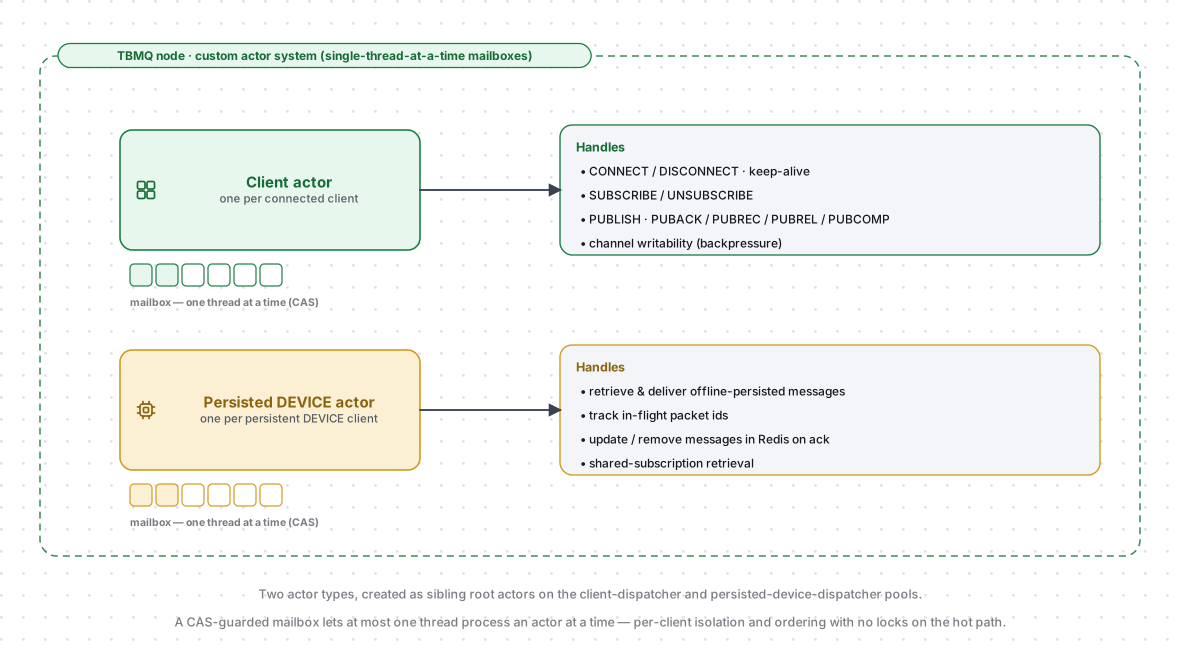
Section titled “Actor system”TBMQ uses a custom Actor System as the underlying mechanism for handling MQTT clients. The Actor model enables efficient, concurrent message processing — each actor operates independently, which eliminates shared-state contention and ensures high-performance operation.
Two distinct actor types exist within the system:
- Client actors — one per connected MQTT client. Responsible for processing the main MQTT message types: CONNECT, SUBSCRIBE, UNSUBSCRIBE, PUBLISH, and related control messages. Client actors manage all interactions with their respective MQTT client.
- Persisted Device actors — one per persistent DEVICE client, created in addition to the Client actor. Specifically designated to manage persistence-related operations, including the storage and retrieval of messages for offline delivery.
Both are sibling root actors, scheduled on the client-dispatcher and persisted-device-dispatcher thread pools (8
threads each by default). Each actor has a mailbox guarded so that at most one thread processes it at a time — giving
per-client isolation and message ordering with no locks on the hot path.
The mailbox is where the concurrency model actually lives, and it is worth being precise about it, because the diagram can only hint at it:
- One thread at a time, without locking. A thread takes the mailbox by flipping a single atomic flag from free to busy (a compare-and-set). Whichever thread wins processes the actor; the others simply return and go do other work, rather than blocking on a lock. This is why hundreds of thousands of actors can share a pool of 8 threads.
- Two queues per mailbox. Control messages (connect, disconnect, stop) sit in a high-priority queue that is drained before the normal one, so a disconnect is never stuck behind a backlog of PUBLISHes.
- Bounded turn length. An actor processes a limited number of messages (5 by default) before the thread is released to serve another actor, so one very busy client cannot starve the rest.
Actors outlive their connection on purpose: a client actor is kept for a short grace period after disconnect (60 seconds for a named client) and a persisted DEVICE actor for several minutes, so a quick reconnect reuses the existing actor and its state instead of rebuilding it.
Message dispatcher service
Section titled “Message dispatcher service”The Message dispatcher service manages the flow from publisher to Kafka to subscribers:
- Receives the published message from the Actor system and persists it to Kafka.
- Once Kafka confirms storage, retrieves the message and queries the Subscription Trie for eligible subscribers.
- Routes each message based on subscriber type:
- Non-persistent DEVICE: delivered directly to the client.
- Persistent DEVICE: published to
tbmq.msg.persisted, then stored in Redis. - Persistent APPLICATION: published to the client’s dedicated
tbmq.msg.app.$CLIENT_IDtopic.
- Passes messages to Netty for network transmission to online clients.
The produce step writes to Kafka through a queue publisher, while a separate consumer service reads tbmq.msg.all back
and drives the routing above — decoupling ingestion from fan-out.
Subscriptions Trie
Section titled “Subscriptions Trie”The Trie data structure provides fast topic matching:
- Common topic prefixes are stored once, minimizing memory and search space.
- Lookup time depends on the topic length, not the total number of subscriptions — consistent performance at scale.
All subscriptions are consumed from Kafka and stored in the Trie in memory. The Trie organizes topic filters hierarchically — each node represents a topic level. When a PUBLISH message arrives, the broker queries the Trie with the topic name to find all matching subscribers, then delivers a copy to each. Single-level (+) and multi-level (#) wildcards are followed alongside the exact match at each level, while non-matching branches are pruned. The trade-off is increased memory consumption proportional to the number of active subscriptions.
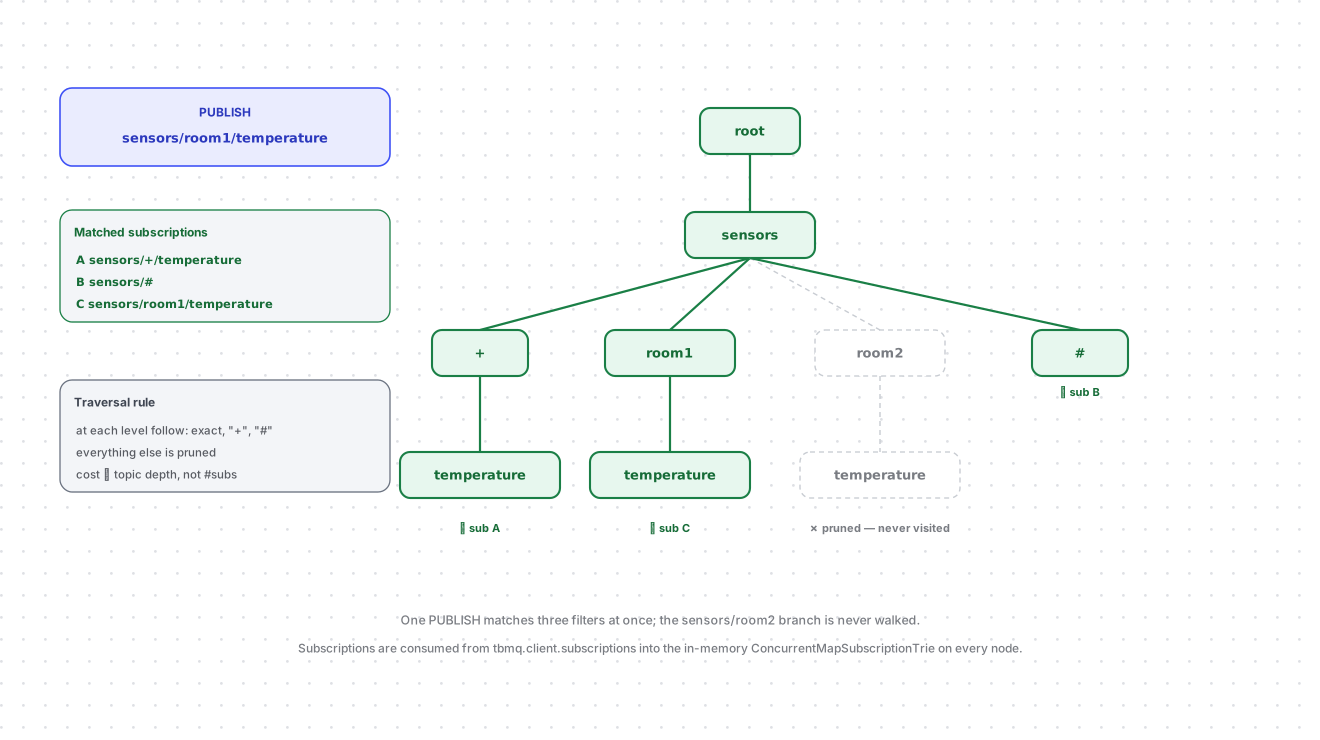
The trie is built for a read-mostly workload: matching a PUBLISH — by far the most frequent operation — walks concurrent maps and takes no lock at all, so lookups scale with the number of message-processing threads. A lock is used only to keep subscribe/unsubscribe from racing the housekeeping job that prunes nodes left empty by unsubscribes, which runs nightly and gives up rather than stalling clients if it cannot get the lock quickly.
Retained messages use a second, separate trie of the same design, because a subscribe has to run the match in the
opposite direction — find every retained message whose topic matches the incoming filter. It is populated from the
compacted tbmq.msg.retained topic and pruned by the same kind of nightly job.
Standalone vs cluster mode
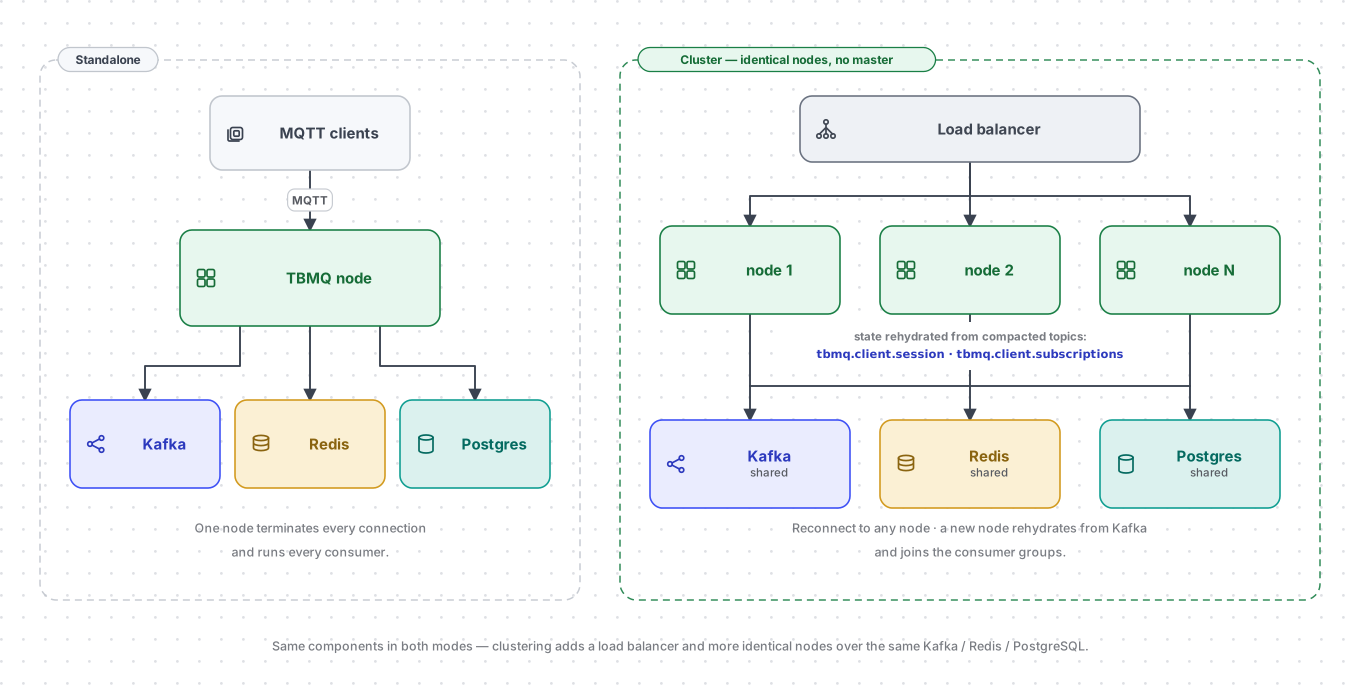
Section titled “Standalone vs cluster mode”In standalone mode, a single TBMQ node handles all connections and processing. In cluster mode:
- All nodes are identical; no master or coordinator processes.
- A load balancer distributes incoming client connections across nodes.
- If a client loses its connection to a node (node failure, network issue), it reconnects to any healthy node.
- New nodes added to the cluster automatically receive the current state from the compacted
tbmq.client.sessionandtbmq.client.subscriptionstopics — see Session state and cluster coordination.
Both modes run the same components against the same Kafka, Redis, and PostgreSQL: clustering adds nodes and a load balancer, it does not add a new tier or change how a message is processed. A node is a stateless consumer of shared state, which is why nodes can be added or lost without a rebalancing procedure of TBMQ’s own — Kafka consumer groups redistribute the partitions, and each node’s local caches are rebuilt from the compacted topics.
What the diagram cannot show is which paths need a second hop in a cluster. Non-persistent and persistent DEVICE
subscribers may be connected to a node other than the one that processed the message, so their copy is forwarded over
the per-node tbmq.msg.downlink.* topics. APPLICATION clients never need this: their consumer is created on the node
where they connect, so it reads their topic locally.
See Clustering for deployment details.
Integration Executor
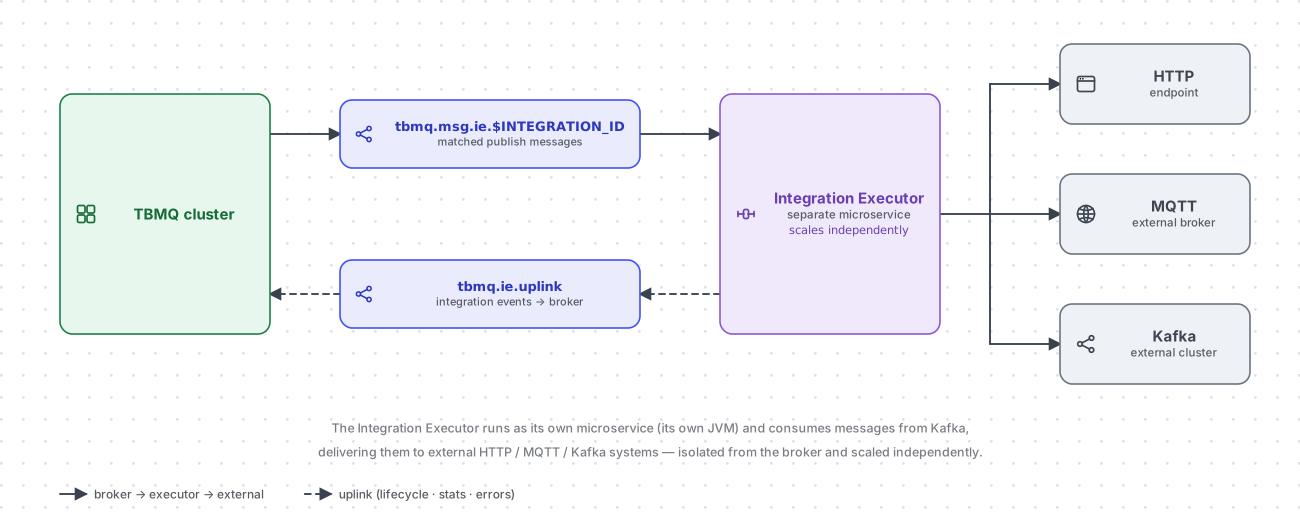
Section titled “Integration Executor”TBMQ integrations run in the Integration Executor — a standalone microservice (its own JVM) that connects the broker to external systems without adding load to the message path. It consumes messages from Kafka and pushes them to the configured targets, supporting HTTP, MQTT, and Kafka integration types.
Because it is deployed and scaled independently of the broker, a slow or failing external endpoint never back-pressures MQTT traffic, and integration throughput can be scaled by running more executor instances. The unit of distribution is the integration, not the partition: the downlink topics are keyed by integration ID, so a consumer-group rebalance across the running executors gives each integration exactly one owning instance, which then processes that integration’s messages and events on its own.
The executor is decoupled from the broker in exactly the way the nodes are decoupled from each other: it shares no
memory and makes no direct calls, and every exchange is a Kafka topic. Messages matched by an integration arrive on
tbmq.msg.ie.$INTEGRATION_ID — one topic per integration, created when the integration starts and deleted with it,
so a slow or failing target backs up only its own queue and never the other integrations’. Integration definitions and
validation requests travel the other way on the compacted
tbmq.ie.downlink.$INTEGRATION_TYPE topics — one per integration type — so a starting executor rebuilds the current set
of integrations from a snapshot, the same trick the broker uses for sessions and subscriptions. Results flow back as
lifecycle, statistics, and error events on tbmq.ie.uplink, which the broker persists so the UI can show each
integration’s state and failures.
An integration can also react to session activity rather than only to published messages. For that the broker produces
MQTT client lifecycle events — connected, disconnected, subscribed, unsubscribed, and the authentication,
authorization, and connection failures — to a dedicated single-partition topic per integration,
tbmq.ie.event.$INTEGRATION_ID, and each integration receives only the event types it is configured for. These events
are best-effort: they are produced on the MQTT processing thread and dropped (and counted) if Kafka cannot accept them,
so they never hold up a client’s connection.
Integrations are available in both editions. See Integrations for the supported types and Integration Executor configuration for deployment and tuning.
Programming languages
Section titled “Programming languages”TBMQ backend is implemented in Java 25. The frontend is a single-page application built with Angular 21.
Was this helpful?