
Integrations
Integrations in TBMQ forward MQTT messages from connected clients to external systems such as HTTP endpoints, Kafka brokers, or other MQTT brokers. They connect IoT devices with the broader data infrastructure, allowing the MQTT broker to act as a central integration point in your architecture.
Besides messages, an integration can receive client lifecycle events — clients connecting and disconnecting, subscription changes, and authentication or authorization failures.
Integrations are outbound only: TBMQ pushes data to the external system. An integration never pulls data in or subscribes to the external system on your behalf. There are three types — HTTP, MQTT and Kafka — and that is the full set.
Integrations require TBMQ 2.1 or later and a running TBMQ Integration Executor, a separate service included in the standard deployments. If you upgraded from an earlier version, confirm you added it: with no reachable executor, saving an integration fails with a validation timeout.
Why use integrations
Section titled “Why use integrations”- Bridge MQTT messages to external systems for processing, storage, or analytics.
- Enable interoperability between MQTT and other protocols.
- Build complex event-driven workflows across different platforms.
- Maintain modularity and scalability in your IoT architecture.
Supported integration types
Section titled “Supported integration types”- HTTP Integration — forward MQTT messages and client lifecycle events to REST APIs or webhooks via HTTP(S).
- MQTT Integration — bridge messages to external MQTT brokers for cross-broker communication, with client lifecycle events on a topic of their own.
- Kafka Integration — stream messages and client lifecycle events into Kafka topics for real-time processing.
Each guide walks through creating an integration of that type end to end. The rest of this page describes the architecture and the operational behavior they all share — read it when you need to tune, scale, or troubleshoot them.
How a message flows
Section titled “How a message flows”At a high level, the integration flow in TBMQ works as follows:
- MQTT clients connect to TBMQ and publish messages.
- When a message matches an integration topic filter (MQTT subscription), TBMQ forwards the message to the TBMQ Integration Executor via Kafka.
- When a client connects, disconnects, changes its subscriptions, or fails authentication or authorization, TBMQ forwards that lifecycle event to every integration subscribed to the event type — over a separate Kafka stream.
- The Integration Executor receives the message or event, processes it, and forwards it to the configured external system:
- An HTTP endpoint over HTTP or HTTPS.
- Another MQTT broker over MQTT or MQTTS.
- A Kafka broker using the Kafka binary protocol over TCP or TLS.
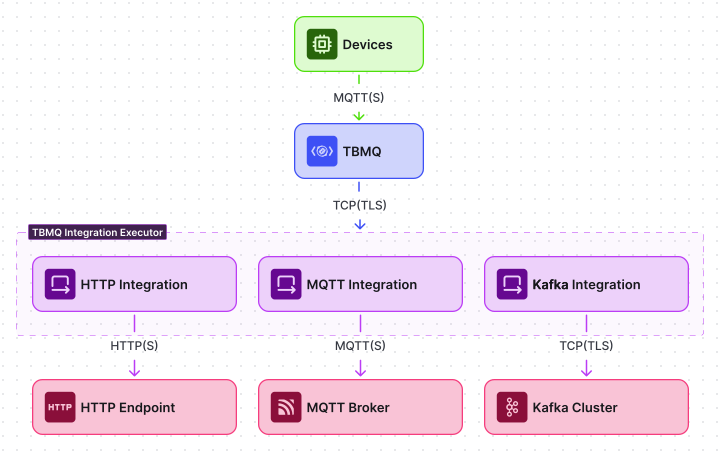
Architecture
Section titled “Architecture”TBMQ Integration Executor
Section titled “TBMQ Integration Executor”TBMQ uses a dedicated microservice called TBMQ Integration Executor (TBMQ IE) to manage and run integrations.
Two service types are defined by the TB_SERVICE_TYPE environment variable:
tbmq— the core MQTT broker.tbmq-integration-executor— the integration execution service.
The Integration Executor listens for integration events and messages from TBMQ (via Kafka), processes them according to the integration configuration, and forwards the data to the external system. Multiple Integration Executor instances can be deployed within a TBMQ cluster for scalability and fault isolation.
Why not embedded in TBMQ?
Integration logic is intentionally kept separate from the broker:
- Isolation — failures or slow responses from external systems do not affect MQTT message processing.
- Scalability —
tbmq-ieinstances can be scaled independently. - Resilience — each Integration Executor can restart or fail without interrupting core MQTT services.
- Extensibility — new integration types can be added to the executor without changing the broker.
- Separation of concerns — the broker handles MQTT protocol logic; the executor handles data delivery.
Integration entity
Section titled “Integration entity”Integration entities are stored in TBMQ’s PostgreSQL database and are used for management via the Web UI and REST API. Each integration entity includes:
- Type — the external system the integration delivers to; see Supported integration types.
- Name — a human-readable name.
- Description — optional free-form notes.
- Enabled — whether the integration is active.
- Status — current state, as shown in the UI:
Disabled— not active.Active— running and processing messages. The executor calls this stateSTARTEDin its statistics.Failed— encountered a connection failure.Pending— waiting for validation and activation.
- Configuration — connection details and parameters for the external system.
- Topic filters — MQTT-based subscriptions that trigger the integration when a matching message is received.
- Lifecycle event types — client lifecycle events the integration receives.
Topic filters and lifecycle event types are independent, and each one is optional — but an integration must have at least one of the two, otherwise it would have nothing to deliver.
Multiple integrations with different types, topic filters, and targets can be configured and managed independently.
Internal communication
Section titled “Internal communication”TBMQ and its Integration Executor microservices communicate asynchronously over Kafka using dedicated topics:
| Topic | Purpose |
|---|---|
tbmq.ie.downlink.$integrationType |
Compact topic for delivering integration configurations and validation requests from TBMQ to IE. |
tbmq.ie.uplink |
Sends lifecycle events, statistics, and errors from IE back to TBMQ. |
tbmq.ie.uplink.notifications.$serviceId |
Routes validation responses to the correct TBMQ node. |
tbmq.msg.ie.$integrationId |
Per-integration topic for forwarding MQTT messages from TBMQ to IE. |
tbmq.ie.event.$integrationId |
Per-integration topic for forwarding client lifecycle events from TBMQ to IE. Created only for integrations that subscribe to at least one event type. |
The first three are the control plane — a fixed set of topics shared by all integrations. The last two are the data plane — one pair per integration.
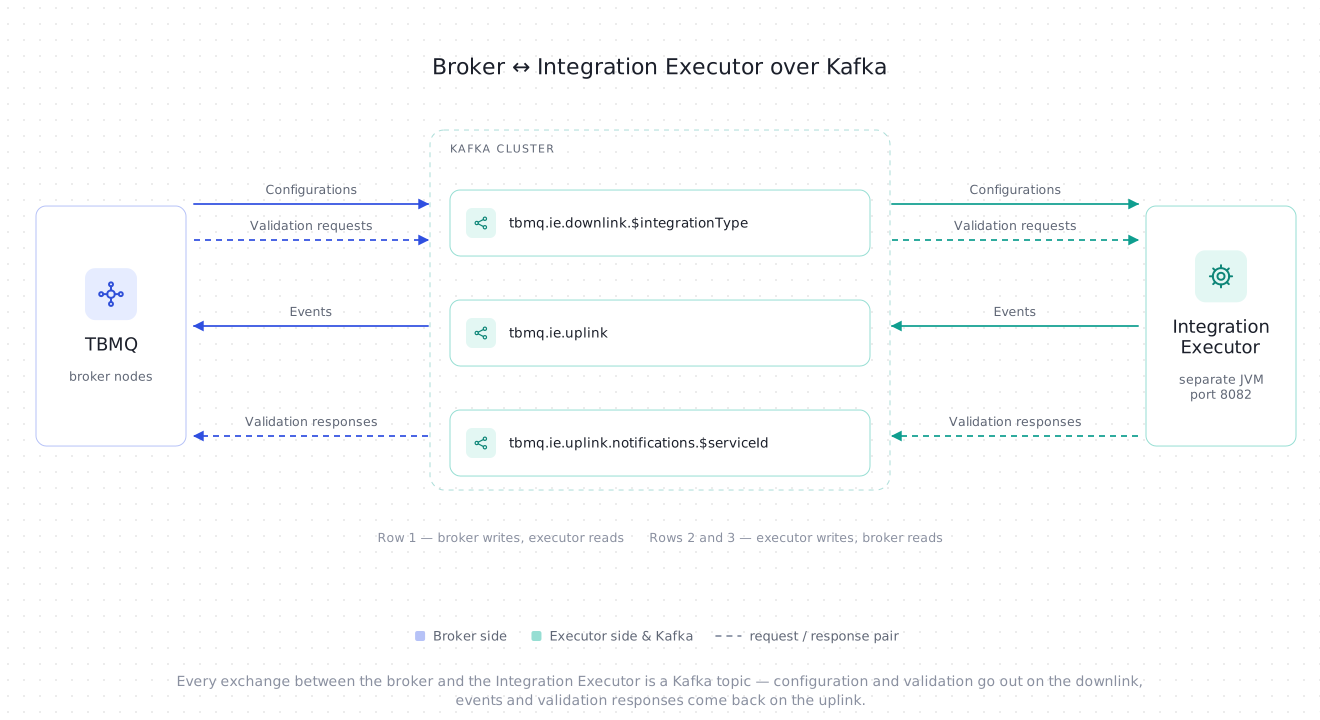
Downlink topics
Section titled “Downlink topics”TBMQ uses Kafka compact topics for downlink communication, one per integration type — tbmq.ie.downlink.$INTEGRATION_TYPE, e.g. tbmq.ie.downlink.mqtt.
These topics deliver integration configuration events (create, update, delete) and trigger connection validation requests.
Kafka’s log compaction keeps only the most recent configuration per integration ID. On startup, a tbmq-ie instance enters restoration mode:
- Seeks to the beginning of the assigned topic partitions.
- Restores the latest state of all relevant integrations from compacted records.
- Skips all validation requests since they were already processed in the past.
- Once the end of the partition is reached, transitions to real-time mode for normal operation.
Integrations are only initialized after their latest configurations are fully restored from Kafka.
In real-time mode, new integration events are handled immediately and validation requests are processed on the fly.
Executors poll the downlink topics every TB_IE_DOWNLINK_POLL_INTERVAL ms (default 1000).
On shutdown or partition revocation, the tbmq-ie instance stops the affected integrations and cleans up underlying resources such as protocol clients and connections.
Downlink records are keyed by integration ID and the topics are consumed as a Kafka consumer group, so the partitions an executor is assigned decide which integrations it runs. Each integration is owned by exactly one executor at a time, and that executor is the only one consuming the integration’s message and event topics. Adding or losing an instance rebalances that ownership: nothing is processed twice, and nothing is left unowned.
This approach ensures:
- Resilience — full recovery after restarts without requiring external configuration stores.
- Consistency — always works with the latest valid configuration, avoiding stale or conflicting states.
- Scalability — stateless service design with all configuration state persisted in Kafka.
- Reduced load — only changed configurations are written, eliminating the need to resend the full configuration set repeatedly.
Separate downlink topics enable executor specialization via TB_SERVICE_INTEGRATIONS_SUPPORTED and TB_SERVICE_INTEGRATIONS_EXCLUDED environment variables. This design provides the following benefits:
- Targeted consumption — executors subscribe only to topics they are configured to handle.
- Improved isolation — different integration types have different configuration payloads and validation logic; dedicated topics ensure only relevant messages are received.
- Operational simplicity — easier to debug and monitor traffic per integration type.
- Flexible scaling — each topic can be tuned individually (e.g., partitions, retention) based on the load characteristics of each integration type.
Uplink topics
Section titled “Uplink topics”tbmq.ie.uplink — Integration Executors send lifecycle events, statistics, and error reports back to TBMQ via this topic.
All messages are stored as Event entities in the database for diagnostics and administrative visibility.
tbmq.ie.uplink.notifications.$serviceId — node-specific topics for direct replies to specific TBMQ nodes, such as responses to “Check Connection” requests and validation results.
This mechanism ensures that responses are routed to the correct instance in clustered environments and maintains accurate request-response correlation.
Message processing
Section titled “Message processing”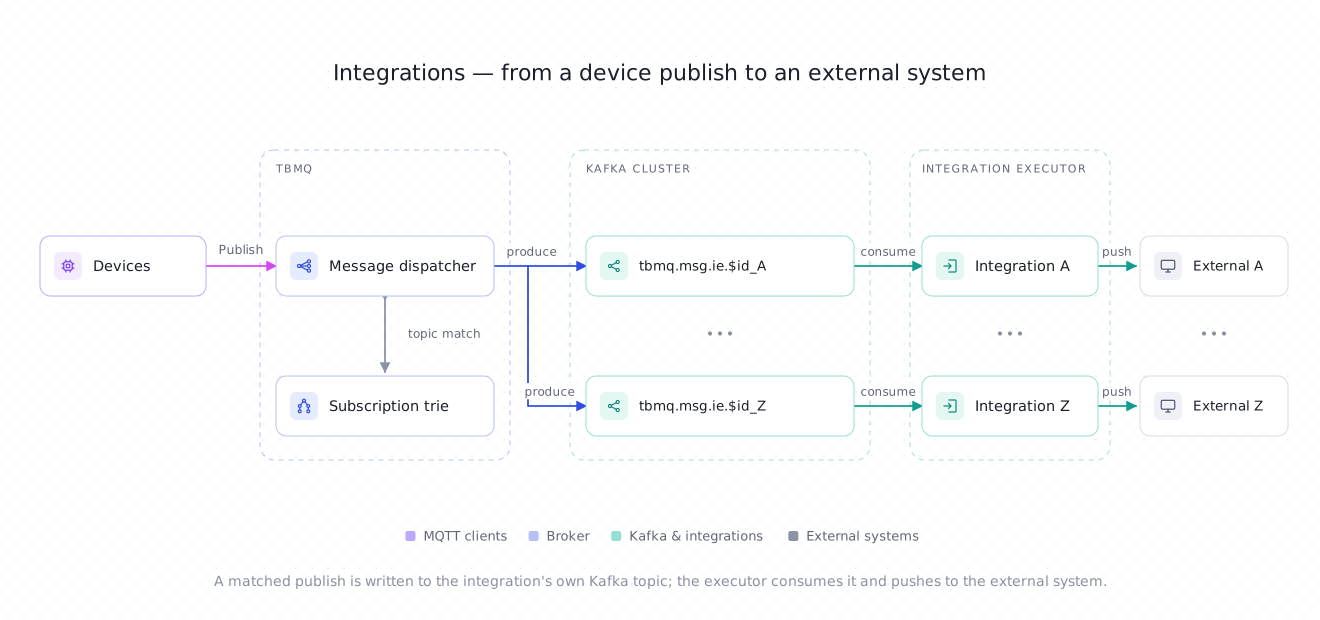
TBMQ uses a dedicated Kafka topic per integration (tbmq.msg.ie.$integrationId) to deliver MQTT messages to the Integration Executor.
When an MQTT client publishes a message, TBMQ checks the Subscription Trie for matching integration topic filters. If a match is found, the message is serialized and published to that integration’s Kafka topic. The Integration Executor consumes it and forwards it to the configured external system.
This decoupled flow means the broker never waits for external responses, preserving low-latency MQTT performance even when external systems are slow or unavailable.
Each integration has its own Kafka topic, which enables full isolation of message flow.
Messages for different integrations are processed independently, in separate threads — one Kafka consumer per integration topic — allowing parallel execution and fine-grained error control. An integration that also opted in for client lifecycle events gets a second consumer for its tbmq.ie.event.$integrationId topic, so a slow event target never stalls message delivery, and vice versa.
Kafka’s retention policies and buffering capabilities provide additional resilience in high-load or temporary-failure scenarios. Message topics are created with a 7-day retention by default (TB_KAFKA_IE_MSG_TOPIC_PROPERTIES), so an integration that is down or lagging can catch up once it recovers, as long as it does so within the retention window.
This design provides the following benefits:
- High throughput and non-blocking broker performance.
- Full isolation of message flow per integration.
- Fine-grained retry, backpressure, and error handling per integration.
Disabled integrations and cleanup
Section titled “Disabled integrations and cleanup”Even when an integration is disabled, TBMQ keeps producing for it: matching messages go to its message topic, and, if it opted in, client lifecycle events go to its events topic. Nothing is lost when the integration is re-enabled — provided that happens within the topic retention and before the cleanup TTL below expires.
To keep unused topics from consuming storage indefinitely, a periodic sweep reclaims integrations that have stayed disabled beyond a configurable TTL. For each expired integration it:
- deletes both of its topics — the message topic and the events topic — along with their consumer groups;
- clears its topic subscriptions, so no further messages are matched to it;
- evicts its lifecycle event types on every node in the cluster, so no further events are produced for it.
Detaching it from both streams is what makes the reclaim stick: deleting the topics alone would achieve nothing, because either producer recreates its topic on the next send. So an expired integration stops producing altogether rather than merely losing topics that would immediately refill, and a broker restart does not resume it. The integration itself is not removed — saving it re-registers its subscriptions and repopulates its event types cluster-wide, and each topic is recreated on the next send.
How often the cleanup task runs (seconds) — every 3 hours.
How long an integration may stay disabled before it is reclaimed (seconds) — 1 week. Set to 0 to disable the sweep entirely, in which case no integration ever expires.
Whether TBMQ may delete integration topics at all. When false, the cleanup task and integration deletion both leave the topics in place.
The TTL is measured from the moment the integration was disabled, so re-enabling it resets the clock.
Deleting an integration is different from disabling it: both topics and their consumer groups are removed either way, a few seconds after the entity is deleted for an integration that was enabled — its executor detaches its consumers first — and right away for one that was already disabled, since no executor instance is running it.
Kafka topic retention settings can be customized to fine-tune storage limits and control how long messages are retained per topic.
Client lifecycle events
Section titled “Client lifecycle events”An integration can also be notified about what MQTT clients are doing: connecting, disconnecting, changing their subscriptions, or failing authentication or authorization.
These are client lifecycle events, delivered to the same external system as the messages. Do not confuse them with the integration’s own lifecycle events (Started, Updated, Stopped), which describe the integration itself, are reported over the uplink topic, and never leave TBMQ.
Delivery is opt-in per event type, so an integration ends up in one of three modes:
| Topic filters | Lifecycle event types | The integration receives |
|---|---|---|
| Set | Empty | Published messages only. |
| Empty | Set | Lifecycle events only. |
| Set | Set | Both, over separate Kafka streams. |
Event types
Section titled “Event types”| Event type | Emitted when | Type-specific fields |
|---|---|---|
CLIENT_CONNECTED |
A client connection is accepted. | cleanStart, keepAlive, protocolVersion, sessionExpiryInterval |
CLIENT_DISCONNECTED |
A client session ends, including a take-over by a session on another node. | disconnectReason |
CLIENT_SUBSCRIBED |
Subscriptions are granted. | subscriptions |
CLIENT_UNSUBSCRIBED |
Subscriptions are actually removed. | subscriptions |
CLIENT_AUTHENTICATION_FAILED |
Authentication fails. | protocolVersion, reason |
CLIENT_AUTHORIZATION_FAILED |
A publish or subscribe is denied by an authorization rule. | action, topic |
CLIENT_CONNECTION_FAILED |
The broker refuses the connection for a reason other than authentication, for example an exceeded quota or an unavailable server. A node that is draining also refuses connections this way. | reason |
Event payload
Section titled “Event payload”Every event is delivered as a JSON object. These fields are common to all event types:
| Field | Description |
|---|---|
eventType |
One of the event types above. Always present. |
clientId |
ID of the MQTT client the event is about. |
sessionId |
ID of the client session. |
ipAddress |
IP address the client connected from. |
ts |
Timestamp (milliseconds) when the event was created. |
tbmqNode |
Node ID of the TBMQ broker that produced the event. |
tbmqIeNode |
Node ID of the Integration Executor that delivered the event. |
username |
Username the client authenticated with. |
clientCertCn |
Common Name of the client’s X.509 certificate. |
metadata |
Additional metadata from the integration configuration (e.g., integration name). |
Text fields are omitted when they have no value, rather than sent as an empty string — expect no username when the client sent none, and no clientCertCn unless the client authenticated with an X.509 certificate.
The type-specific fields are added on top:
| Field | Description |
|---|---|
cleanStart |
Whether the client requested a clean session start. |
keepAlive |
Keep-alive interval (seconds) in effect for the session. |
protocolVersion |
MQTT protocol level: 3 for MQTT 3.1, 4 for 3.1.1, 5 for 5.0. 0 when the version is not yet known. |
sessionExpiryInterval |
Session expiry interval (seconds) for the session. |
disconnectReason |
Name of the MQTT reason code for the disconnect, e.g. NORMAL_DISCONNECT or SESSION_TAKEN_OVER. |
subscriptions |
Array of the granted or removed subscriptions. For CLIENT_SUBSCRIBED each entry has topicFilter, qos, and options (noLocal, retainAsPublish, and retainHandling — one of SEND, SEND_IF_NOT_EXISTS, DONT_SEND), plus shareName and subscriptionId when the subscription has them. For CLIENT_UNSUBSCRIBED an entry carries only topicFilter, plus shareName for a shared subscription, since an UNSUBSCRIBE names filters only. |
reason |
Why authentication or the connection failed. |
action |
The denied operation: publish or subscribe. |
topic |
The topic or topic filter that was denied. |
A client connecting with MQTT 5.0:
{ "eventType": "CLIENT_CONNECTED", "clientId": "sensor-01", "sessionId": "b2f1c4de-8a35-4f6b-9d0e-7c1a5b3e2f40", "ipAddress": "10.7.0.42", "ts": 1767225600000, "tbmqNode": "tbmq-node-1", "tbmqIeNode": "tbmq-ie-1", "username": "sensor-01", "cleanStart": true, "keepAlive": 60, "protocolVersion": 5, "sessionExpiryInterval": 3600, "metadata": { "integrationName": "Audit trail" }}A client subscribing to two topic filters, the second one shared:
{ "eventType": "CLIENT_SUBSCRIBED", "clientId": "backend-consumer-1", "sessionId": "9d54e0a7-6b12-4c8e-8f3a-1e7b9c2d4a68", "ipAddress": "10.7.0.51", "ts": 1767225601500, "tbmqNode": "tbmq-node-2", "tbmqIeNode": "tbmq-ie-1", "username": "backend", "subscriptions": [ { "topicFilter": "tbmq/devices/+/status", "qos": 1, "options": { "noLocal": false, "retainAsPublish": false, "retainHandling": "SEND" } }, { "topicFilter": "tbmq/telemetry", "qos": 1, "shareName": "workers", "subscriptionId": 7, "options": { "noLocal": false, "retainAsPublish": true, "retainHandling": "DONT_SEND" } } ], "metadata": { "integrationName": "Audit trail" }}A publish denied by an authorization rule:
{ "eventType": "CLIENT_AUTHORIZATION_FAILED", "clientId": "sensor-01", "sessionId": "b2f1c4de-8a35-4f6b-9d0e-7c1a5b3e2f40", "ipAddress": "10.7.0.42", "ts": 1767225603000, "tbmqNode": "tbmq-node-1", "tbmqIeNode": "tbmq-ie-1", "username": "sensor-01", "action": "publish", "topic": "admin/commands", "metadata": { "integrationName": "Audit trail" }}Delivery per integration type
Section titled “Delivery per integration type”Each integration type reuses the connection it already has, but the destination differs:
| Type | Where events go | Setting that controls it |
|---|---|---|
| HTTP | The configured endpoint, as a JSON request body. | Shared with messages |
| Kafka | The configured topic, with the configured key and headers. | Shared with messages |
| MQTT | A dedicated topic on the external broker, always with QoS 1 and the retain flag off. | Events topic name |
Delivery guarantees
Section titled “Delivery guarantees”Lifecycle events are best-effort hints, deliberately weaker than message delivery:
- Events are produced on the MQTT processing thread, the same path as a regular publish. If Kafka cannot accept the record, the event is dropped and counted in the broker’s
droppedLifecycleEventsstatistic instead of being retried. That send is synchronous, so an unavailable Kafka holds the thread until the send fails, and then the event is dropped. - Events travel on their own topic per integration (
tbmq.ie.event.$integrationId) with a shorter retention than the message topic — 1 day by default against the message topic’s 7 days — so an event backlog never holds up message delivery. - On the Integration Executor side the events stream has its own acknowledgment strategy, defaulting to
SKIP_ALLso that a failing target does not cause stale events to be redelivered out of order:
Poll interval for tbmq.ie.event topics (ms).
Processing timeout per event batch (ms).
Strategy: SKIP_ALL or RETRY_ALL.
Number of retries (0 = unlimited). Used with RETRY_ALL.
Pause between retries (seconds).
Integration lifecycle
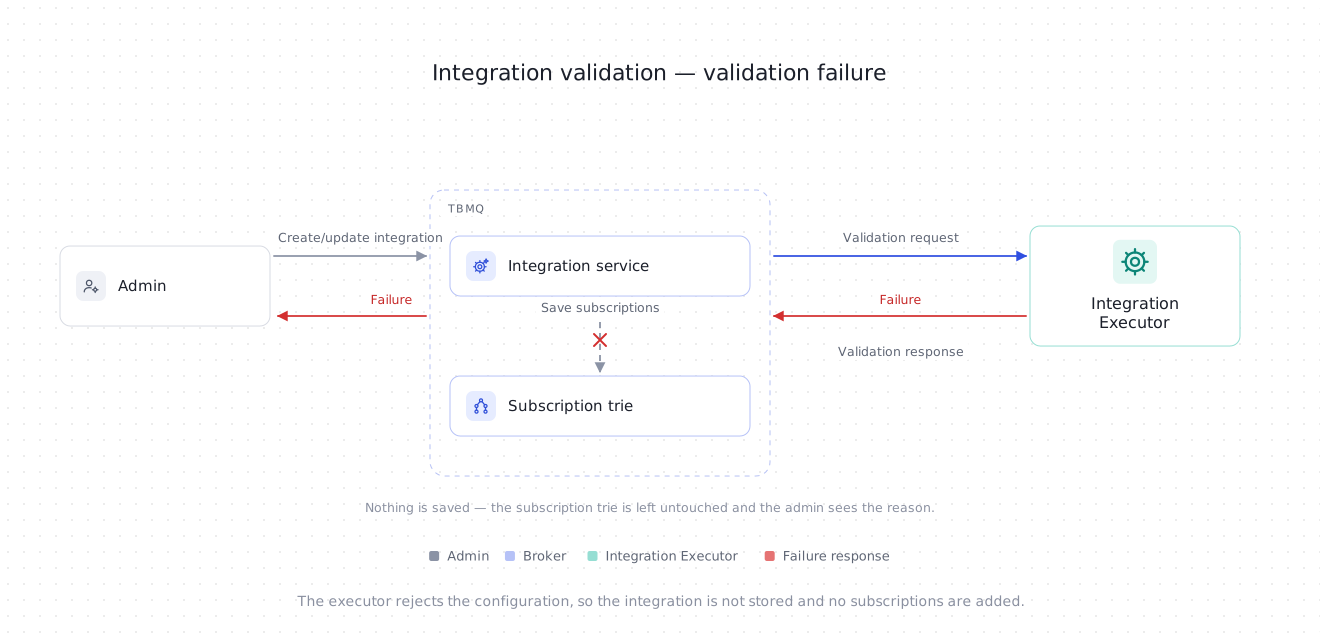
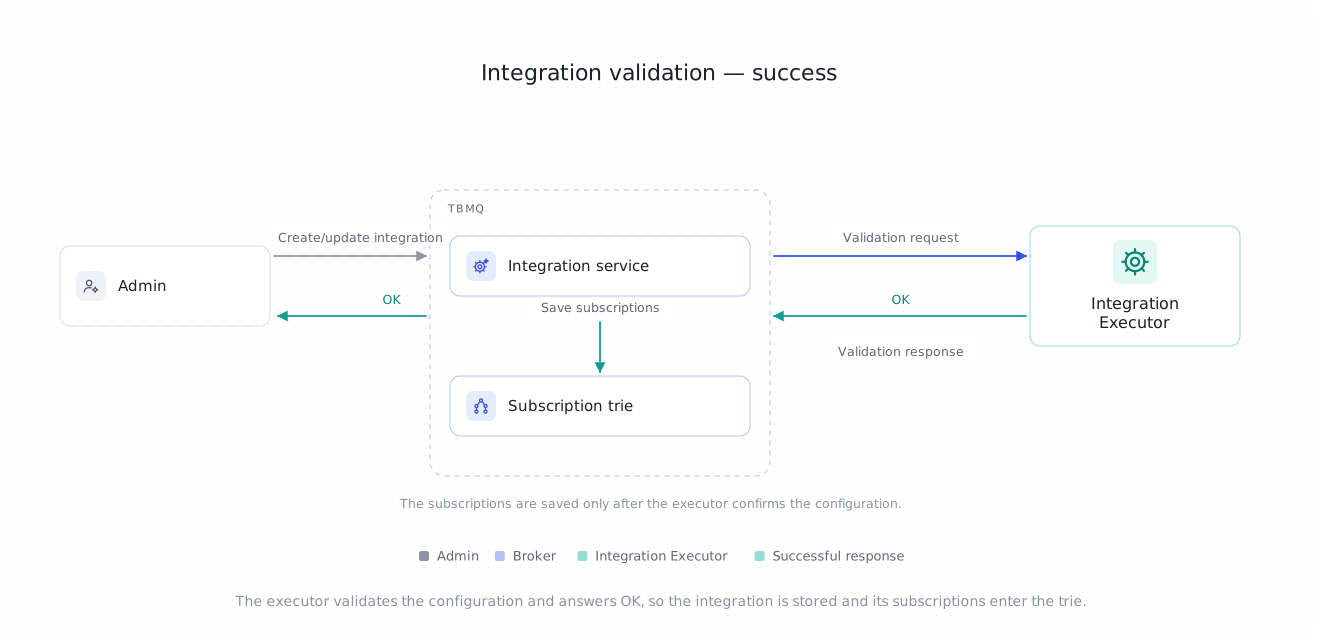
Section titled “Integration lifecycle”When a create or update request is received, TBMQ sends a validation request to the Integration Executor. The IE validates the configuration and responds before the integration is saved.
The validation can result in one of three outcomes:
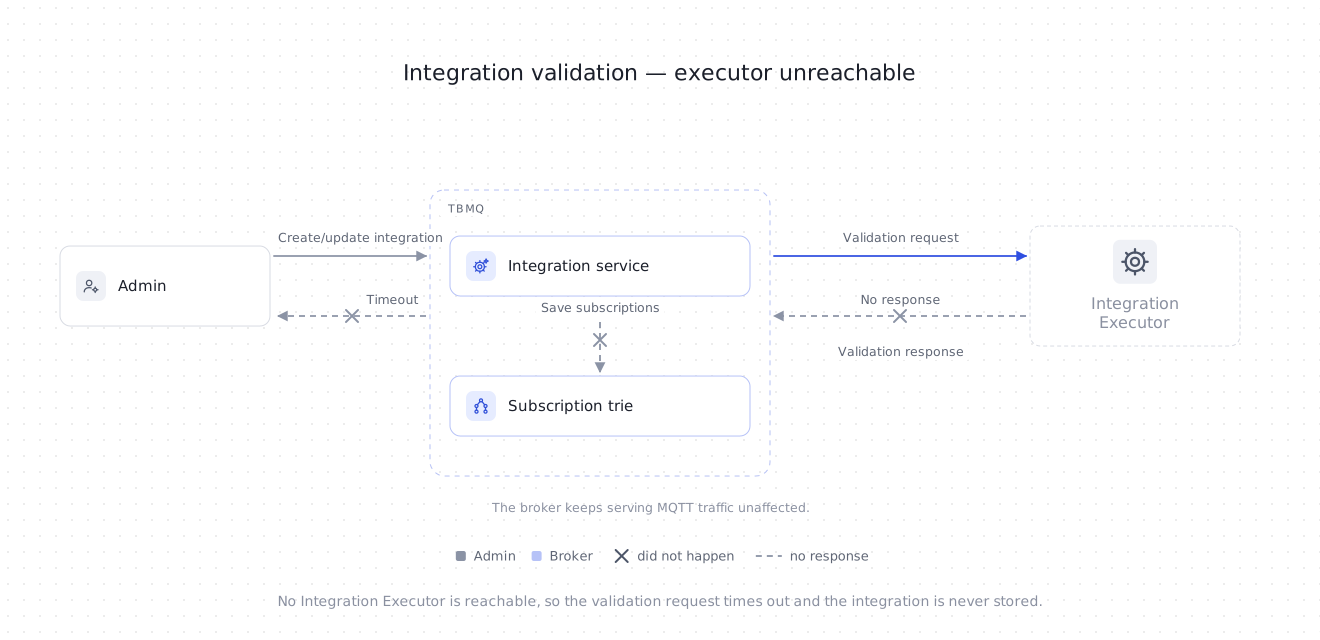
- Timeout — the Integration Executor is not running, so the broker waits until a timeout occurs. The integration is not saved.
- Failure — the Integration Executor is running, but the configuration is invalid. The integration is not saved.
- Success — the configuration is valid. The integration entity is saved in the database, subscriptions are added to the Subscription Trie, and the configuration event is sent to IE.
Deadline for validation and check-connection requests (seconds).
Upper bound for a connection timeout configured on an integration (seconds). A larger user-defined value is silently reduced to this limit.
Whether integrations may target local network hosts. When false, validation rejects any target that resolves to a loopback, link-local, site-local, or wildcard address — worth turning off on a public deployment to keep an integration from reaching into the internal network.
Validation checks the configuration, not connectivity: the executor verifies the per-type rules — a required field left empty, a malformed host:port, a topic name containing wildcards, an unsupported acks or compression value, a target host that INTEGRATIONS_ALLOW_LOCAL_NETWORK_HOSTS forbids. The failure message shown to the admin is the one the executor produced, so it names the offending field.
An integration whose configuration is valid but whose target is unreachable is therefore saved successfully, and then reports the connection problem through its status and error events. Use Check connection to test the target itself before saving.
Managing a running integration
Section titled “Managing a running integration”| Action | UI | REST API |
|---|---|---|
| Check connection | Check connection on the integration form | POST /api/integration/check |
| Restart | Restart integration | POST /api/integration/{integrationId} |
| Enable / disable | Enable integration toggle | POST /api/integration with enabled set |
| Delete | Delete integration | DELETE /api/integration/{integrationId} |
Check connection tests connectivity to the external system at any time, without saving anything. It is safe for HTTP and Kafka, but for MQTT it opens a real session with the configured client ID — see the MQTT integration guide for why that matters.
Restart reinitializes the integration process: the executor stops the current instance, discards its protocol client, and starts it again from the stored configuration. Use it after fixing something on the remote side that the automatic hot reinitialization has not picked up yet.
Error handling and retry
Section titled “Error handling and retry”When a message fails to be processed, the Integration Executor handles it based on the configured acknowledgment strategy:
Poll interval for tbmq.msg.ie topics (ms).
Processing timeout per message batch (ms).
Strategy: SKIP_ALL or RETRY_ALL.
Number of retries (0 = unlimited). Used with RETRY_ALL.
Pause between retries (seconds).
SKIP_ALL(default) — failed messages are logged and skipped. High throughput, no delivery guarantee to external systems.RETRY_ALL— failed messages are retried up to the configured limit with a pause between attempts. Setretriesto0for unlimited retries.
Each batch of messages has a processing timeout (TB_IE_MSG_PACK_PROCESSING_TIMEOUT) to prevent long-running tasks from blocking the consumer thread.
This ensures system responsiveness even under high load or with slow external targets.
Both strategies advance past the batch in the end — neither one blocks the stream forever. The difference is how many attempts a message gets before it is abandoned.
Error events and rate limiting
Section titled “Error events and rate limiting”Every processing failure is also recorded as an error event on the integration, which is what the Errors tab in the UI shows. Because a broken target can fail on every single message, error-event persistence is rate-limited across all integrations:
Enables error-event rate limiting.
Limits as count:seconds pairs — 5000 events per hour and 100 per minute, for all integrations combined.
How long (minutes) to suppress duplicate rate-limit notices once a limit is hit.
An integration failing in a tight loop therefore shows a sample of its errors, not one row per message. The failedMsgs and tmpFailed counters in the message processing stats are not rate-limited and remain the accurate measure of how much is failing.
Hot reinitialization
Section titled “Hot reinitialization”If an integration enters the FAILED state, the Integration Executor periodically attempts to reinitialize it:
Enable/disable hot reinitialization.
Check interval (ms) — every 5 minutes.
If the underlying issue is resolved (e.g., the remote system becomes reachable), the integration is restored automatically without manual intervention.
Integration metrics
Section titled “Integration metrics”The Integration Executor collects and reports detailed metrics that give visibility into the health, performance, and behavior of all configured integrations. These metrics are logged periodically and can be exported to external monitoring systems like Prometheus or Grafana for alerting, dashboards, and historical analysis.
Whether the executor prints the statistics below to its log.
How often they are printed (ms) — every minute.
Whether per-integration statistics are reported to TBMQ as events, making them visible on the Statistics tab.
How often those statistics events are sent (ms) — every hour.
Actuator endpoints exposed over HTTP. Keep prometheus in the list to scrape the executor.
Current integration activity
Section titled “Current integration activity”Per-integration-type counters for the current reporting interval:
IntegrationStatisticsKey(integrationStatisticsMetricName=START, success=true, integrationType=HTTP) = [0]START— number of times an integration startup was attempted.STOP— number of times integration shutdown was triggered.MSGS_UPLINK— number of messages forwarded from the executor to external systems.success=true | false— whether the attempt succeeded or failed.integrationType— the type of integration (e.g., HTTP, MQTT, Kafka).
Direction is from the executor’s point of view, as with the tbmq.ie.uplink and tbmq.ie.downlink topics: MSGS_UPLINK is what leaves the executor for an external system.
Integration state summary
Section titled “Integration state summary”Tracks the current state of all integrations managed by the executor:
START, success=true, integrationType=MQTT = [1]success=true— number of integrations inSTARTEDstate, shown as Active in the UI.success=false— number of integrations inFAILEDstate.
These values are updated whenever any integration changes state and help administrators understand the real-time health of all running integrations.
Integration uplink queue stats
Section titled “Integration uplink queue stats”Summarizes the state of the uplink Kafka topic used by the executor to send error, statistics, and lifecycle events back to TBMQ:
queueSize = [0]totalMsgs = [1]successfulMsgs = [1]failedMsgs = [0]queueSize— messages currently waiting in the uplink Kafka queue.totalMsgs— total messages sent to the uplink topic.successfulMsgs— messages published successfully.failedMsgs— messages that failed to publish.
Message processing stats
Section titled “Message processing stats”Per-integration-instance metrics that reflect how messages are being processed and delivered to external systems:
[integrationProcessor][f6e82897-dd18-4c6f-ac31-5f19ce75e2db]totalMsgs = [38]successfulMsgs = [38]tmpTimeout = [0]tmpFailed = [0]timeoutMsgs = [0]failedMsgs = [0]successfulIterations = [38]failedIterations = [0]totalMsgs— total messages received for processing.successfulMsgs— messages successfully delivered.tmpTimeout— messages that exceeded the processing timeout but will be retried.tmpFailed— messages that failed but will be retried.timeoutMsgs— messages that exceeded the processing timeout and will not be retried.failedMsgs— messages that failed permanently after retry attempts.successfulIterations— successful message batch executions.failedIterations— message batch executions that resulted in one or more processing failures.
Client event processing stats
Section titled “Client event processing stats”An integration that opted in to client lifecycle events consumes them on a separate stream, and the executor reports that stream on its own, with the same counters under a different stem:
[integrationEventProcessor][f6e82897-dd18-4c6f-ac31-5f19ce75e2db]totalMsgs = [6]successfulMsgs = [6]tmpTimeout = [0]tmpFailed = [0]timeoutMsgs = [0]failedMsgs = [0]successfulIterations = [6]failedIterations = [0]Reading the two blocks side by side tells you which stream is in trouble: an unreachable target fails both, while numbers that only move under integrationEventProcessor point at the events topic or the event payload rather than at message delivery. Because that stream defaults to SKIP_ALL, its failedMsgs accumulates instead of being retried. An integration with no event types configured never prints this block.
Scalability and fault tolerance
Section titled “Scalability and fault tolerance”- Executor scaling — multiple
tbmq-ieinstances can run in parallel. Kafka spreads the downlink partitions across them, so each integration is owned by exactly one executor and adding or losing an instance rebalances that ownership without duplicating or dropping work. - Fault isolation — issues in external systems affect only the Integration Executor; the TBMQ broker continues operating normally.
- Backpressure management — Kafka buffers messages when executors are slow or overloaded.
- Resilience — executor instances restart independently; integrations are restored from compacted configuration topics.
Was this helpful?