
Client type
TBMQ classifies every connecting client as either DEVICE or APPLICATION. This distinction drives message routing, persistence strategy, and resource allocation — ensuring each client type gets the behavior best suited to its role in an IoT deployment. Both types are ordinary MQTT clients on the wire — the type is a TBMQ concept, not a protocol one.
-
DEVICE clients primarily publish data and subscribe to a limited number of topics with moderate traffic. They represent IoT sensors, actuators, and embedded devices that send telemetry to the broker.
-
APPLICATION clients subscribe to high-rate topics and are expected to process every message reliably, even after an offline period. They represent analytics services, rule engines, or backend processors that consume data from the broker.
For example, a temperature sensor publishing readings every second is a DEVICE client, while a cloud analytics service subscribing to data from thousands of sensors is an APPLICATION client.
How client type is determined
Section titled “How client type is determined”TBMQ resolves the client type during MQTT CONNECT packet processing, based on the credentials used:
- When the Basic, X.509, JWT, and HTTP providers are all disabled, every client is accepted without authentication and assigned the DEVICE type. SCRAM does not take part in this check, because it runs on the separate MQTT 5 enhanced authentication path.
- When any provider is enabled, TBMQ takes the client type from whichever provider authenticated the client:
- Basic, X.509 Certificate Chain, and SCRAM — the
clientTypefield of the matched credentials. - JWT — resolved from the token claims: if at least one client type claim is configured and every one of them matches, the type is the opposite of the provider’s default client type. In every other case, including when no client type claims are configured at all, the default is used.
- HTTP — the
clientTypefield of the response returned by the external authentication service, falling back to the provider’s default client type when that field is missing, empty, or not a recognized type.
- Basic, X.509 Certificate Chain, and SCRAM — the
The client type of new credentials defaults to DEVICE, and the UI offers only DEVICE and APPLICATION.
For details on client authentication, see the Security overview. For instructions on creating credentials with a specific client type, see the MQTT client credentials guide. Changing the client type on existing credentials does not affect a connected session — the new type applies from the client’s next CONNECT.
Client persistence
Section titled “Client persistence”All published messages are written to the tbmq.msg.all Kafka topic. How messages are forwarded from there
depends on the client type and whether the client uses a persistent session.
A Kafka consumer polls the tbmq.msg.all topic and forwards messages to their subscribers:
- Non-persistent clients — messages are delivered directly to the connected client. No state is retained. See Non-persistent client in the architecture overview.
- Persistent clients — the session survives disconnections. Messages published while the client is offline are stored and delivered on reconnect. The handling differs by client type (see sections below). See Persistent client in the architecture overview.
There is one exception: if a persistent subscriber uses QoS 0, or if the publisher sends at QoS 0, messages are delivered without additional persistence steps. This is a result of QoS downgrading.
Device client
Section titled “Device client”DEVICE clients can be persistent or non-persistent, depending on the CONNECT packet settings.
For persistent DEVICE clients, matching messages are forwarded to the tbmq.msg.persisted Kafka topic.
A dedicated Kafka consumer reads this topic and persists the messages in Redis before delivering them to
online subscribers. When an offline DEVICE client reconnects, it receives the messages stored in Redis.
Redis holds one queue per client, bounded by both a message count and a TTL:
persistent-session: device: persisted-messages: # Maximum number of PUBLISH messages stored for each persisted DEVICE client. limit: "${MQTT_PERSISTENT_SESSION_DEVICE_PERSISTED_MESSAGES_LIMIT:10000}" # TTL of persisted DEVICE messages (in s). Defaults to one week. ttl: "${MQTT_PERSISTENT_SESSION_DEVICE_PERSISTED_MESSAGES_TTL:604800}"- When a client’s queue exceeds
limit, TBMQ trims it by removing the oldest messages first, so a client that stays offline for a long time keeps the most recent messages and loses the earliest ones. - Each stored message expires independently after
ttlseconds. For MQTT 5 publishers, the message’s Message Expiry Interval property overrides this default for that message.
Application client
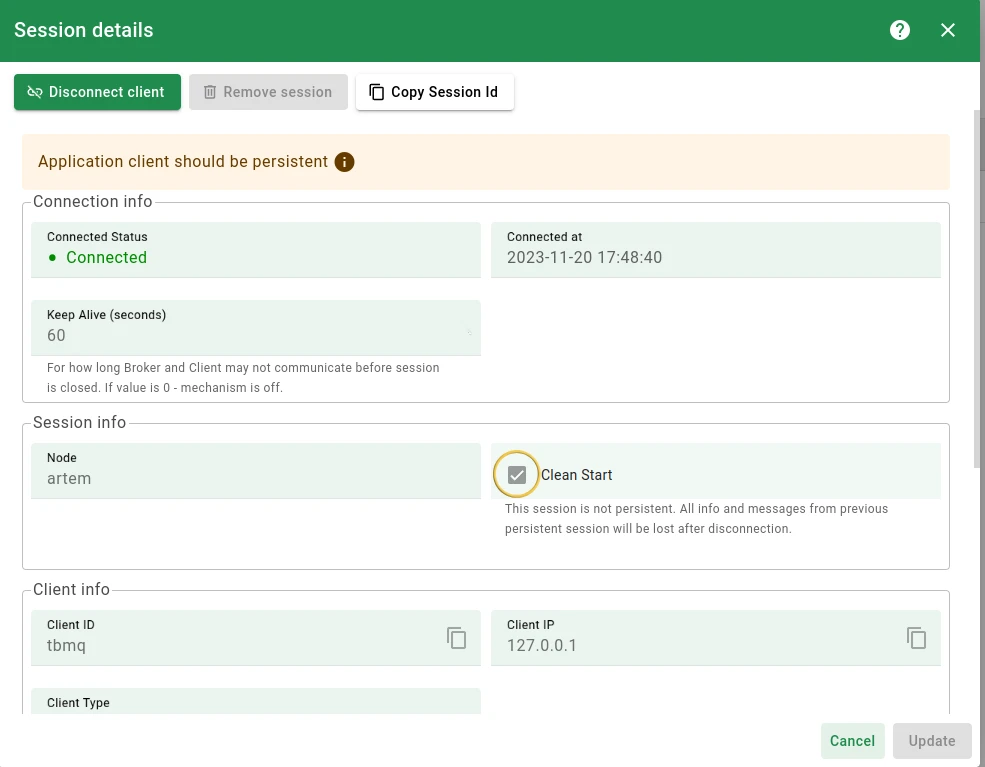
Section titled “Application client”If an APPLICATION client connects with a non-persistent session, messages are still delivered while connected, but no persistence mechanism is applied — messages can be lost if the client disconnects.
TBMQ displays an Application client should be persistent warning on the session details page when it detects this configuration:
For persistent APPLICATION clients, TBMQ creates a dedicated Kafka topic per client:
tbmq.msg.app.$CLIENT_IDTBMQ creates the topic when the client connects as APPLICATION type with a persistent session and the broker starts processing its persisted messages. A dedicated Kafka consumer per client polls this topic and delivers messages to the client in its own thread, providing isolated, high-throughput delivery. Because every connected persistent APPLICATION client costs a Kafka topic, a Kafka consumer, and a thread, this type is meant for a limited number of backend consumers rather than for devices.
MQTT_APPLICATION_CLIENTS_LIMIT caps how many persistent APPLICATION clients and
integrations the cluster may hold in total — the count is
shared across nodes, not per node. It defaults to 0, which disables the limit. Once the limit is reached, TBMQ refuses
further CONNECT requests: MQTT 5 clients get CONNACK reason code 0x97 Quota exceeded, MQTT 3.x clients get 0x03
Server unavailable.
Client IDs with special characters — MQTT allows characters in a client ID that Kafka does not accept in a topic
name. TBMQ therefore requires the client ID to be purely alphanumeric to use it verbatim, which is stricter than
Kafka’s own [a-zA-Z0-9._-]: even a Kafka-legal ID such as my-app.1 is replaced by its SHA-256 hash:
tbmq.msg.app.$CLIENT_ID_HASHThis substitution is controlled by the TB_APP_PERSISTED_MSG_CLIENT_ID_VALIDATION environment variable
(true by default). Setting it to false makes TBMQ use the client ID verbatim as the topic name — only safe when
every APPLICATION client ID is already a valid Kafka topic name, otherwise topic creation fails for that client.
APPLICATION shared subscriptions get
their own topic per topic filter, named tbmq.msg.app.shared.$TOPIC_FILTER with / replaced by . and the + / #
wildcards replaced by slw / mlw. The equivalent hashing fallback is controlled by
TB_APP_PERSISTED_MSG_SHARED_TOPIC_VALIDATION, and retention by TB_KAFKA_APP_PERSISTED_MSG_SHARED_TOPIC_PROPERTIES.
Comparison
Section titled “Comparison”| Feature | DEVICE client | APPLICATION client |
|---|---|---|
| Typical role | Publishes telemetry; moderate subscriptions | Subscribes to high-rate topics; processes data |
| Persistence | Persistent or non-persistent | Expected to be persistent |
| Default type (no auth) | Yes | No |
| Storage for non-persistent sessions | No persistence | No persistence |
| Storage for persistent sessions | Redis | Dedicated Kafka topic per client |
| Offline message delivery | Yes (if persistent), via Redis | Yes (if persistent), via Kafka |
| Common use cases | IoT sensors, actuators, and embedded devices | Analytics systems, rule engines, and data processors |
Was this helpful?