
Blocked clients
The Blocked Clients feature lets administrators restrict broker access based on client identifiers or pattern-based rules. It strengthens security, conserves system resources, and provides fine-grained control over who can establish a connection.
TBMQ stores blocked client entries in memory for fast matching and synchronizes them across all broker nodes in a cluster
through the log-compacted tbmq.client.blocked Kafka topic (TB_KAFKA_BLOCKED_CLIENT_TOPIC), ensuring consistent enforcement in
distributed deployments. Entries are keyed by type and value (plus the match target for regex entries), so compaction keeps the
latest state of each one and each node replays the topic on startup to rebuild the in-memory set. A new or deleted entry takes
effect on the node that made the change immediately, and on the other nodes as soon as they consume the update.
Each entry supports an optional expiration timestamp. Once expired, the entry is treated as inactive and cleaned up automatically.
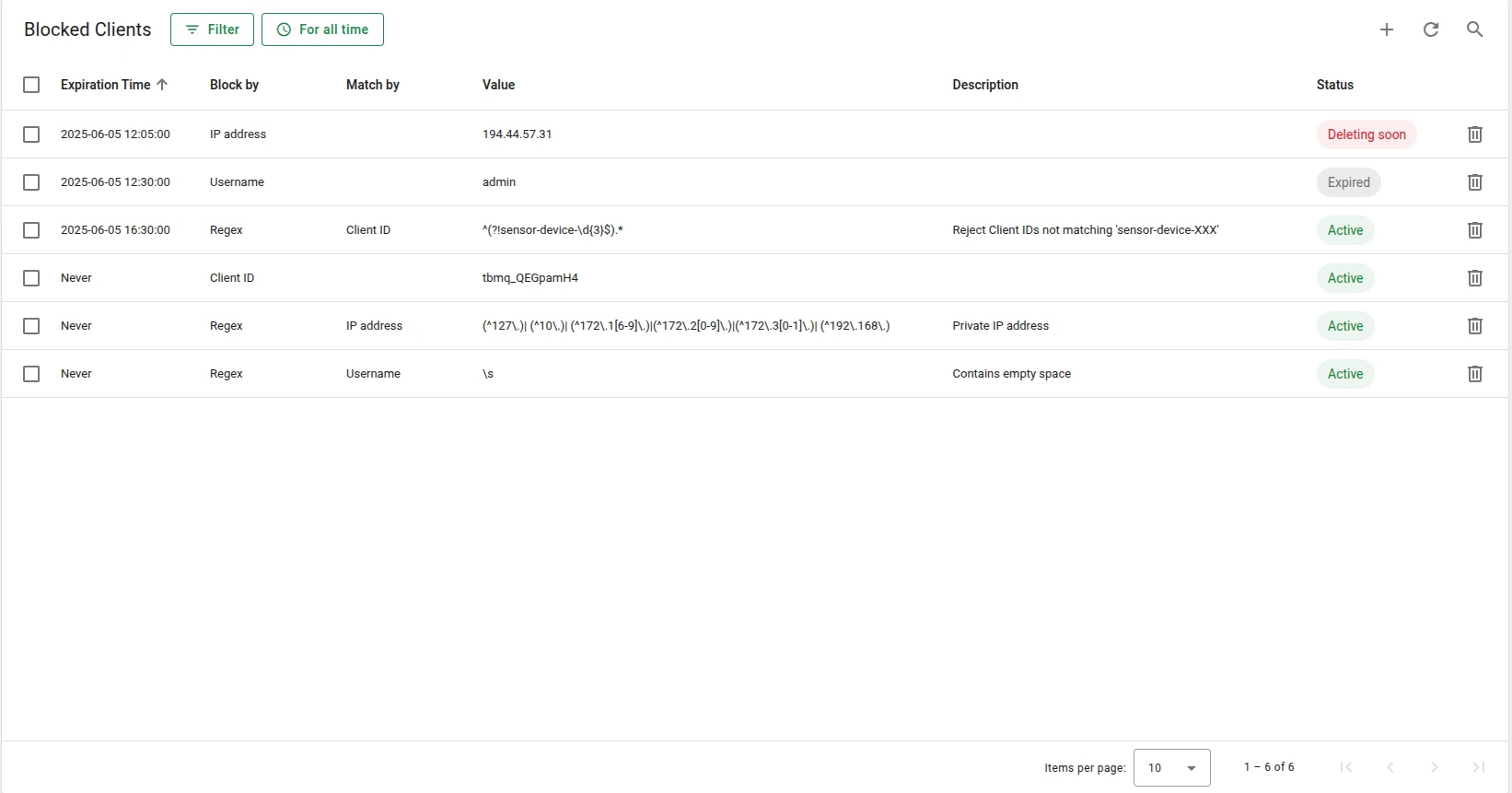
Adding a blocked client
Section titled “Adding a blocked client”Blocked clients are managed by the system administrator.
-
Open Authentication → Blocked clients and click the + button (Add blocked client).
-
Choose Block by —
Client ID,Username,IP address, orRegex. -
For
Regex, choose Match by —Client ID,Username, orIP address— to select which connection attribute the pattern is tested against. -
Enter the Value: the exact identifier for the first three types, or the regular expression for
Regex. -
Leave the Never expires toggle on for a permanent block. Switch it off to reveal the Date and Time fields — prefilled one month ahead — and set the moment after which the entry stops being enforced. The form rejects a time in the past.
-
Optionally add a Description, then click Add.
An entry is identified by its type and value, plus Match by for regex entries. Adding the same combination twice fails with
Such blocked client already exists!, and there is no edit action — delete the entry and re-create it to change its expiration
time or description.
The same operations are available over REST at /api/blockedClient; every endpoint requires the system administrator role.
Blocking and unblocking a client are recorded in the audit logs as the Blocked and Unblocked actions on the Blocked client entity type.
Block types
Section titled “Block types”You can block a client using any of the following identifiers:
| Block by | UI label | Description |
|---|---|---|
CLIENT_ID |
Client ID | Block clients with a specific client ID |
USERNAME |
Username | Block by MQTT username |
IP_ADDRESS |
IP address | Block by the client’s IP address |
REGEX |
Regex | Pattern-based blocking using a regular expression |
CLIENT_ID, USERNAME, and IP_ADDRESS entries are compared as exact, case-sensitive strings. IP_ADDRESS is tested against
the address TBMQ resolved for the connection, so behind a load balancer it is the balancer’s address unless
PROXY protocol is enabled. Subnets and CIDR notation are
not supported — use a REGEX entry with Match by = IP address to cover an address range.
The REGEX type matches against one of: BY_CLIENT_ID — labeled Client ID in the UI, BY_USERNAME — labeled Username, or BY_IP_ADDRESS — labeled IP address.
Example: To block all clients whose IDs start with test- followed by digits:
Block by: REGEXRegex pattern value: ^test-\d+$Match by: BY_CLIENT_IDThis matches test-001, test-42, and test-9999, but not demo-test-1, test-user, or test-.
A pattern is always matched against the value in full, so test-\d+ behaves exactly like the anchored form above.
A pattern that does not compile is rejected when the entry is saved.
Entry statuses
Section titled “Entry statuses”| Status | Description |
|---|---|
| Active | The entry is valid and enforced. |
| Expired | The entry is no longer valid but has not yet been cleaned up. |
| Deleting soon | The entry is expired and more than half of the cleanup grace period has passed. Removal is imminent. |
Matching order
Section titled “Matching order”During the connection phase, each client is evaluated in the following order:
- Exact match on
CLIENT_ID - Exact match on
USERNAME - Exact match on
IP_ADDRESS - Regex-based match (if any exist)
The first three are single hash-map lookups keyed by type and value, so their cost does not grow with the number of
entries. Regex entries are only evaluated if no exact match was found, and each one is tested in turn.
A check is skipped when the corresponding connection attribute is absent — a client that connects without a username,
for example, can never be caught by a USERNAME or BY_USERNAME entry.
If a match is found and the entry is not expired, the connection is rejected before authentication and the channel is closed. The CONNACK reason code depends on the protocol version:
| MQTT version | CONNACK reason code |
|---|---|
| 5.0 | 0x8A Banned |
| 3.1.1 / 3.1 | 0x05 Connection Refused, not authorized |
The check runs only while a connection is being established. Blocking a client that is already connected does not close its session — the entry applies the next time it connects, so disconnect the live session from the Sessions page if you need the client gone immediately.
Every rejection is recorded in the Unauthorized Clients view
(unless you disable that persistence with SECURITY_UNAUTH_CLIENTS_ENABLED=false) with a reason that names the entry that
matched — useful for confirming that a regex is catching what you intended:
Blocked client by clientId:attack-bot-23Blocked client by regex:^test-\d+$:byIDEnhanced auth blocked client by ipAddress:10.7.0.15The key is <type>:<value>, plus :byID, :byUN, or :byIP for regex entries to show which attribute was tested.
Rejections on the enhanced authentication path use the Enhanced auth blocked client by prefix.
Automatic cleanup
Section titled “Automatic cleanup”Expired entries are cleaned up automatically by a background process.
blocked-client: cleanup: # Interval between cleanup runs, in minutes. Default: 5 minutes period: "${BLOCKED_CLIENT_CLEANUP_PERIOD_MINUTES:5}" # Time-to-live for expired entries, in minutes. # After this period, the expired entry is removed permanently. Default: one week ttl: "${BLOCKED_CLIENT_CLEANUP_TTL_MINUTES:10080}"The TTL is counted from the entry’s expiration time: an entry is removed on the first cleanup run at or after
expiration time + ttl, and that removal is propagated to the other nodes like any other change. Expired entries stop being
enforced the moment they expire, well before they are swept.
Recommendations
Section titled “Recommendations”- Prefer exact matches over regex. Regex rules are evaluated on every connection that no exact entry matched; they add overhead that scales with the number of regex entries. Use them only when
CLIENT_ID,USERNAME, orIP_ADDRESSmatching is insufficient. - Use authentication as the primary rejection mechanism. Blocked clients should serve as an additional control layer, not the main one.
- Keep the list small. A large number of entries increases memory usage, and each extra regex entry adds work to the regex pass.
Was this helpful?