
PROXY protocol
The PROXY Protocol safely transports connection metadata — such as the real client IP and port — across proxies and load balancers.
TBMQ supports both PROXY Protocol v1 and v2, enabling it to receive the actual client IP rather than the address of the proxy. This is critical for accurate logging, IP-based access control, rate limiting, and auditing.
- PROXY Protocol v1 — a human-readable ASCII format that prepends connection metadata (client IP, port) to the TCP stream.
- PROXY Protocol v2 — a binary format that carries the same information as v1 but with better performance in high-throughput environments.
By supporting PROXY Protocol, TBMQ can log, filter, and apply policies based on the real IP address of clients, which is otherwise masked by the proxy or load balancer.
How it works
Section titled “How it works”The proxy sends a PROXY Protocol header at the very start of the TCP stream, before any MQTT or TLS data.
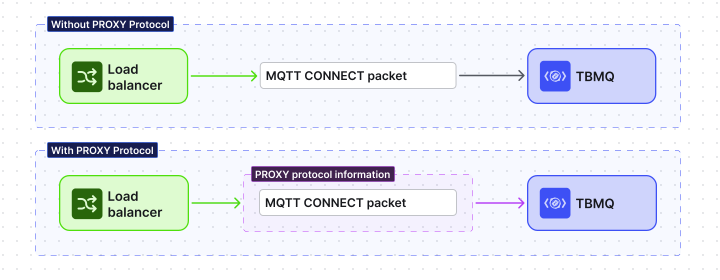
The connection follows this flow:
- The proxy accepts the TCP connection from the client.
- The proxy immediately sends a PROXY Protocol header containing the client source IP and port, destination IP and port, and protocol type (TCP over IPv4 or IPv6).
- TBMQ reads the header, extracts the real client information, then continues:
- Plain MQTT/WS: processes the MQTT CONNECT packet.
- TLS-secured MQTT/WS: proceeds with the TLS handshake.
PROXY Protocol v1 header example (ASCII):
PROXY TCP4 192.0.2.1 198.51.100.1 12345 1883\r\nPROXY Protocol v2 uses a compact binary format suitable for high-performance environments.
This means TBMQ treats the very first bytes of every connection on a proxy-enabled listener as PROXY Protocol data, before interpreting them as MQTT or TLS.
When to enable it
Section titled “When to enable it”Enable PROXY Protocol in TBMQ when:
- TBMQ is deployed behind a load balancer or reverse proxy (e.g., HAProxy, AWS NLB, NGINX) that supports PROXY Protocol.
- You need the real client IP for logging, IP-based security policies, rate limiting, or auditing.
TBMQ resolves the client address once per connection, before authentication, and then uses it throughout the session:
- Session details — the Client IP shown for each connected session in the UI and returned by the REST API.
- Unauthorized Clients — the source address recorded for every connection attempt that fails authentication or is blocked.
- Blocked clients —
IP_ADDRESSentries and regex entries with Match by =IP addressare tested against this address, so IP-based blocking is only meaningful when the address is the real client’s. - Broker logs — connection and disconnection entries.
Without PROXY Protocol, all of the above see only the proxy’s IP, making it impossible to distinguish individual clients —
and an IP_ADDRESS block would either match nothing or match every client behind that proxy.
Configuration
Section titled “Configuration”Global setting
Section titled “Global setting”listener.proxy_enabled turns PROXY Protocol on for all MQTT listeners. It is disabled by default:
listener: # Enables or disables proxy protocol support as a global setting for all listeners. # If enabled, supports both v1 and v2. proxy_enabled: "${MQTT_PROXY_PROTOCOL_ENABLED:false}"Per-listener overrides
Section titled “Per-listener overrides”Since TBMQ v2.3, each listener can also be configured independently. Per-listener values are unset by default and inherit the global value; an explicitly set value overrides it.
listener:  # Global PROXY Protocol setting for all listeners.  proxy_enabled: "${MQTT_PROXY_PROTOCOL_ENABLED:false}"
  tcp:    # Inherits the global value if unset. Overrides the global value if explicitly set.    proxy_enabled: "${MQTT_TCP_PROXY_PROTOCOL_ENABLED:}"  ssl:    proxy_enabled: "${MQTT_SSL_PROXY_PROTOCOL_ENABLED:}"  ws:    proxy_enabled: "${MQTT_WS_PROXY_PROTOCOL_ENABLED:}"  wss:    proxy_enabled: "${MQTT_WSS_PROXY_PROTOCOL_ENABLED:}"
Example:
MQTT_PROXY_PROTOCOL_ENABLED=true # globally enabledMQTT_TCP_PROXY_PROTOCOL_ENABLED=false # TCP listener explicitly disabledMQTT_SSL_PROXY_PROTOCOL_ENABLED= # TLS listener unset → inherits global → enabledThis is the setting to reach for when only part of your traffic arrives through a PROXY Protocol-aware load balancer — for example, external clients terminating on a TLS listener behind an NLB, while in-cluster clients connect to the plain TCP listener directly.
Load balancer configuration
Section titled “Load balancer configuration”HAProxy
Section titled “HAProxy”To use PROXY Protocol v1:
server tbmq1 192.168.1.100:1883 send-proxysend-proxy instructs HAProxy to send PROXY Protocol v1 headers to TBMQ.
To use PROXY Protocol v2:
server tbmq1 192.168.1.100:1883 send-proxy-v2send-proxy-v2 instructs HAProxy to send PROXY Protocol v2 headers to TBMQ.
Replace 192.168.1.100:1883 with your TBMQ broker’s IP and port.
For the full HAProxy guide, see the HAProxy PROXY Protocol documentation.
AWS Network Load Balancer (NLB)
Section titled “AWS Network Load Balancer (NLB)”AWS NLB supports PROXY Protocol v2 only. Ensure your NLB is TCP or TLS type, then enable PROXY Protocol v2 with the AWS CLI:
aws elbv2 modify-target-group-attributes \ --target-group-arn <your-target-group-arn> \ --attributes Key=proxy_protocol_v2.enabled,Value=trueIn a Kubernetes environment, add this annotation to your Service:
service.beta.kubernetes.io/aws-load-balancer-proxy-protocol: "*"The * value enables PROXY Protocol v2 for all source IPs.
For details, see the AWS Load Balancer Controller documentation.
Other load balancers
Section titled “Other load balancers”Any load balancer that supports PROXY Protocol works with TBMQ — including Google Cloud Load Balancer, Azure Load Balancer, and NGINX. Enable PROXY Protocol on your load balancer according to its documentation, then enable it on the TBMQ side.
Considerations
Section titled “Considerations”- If PROXY Protocol is enabled in TBMQ but not on the proxy, TBMQ cannot parse the initial bytes: the connection is closed before any CONNECT is processed, and the parse failure is logged at
ERROR. - If PROXY Protocol is enabled on the proxy but not in TBMQ, the header is misinterpreted as MQTT or TLS data, causing connection errors. On a TLS listener this surfaces in the broker log as
NotSslRecordException. - All connections to TBMQ must pass through a properly configured proxy when PROXY Protocol is enabled.
- PROXY Protocol must only be configured when TBMQ is behind a trusted proxy, as the proxy defines the reported client IP.
Was this helpful?